

Because of my interest in cybersecurity, I was intrigued to learn that Avast, a cybersecurity business best known for its antivirus software, also had a VPN. I wanted to see if this VPN lived up to the company’s reputation, so I put it through rigorous testing.
According to my results, Avast SecureLine VPN falls short of my expectations despite its affiliation with a respected corporation.
My tests revealed all of the information contained in this exhaustive study. You could have discovered all the data regarding Avast SecureLine VPN on your own, but thanks to this timely review, your work is done.
So, how does Avast SecureLine VPN stack up against competing VPN services?
Is it safe, how fast are its connections, and does it work with Netflix and other streaming services? Let’s take a closer look at this product and find out the answers to these queries in this Avast SecureLine VPN review.
About Avast SecureLine VPN
Avast Secureline was first introduced in Prague, Czech Republic, in 2014, even though Avast has been in business since 1988. The VPN service is compatible with the following devices and operating systems: PC, Mac, iPhone, iPad, iPod Touch, Android, and Android TV.
Avast SecureLine supports up to five devices and has no bandwidth restrictions. Customer service stated that the VPN is incompatible with TOR.
It’s worth noting that Avast has 700 servers spread over 35 countries. When compared to other VPN companies, such as NordVPN and ExpressVPN, which both offer over 3,000 servers, this is a very small number of total servers.
Only Canada (two cities), Germany (two cities), Russia (two cities), Spain (two cities), the United Kingdom (two cities), and the United States (16 cities) have more than one server site. Avast SecureLine does provide a kill switch, which is ideal for protecting your privacy in the event that your connection is lost.
Kill switches are an important precaution or backup strategy. When they detect that your network connection is about to be terminated, they will also terminate your present session.
That allows you to keep whatever you are doing secret and out of the way of curious eyes. When purchased in conjunction with your membership, their MultiDevice service allows for up to ten simultaneous connections.
Avast SecureLine VPN Pros and Cons
Pros
- Top speeds. I got fast connections on nearly every server I tested.
- Cool security features. It always hid my original location.
- Awesome for torrenting. I could download files at top speeds.
- Extended free trial. I’ve never seen a VPN that allows you to test it for 2 months.
Cons
- Can’t unblock multiple platforms. I had a hard time accessing the top streaming services.
- Limited server network. There are very few city-standard connections.
- Privacy issues. While its logging policy is good, it’s never been audited.
- Compatible with a few devices. It only has apps for the 4 most famous Operating Systems.
- Support isn’t always useful. It’s hard to find its live chat feature.
- Avast SecureLine VPN may not function in China. I reached out to Avast support via email, and the agent affirmed that the VPN isn’t guaranteed to work in China.
Read Also our Full reviews:
Avast SecureLine VPN Core Features: How Avast SecureLine VPN Works?
Let me take you deep into the details of the VPN itself. Go nowhere!
Top Speeds
Avast boasts about the speed of their VPN service on their website. So it’s time to put them to the ultimate test – literally! I did performance tests on their service on servers in the United States and the Netherlands to see how it compares to the competition.
Ping was 113 ms on the US server, Download was 67.94 Mbps, and Upload was 13.67 Mbps. Ping was 34 ms, Download was 65.97 Mbps, and Upload was 39.44 Mbps on the Netherlands Server. In comparison to other VPNs, these are quite fast. They’re not the fastest, but they’re also not the slowest.
No Logs Policy
According to Avast SecureLine, no data logs of your internet activities are kept. According to Avast SecureLine, no data logs of your internet activities are kept. They do, however, keep connection logs, which show when you log in or disconnect from a server, how long you stay connected, and how much bandwidth you consume.
Avast says this data is exclusively gathered for “diagnostic purposes and to prevent abuse of the VPN connection.”However, if you read Avast’s privacy policy, you’ll notice that they provide links to third-party websites such as Twitter and Facebook.
Overall, I like Avast’s security. Just be aware that, like most other VPN services, some logging occurs in the background.
Secure Encryption
Avast SecureLine supports IPSec and OpenVPN on UDP with AES 256-bit encryption. This is military-grade security. The number “256” refers to the encryption strength.
The short version is that 256-bit is currently the best in the market. Many of the world’s leading government agencies and security professionals regard it as almost “brute-force proof.”
Avast SecureLine additionally protects against DNS leaks. This useful function ensures that no of your personal data ‘leaks’ beyond the VPN connection without your knowledge, revealing your surfing behavior or your physical location.
Torrenting
This VPN appears to facilitate torrent downloads and peer-to-peer file sharing. According to their official website. SecureLine VPN supports peer-to-peer connections via our data centers in Prague, Czech Republic, Frankfurt, Germany, Amsterdam, Netherlands, New York City, New York, Miami, Florida, Seattle, Washington, London, United Kingdom, and Paris, France.
Great Usability
Avast’s VPN program is surprisingly elegant and straightforward. It only takes one click to connect to one of Avast’s servers and disguise your IP address. Changing your location is as simple as choosing a nation from the server list within the user interface.
There’s even a “Preferences” tab where you may tailor Avast to your specific needs. You can, for example, configure it to connect automatically whenever your computer boots. That way, you’re always safe.
Avast also has a mobile app accessible for both the iPhone and Android. The mobile app is equally as powerful and straightforward to use as the service on a PC or Mac.
It needs a single tap to connect to a server, similar to the desktop interface. And switching server locations takes little to no time.
However, unlike the desktop version, the free mobile trial needs users to provide credit card information in order to begin. So, if you’re only looking for an initial test drive of the service, you might choose to do it on your desktop rather than mobile.
WebRTC Leaks
VPNs encrypt your internet connection and create a safe tunnel around it. This encrypts your traffic so that no one can break through. More crucially, it forms a seal around your IP address, masking your genuine location. That way, no government agency can prosecute you for doing what you’re doing while sitting where you’re sitting.
Unfortunately, these relationships are not always as safe as they appear. A DNS or WebRTC leak, for example, can expose your IP address without your knowledge. The good news is that we discovered no leaks in the Avast SecureLine connection.
But that’s the good news. That suggests there’s some terrible news we discovered when executing these security tests, and we’ll tell you about those down below.
Avast SecureLine VPN Pricing
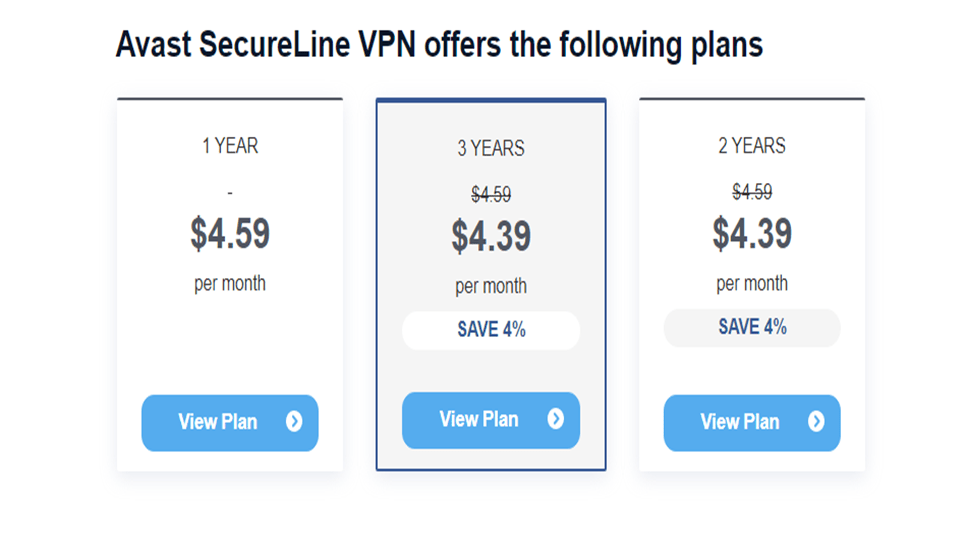
While Avast SecureLine VPN is a good alternative, it falls short of the best monthly VPN picks. It offers membership plans for one, two, and three years but does not offer a monthly alternative for individuals looking for short-term use.
For one year, the monthly rate is $4.59, while for two years, the monthly rate is $4.39, and for three years, the monthly rate is $4.39.
This amounts to $59.88 for the one-year plan and $95.76 for the two- or three-year plans. However, the benefits are comparable across all contracts, and the longer-term alternatives do not deliver significant savings when compared to other VPN providers.
Due to limitations compared to the desktop version, I recommend avoiding purchasing Avast SecureLine VPN on your mobile phone.
The mobile version may have different price levels and a shorter trial time, limiting access to all of the perks. Get the desktop version for the best experience, complete with unrestricted functionality and a longer trial time.
Avast SecureLine VPN accepts major credit cards (VISA, MasterCard, Discover, and American Express), as well as PayPal. It is crucial to note, however, that these methods link your identity to your account, which may be a worry for privacy-conscious users seeking anonymity.
Read Also our Full reviews:
Avast SecureLine VPN’s Privacy and Security
Privacy
The privacy policy of Avast SecureLine VPN is alarming. With so many products from Avast, it was tough to find its Avast SecureLine VPN privacy policy. The service records a timestamp of your connection, your IP address, how much data is transmitted, and the client’s service data, which is maintained for two years, according to its privacy policy.
While it indicates that this information cannot be used to identify you, I am nevertheless concerned about Avast SecureLine VPN logging any information about my online activities. Not only that, but Avast has a history of selling user data to advertisers such as Facebook and Twitter. Furthermore, in 2019, their antivirus extension was prohibited for violating Mozilla’s privacy policy.
The option of automatic sharing of app usage data is turned on by default in Avast SecureLine VPN’s Android app. You can toggle off an automatic sharing of app-usage data that goes to third parties. It shouldn’t be there in the first place, really. At least, it should be an opt-in option.
I contacted the customer care team to discover more about its log policy. Avast’s support team informed me that the service does not monitor website or application use but does store connection logs.
The option to automatically share app usage data is enabled by default in the Avast SecureLine VPN Android app. You can disable the automatic transmission of app usage data to third parties. It really shouldn’t be there in the first place. It should, at the very least, be an opt-in option.
The option of automatic sharing of app usage data is turned on by default in Avast SecureLine VPN’s Android app. You can toggle off an automatic sharing of app-usage data that goes to third parties. It shouldn’t be there in the first place, really. At least, it should be an opt-in option.
On the plus side, Avast SecureLine VPN owns the majority of its servers, reducing the risks associated with third-party providers who may install backdoors or disclose data to law police. Furthermore, Avast has a warrant canary, which ensures that the corporation does not have a backdoor that allows access to its server information. However, because Avast maintains certain connection logs, I wouldn’t suggest it for a VPN user concerned with privacy.
Security
The option of automatic sharing of app usage data is turned on by default in Avast SecureLine VPN’s Android app. You can toggle off an automatic sharing of app-usage data that goes to third parties. It shouldn’t be there in the first place, really. At least, it should be an opt-in option.
Although Avast SecureLine VPN provides great security protections, their availability and efficacy may vary depending on the device. Nonetheless, it does an excellent job of providing solid encryption, several protocol options, split tunneling, kill switch, and DNS leak protection.
Avast SecureLine VPN Performance
Speeds
Using the Ookla speed test tool, I realized that my base speed significantly decreased and that Avast SecureLine VPN considerably hindered my internet connection on the majority of their servers.
I connected to several different servers and did a series of speed tests using its OpenVPN protocol to get an idea of how fast it is. It’s worth noting that Avast SecureLine VPN claims to have no bandwidth restrictions, but that is not accurate. However, that doesn’t make them bad.
Speed Test Results
Although I usually had download rates of 180Mbps, when I connected to Avast SecureLine local servers, my download speeds dropped by 58%. My connection was even slower for servers that were further distant or had a high user demand.
Even the slowest connections provided me with fast enough speeds to watch my favorite shows in UHD. I had 8Mbps when connected to the server in Melbourne, Australia (the farthest server from my location).
However, keep in mind that this isn’t fast enough to multitask while watching. If you do these tests yourself, your results may differ slightly. Base speeds, geographic distance from a server, and peak-use hours all substantially impact download speeds.
Avast SecureLine VPN will significantly reduce your connection speeds. The good news is that I obtained low latency with servers closer to my location, making it ideal for gaming activities.
However, even with faraway servers, you seldom observe a speed decrease of more than 20% or a latency drop of more than 15% when compared to leading VPNs like ExpressVPN.
You need a VPN that doesn’t cause substantial performance decreases if you rely on fast internet speeds for gaming or torrenting. Several VPNs provide quicker internet speeds for everything you do online.
ExpressVPN is the fastest VPN on the market, according to my tests. ExpressVPN is ideal for multitasking, so you can simply use it to play games, stream music, or torrent while watching a movie.
Gaming
Avast SecureLine VPN offers fast speeds on local servers but slows down on distant ones. Competitive gamers should be aware of high ping times when using remote servers.
Unless the ping surpasses 120 ms, most casual players will not notice a substantial difference. To get a competitive advantage, choose a nearby server with a ping rate of less than 50 ms.
When connecting to Avast SecureLine VPN servers outside the United States, I noticed a change in performance.
Avast SecureLine VPN is ideal for casual gamers searching for a flawless experience. However, if you’re a big gamer who appreciates a diverse set of server options and minimal latency, ExpressVPN is the best choice for your gaming needs.
Server Network
Avast SecureLine VPN piqued my interest with its solid server network, which spans an incredible number of locations – over 53 servers spread across more than 30 countries. Furthermore, the service ensures that each site contains many servers, for a total of more than 700 servers at your disposal.
Avast SecureLine VPN organizes its servers according to regions, assuring global coverage. Africa, Asia Pacific, Europe, the Middle East, North America, and South America are among these regions.
If you want a more precise server location, simply click the “All” tab, which displays a comprehensive list of nations and their server possibilities.
Avast SecureLine VPN has two dedicated tabs for increased functioning in addition to regional and country-specific servers.
The first tab is for P2P servers, which are meant to optimize your peer-to-peer connections for faster and more efficient file sharing. The second page is dedicated to streaming servers, allowing you to watch geo-restricted content from multiple streaming sites easily.
Avast servers are available in two modes: manual and smart. In Smart mode, you can create rules to manage the app’s behavior based on your activity.
You can, for example, configure Avast SecureLine VPN to launch automatically whenever you connect to a public network, visit torrent websites, access banking websites, or stream videos. Manual mode, on the other hand, allows you to manually switch between servers.
Please keep in mind that the Android app lacks the Smart mode.
When it comes to selecting and switching servers, the mobile app provides a smooth experience. Simply tap the “Server Location” button and scroll through the list of accessible servers.
Streaming
Despite its dedicated streaming servers, Avast SecureLine VPN’s streaming performance is mixed. The service has six specialized servers strategically positioned in Berlin, Germany; Wonderland, the United Kingdom; Gotham, Miami, Seattle; and New York, the United States.
I selected to analyze their capacity to evade restrictions on prominent streaming sites since I was eager to assess their performance.
I was pleasantly surprised to discover that Avast SecureLine VPN was really good at unblocking popular services such as YouTube, Netflix, Disney+, and BBC iPlayer.
However, I encountered issues when accessing Hulu, HBO Max, and Amazon Prime Video.
Netflix and Disney: Unblocked
Avast SecureLine VPN features multiple servers in the United States, which is ideal for accessing your American Netflix account. When I viewed The Witcher on my US account, I was blown away by the smooth video playback and high quality.
Avast SecureLine VPN server tests in the United Kingdom, France, Germany, Sweden, and Canada demonstrated that it could seamlessly unblock content in those countries.
Avast SecureLine VPN also unblocked Disney+, allowing me to view The Simpsons without issue. The speeds were sufficient to stream in UHD with no buffering.
Avast SecureLine VPN cleared BBC iPlayer as well as lesser-known providers like ITV and Channel4 with a single UK server dedicated to streaming. Furthermore, it had no trouble connecting to Australia’s 9Now.
Hulu, HBO Max, and Amazon Prime Video: Blocked
I understand your disappointment with Avast SecureLine VPN and its limits in accessing streaming services. You had difficulties accessing popular streaming platforms such as Hulu, Amazon Prime Video, HBO Max, All4, DAZN, and BBC iPlayer when connected to Avast SecureLine VPN.
You received error messages on the majority of these platforms despite using one of Avast SecureLine’s optimized streaming servers.
Amazon Prime Video, in my experience, has one of the most stringent VPN-blocking systems. Avast SecureLine VPN was unable to bypass the restriction, and I was unable to access any of its streaming material.
According to the above statistics, Avast SecureLine VPN was only successful in unblocking a few streaming sites. If you’re searching for a VPN primarily for streaming, ExpressVPN is your best chance to unblock all of your preferred streaming services.
Although Avast SecureLine offers peer-to-peer file sharing within its network, the number of servers is limited. While it features customized P2P servers for rapid torrenting, it also takes and maintains connection records, which is a significant red flag for anyone concerned about their privacy.
Fortunately, several top-tier VPNs, such as CyberGhost, provide P2P-optimized servers and do not keep connection logs.
Device Compatibility
Only the most widely used operating systems are supported by Avast SecureLine VPN. There are only Windows, Mac, iOS, and Android apps. It cannot be configured on a router. There is also no smart DNS capability; thus, it cannot be used with a gaming console or smart TV. Furthermore, there is no Linux app.
Browser Extensions
Avast SecureLine VPN is only open to the most popular operating systems. There are apps for Windows, Mac, iOS, and Android devices, but nothing more. There is no way to configure it on a router. There is also no smart DNS capability; therefore, it cannot be used on a gaming console or smart TV. In addition, there is no Linux app.
Device Connections
Avast SecureLine VPN supports up to ten devices, which is more than enough for me. Some VPNs allow you to connect an unlimited number of devices, but this should be plenty for most people.
I successfully connected Avast SecureLine to my Android phone, Windows desktop, Windows laptop, and a friend’s iPhone. It was reassuring to discover that all of the devices could stream at the same time, ensuring a smooth experience with no performance issues even when several devices were connected.
Read Also our Full reviews:
Is Avast SecureLine VPN Easy to Use?
Avast SecureLine VPN provides software for Windows, macOS, Android, and iOS. I enjoy how simple the apps are to install and use, which means that Avast is ideal for folks who are purchasing a VPN for the first time.
Windows
Avast SecureLine VPN’s Windows interface is quite decent. Everything appears to be slick and responsive. However, the software appears to prioritize appearance above functionality. There is no mechanism, for example, to easily search for a region to connect to or to select a certain server/IP.
The settings menu is also concealed behind another menu that contains distinct buttons for Avast’s other products. In fact, while attempting to exit the menu, I mistakenly clicked on one of these buttons, and the app promptly installed another application onto my computer without asking for any extra approval.
macOS
Avast SecureLine VPN’s macOS application is nearly identical to its Windows counterpart: there are no new or missing functions, and the user interface looks the same. The only difference is that instead of OpenVPN, you receive the IPSec tunneling protocol.
Android
The Avast VPN Android app looks and feels fantastic. It’s also the only version that supports split tunneling, which is important when you only want certain apps to use the VPN connection. Aside from that, it’s quite identical to Avast SecureLine VPN for Windows.
iOS
As is customary, this is the least feature-rich version of the bunch: you can simply change your auto-connect settings. There is no way to modify the VPN protocol because IPSec is the only option. The design of the app is fairly similar to that of the Android app.
Avast SecureLine VPN Customer Support
Avast Secureline employs a ticketing system and provides a phone number where you can obtain a free diagnosis.
Having said that, Avast does provide live chat assistance, and I was also able to contact them via email. You can also reach them via their Facebook and Twitter handles. I submitted one to see how responsive their social support is. I still hadn’t heard back after more than three hours. The good news is that Avast’s phone help is available 24 hours a day, seven days a week.
The question is, of course, how fast was it? I called to see if it was an automated service or if I would get help from a real person. Initially, an automated message directs you to select a number so that Avast can route your call to the appropriate individual.
In my opinion, this is a significant improvement over live chat because you can hear a live person’s voice for assistance.
I’ve tried “live” chats on several VPNs, and it frequently took them hours to respond. I was disappointed that there were no live chat or email options accessible. Although their Twitter alternative was intriguing, it has proven to be too slow thus far. However, a speedy, responsive call center saved the day in the end.
How Do I Install and Set Up Avast SecureLine VPN?
Here are the steps to installing Avast SecureLine VPN:
- Navigate to the Avast SecureLine VPN site. You can usually locate it under the “Privacy” section of the Avast page.
- Download the application. On the product page, search for the “Download Trial” button and click on it. This will begin the download process.
- Load the installer. Once the download is finalized, locate the downloaded file (usually in your “Downloads” folder) and double-click on it to start the installation.
- Launch the application. Wait for the installation to be completed. Once finalized, you can launch Avast SecureLine VPN from your desktop or the Windows Start menu.
- Create your account. To access the main dashboard, you can either start a free trial or opt for a subscription and pay immediately.
- Link up to a server. Pick your preferred server from the list and click the “ON” button to establish a connection.
- That is all. Begin using the VPN to secure your internet connection and protect your privacy.
Read Also our Full reviews:
Frequently Asked Questions
Is Avast SecureLine VPN Good?
Yes, it is good if you desire an affordable VPN service that offers military-grade encryption. However, SecureLine VPN failed at unblocking most streaming platforms and reduced my base speeds significantly. Its privacy policy also left me questioning what personal data Avast actually retains.
Can I Use Avast SecureLine VPN for Free?
Yes, Avast SecureLine VPN offers a free 60-day trial without any data limits, speed, or server limitations. However, you must provide payment information to secure the free trial.
Is Avast SecureLine VPN Really Safe?
Yes, Avast SecureLine VPN has multiple safety features that will protect your device and keep your internet connection secure. This covers AES 256-bit encryption, OpenVPN protocols, and a kill switch. However, the service has no straightforward log policy, which is a huge concern.
Conclusion
With its long free trial, Avast SecureLine isn’t a bad VPN to try out. It provides fast speeds and an easy-to-use app, and it works well for torrenting. Additionally, the logging policy is good as long as you can overlook its past.
However, there are much better VPNs available for the same rate or cheaper. Avast SecureLine can’t compete with its top rivals when it comes to value. That’s because the best VPNs at this price point provide more security features, proven privacy policies, and much better streaming capabilities.


