

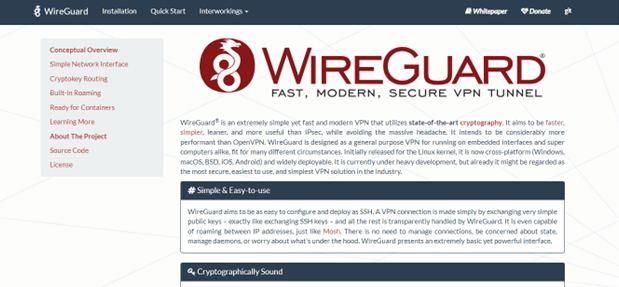
For VPNs to boost their security functions, they make use of tunneling protocols like WireGuard. This is because WireGuard is the new security sheriff in town.
In terms of speed and data encryption, the open-source protocol promises to outperform current industry standards (OpenVPN and IPSec). Because it also claims to be simpler to configure, many people have begun to refer to it as the new gold standard among VPN protocols.
This opens the door to a wide range of potential protocol applications, such as allowing employees to connect to their company’s intranet remotely and quickly. Backbone routers can also be configured with WireGuard to establish connections anywhere without the need for special infrastructure or certificates.
This guide takes a detailed look at how WireGuard works and highlights what you should keep in mind when installing and configuring it. In addition, I’ll summarize the most important Pros and Cons of the open-source protocol. Continue reading as I look into this service with you, highlighting additional key features that are either a hit or a miss.
About WireGuard VPN
WireGuard is based on Jason A. Donenfeld’s technology for establishing secure VPN networks and provides an alternative to well-known solutions such as IPSec, SSTP, or OpenVPN. It’s best thought of as a hybrid of a VPN protocol and VPN software, capable of not only establishing fast connections and stable VPN tunnels (even on mobile clients) but also establishing fast connections and stable VPN tunnels.
WireGuard performs well on the open systems interconnection (OSI) model’s Layer 3 (network), supporting IPv4 and IPv6. Despite its peer-to-peer architecture, the software can also simulate client-server architecture. It creates VPN connections in the same way that the secure shell protocol (SSH) does by exchanging publicly available keys. Although it was created for Linux, WireGuard is now available for Windows, Android, Mac, and iOS.
WireGuard VPN Pros and Cons
Pros
- VPN tunneling that is fast and stable
- Solid security as a result of the incorporation of current cryptographic processes
- Manageable code with fewer weaknesses
- Well thought-out Package
Cons
- The software is still in the preliminary phase
- Does not support dynamic IP address management (client ought to be coupled with a previously-defined VPN address)
- No server verification exercise
- Impossible to connect or authenticate via proxy
- Does not support TCP currently
Read Also our Full reviews:
WireGuard VPN Core Features: How Will WireGuard VPN Assist You?
Cryptokey Routing
According to the WireGuard website, the concept at the heart of WireGuard is Cryptokey Routing, which works by associating public keys with a list of tunnel IP addresses that are permitted inside the tunnel. As a result, each network interface has a private key as well as a list of peers. Each peer has a unique public key.
Peers use public keys to authenticate each other. They are short and simple. They can be passed around by any out-of-band method for use in configuration files, similar to how one might send their SSH public key to a friend for access to a shell server.
Built-in Roaming
This VPN service, according to them, embodies client configuration that includes an initial endpoint of its single peer (the server), so that it knows where to send encrypted data before receiving encrypted data. However, their server configuration lacks any initial peer endpoints (clients). This is because the server determines the endpoint of its peers by examining the source of correctly authenticated data.
If the server changes its own endpoint and sends data to the clients, the clients will discover the new server endpoint and update the configuration accordingly, according to the resources made available on their website. Furthermore, the client and the server send encrypted data to the most recently decrypted IP endpoint. As a result, there is complete IP roaming on both ends.
WireGuard acts as a network adapter in the system, adding one or more network interfaces that can be configured similarly to wlan0 or eth0 (i.e., with config or route). To keep things as simple as possible, the application only provides the most essential features. This is evident in the program’s code, which is only 4,000 lines long and easy to read and understand.
To compare, IPSec or OpenVPN require hundreds of thousands of lines of code. As a result, WireGuard has fewer configuration options but can also be checked more easily, which is important for security-critical applications.
To encrypt connections, WireGuard’s VPN solution employs three basic cipher functions:
- Curve25519 is used with the Elliptic Curve Diffie-Hellman (ECDHE) protocol for handshake encryption (key exchange).
- BLAKE2s is used for universal hashing (for example, to generate HMAC codes or key derivations with HKDF).
- ChaCha20 and Poly1305 are used for symmetric encryption and data exchange.
The underlying principle is straightforward and effective: Each participant is given a public VPN key that identifies them uniquely. Ed25519 is the protocol used for public key authentication.
The high security and encryption standards of WireGuard are based on modern crypto algorithms. Servers and clients receive static IP addresses, which are stored in the server’s configuration data, thanks to “cryptokey routing.” When connecting, this is compared to the public key, and the process is only completed if they match.
WireGuard VPN Pricing
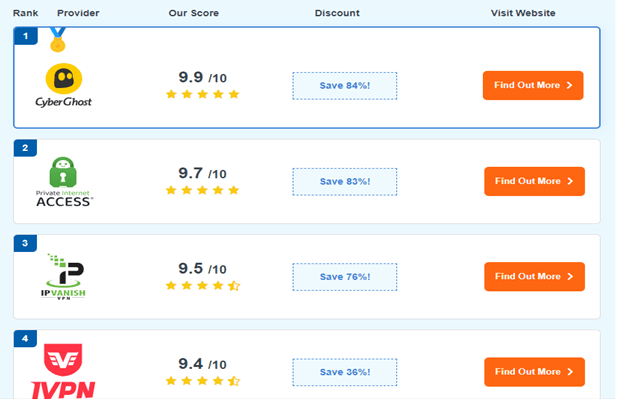
Since WireGuard VPN is a protocol for Mainstream VPNs, it has varied prices depending on the VPN in question. I have sampled the offers of some of the Leading VPNs that use the WireGuard protocol below.
CyberGhost VPN
This VPN offers good value for money, with the 2-year + 3-month plan costing only $2.11 per month. It also includes a 45-day money-back guarantee, so you can try CyberGhost with WireGuard risk-free. I put it to the test by requesting a refund via 24/7 live chat, and the agent approved my request in two minutes. My money was refunded in less than a week.
PIA VPN
This VPN offers reasonably priced plans. A 2-year + 3-month subscription to PIA costs only $2.11 per month. To use PIA with WireGuard risk-free, it comes with a 30-day money-back guarantee. I put it to the test by requesting a refund through PIA’s website’s 24/7 live chat, and the support agent processed my refund in less than 2 minutes. My money was returned to me three days later.
IPVanish VPN
Despite being slower than the other VPNs on this list, IPVanish is one of the best month-to-month VPNs because it offers competitive pricing even on short-term plans. Its longer-term options offer even greater savings — I discovered that a 2-year subscription to IPVanish costs just $2.99 per month.
There’s also a 30-day money-back guarantee, so getting IPVanish for WireGuard is risk-free. I put it to the test by requesting a refund via live chat support, and my request was approved in less than 5 minutes. My money was returned to me within a day.
WireGuard VPN’s Privacy and Security
Privacy and Security
WireGuard is a very secure protocol, according to my testing. It provides strong encryption despite using shorter cryptographic keys than some previous protocols.
A longer key takes longer to crack, but brute forcing WireGuard’s encryption keys would still take millions of years. In my experience, “shorter” keys with mixed cases provide more than enough security to keep your data safe.
However, the impact of the WireGuard protocol on your privacy and security will differ depending on the VPN and the location of the VPN. It is critical to keep this in mind when selecting a WireGuard-assisted VPN.
CyberGhost VPN
Despite WireGuard’s logging issues, CyberGhost’s RAM-only NoSpy servers record no of your information, keeping your data hidden. They are privately owned and operated in Romania, a privacy-friendly country where authorities do not conduct web surveillance. The VPN also makes public reports on data requests (to which it has never responded).
In the settings menu, I chose WireGuard, and CyberGhost encrypted my connection with a 256-bit key. It also has the following security and privacy features:
- If your device malfunctions and you lose your WireGuard connection, a kill switch automatically terminates your connection (to protect your data).
- Built-in DNS and IP leak protection keep your data hidden in the unlikely event of a network outage.
- A feature that allows you to select which websites or apps connect via the VPN.
- The company’s RAM-based servers, Romanian location, and transparent public reports all contribute to a strict no-logs policy.
- Perfect forward secrecy constantly generates new encryption keys, protecting your data from hackers.
PIA VPN
Unfortunately, PIA is headquartered in the United States (a member of the intelligence-sharing Five Eyes Alliance). However, I’m not concerned because its strict no-logs policy has been independently verified by a third party.
IPVanish VPN
IPVanish’s WireGuard option, like CyberGhost and PIA, protects your data with a powerful 256-bit encryption key. It also has the following privacy and security features:
- A kill switch that activates automatically.
- DNS/IP leak protection that kept my data hidden.
- A no-logs policy that has been internally audited.
Read Also our Full reviews:
WireGuard VPN Performance

Speeds
When I tested my speeds, WireGuard showed only a minor decrease in performance when compared to when I wasn’t using a VPN. With such fast internet, there was no buffering while watching Stranger Things on Netflix. OpenVPN and IKEv2 slowed my connection by about a third and required a few seconds of buffering before an episode could begin.
Simplicity
Because its code is much simpler than that of other VPN protocols, Wireguard has a small attack surface. As a result, hackers have few opportunities to exploit security flaws. There are fewer components for hackers to target when there are fewer lines of code in a piece of software. This also makes it easier for cybersecurity experts to audit for vulnerabilities because going through the code line by line will take less time.
Another advantage of using a lightweight protocol is that it consumes less of your data, making WireGuard faster than the majority of the competition. WireGuard can be used with many subscription-based VPNs, even if it isn’t always available as an integrated option in the VPN’s settings menu. The disadvantage is that you must occasionally perform manual configuration using the free, open-source WireGuard app.
WireGuard, in addition to having fewer lines of code, only transmits the minimum data required in each packet (a piece of data sent between two connections). Small packet sizes reduce the amount of information that is vulnerable to “packet sniffers” or third-party attempts to access data over a network. Furthermore, because of the small packet size, WireGuard consumes very little battery life on mobile devices.
Strong Encryption
WireGuard employs the ChaCha20 algorithm to encrypt your data. Because of its simpler code, it is just as secure as AES-256 (the military-grade industry standard), but it consumes less power and uses fewer system resources. It also performs better on mobile devices, with faster speeds and more consistent connections.
WireGuard’s encryption also makes use of a technology known as Cryptokey Routing. Because this method authenticates data faster than other protocols, WireGuard provides faster connections than OpenVPN while maintaining the same level of encryption.
WireGuard Privacy
Unlike OpenVPN and IKEv2, WireGuard assigns you the same IP address each time you use it. This makes online tracking easier for third parties. Worryingly, WireGuard logs this address with timestamps indefinitely. That means your IP address may have been recorded. In the unlikely event that a server is compromised, your browsing activity could be linked to your identity.
Many VPNs, however, use custom network configurations to circumvent this privacy issue. Top WireGuard VPNs, for example, use servers that prevent any of your logs from being collected. CyberGhost also includes privacy features such as RAM-only hardware that is incapable of storing any data.
Other VPNs have created entirely new protocols that provide the same speed and security as WireGuard while also providing stronger native privacy features. During my tests, for example, ExpressVPN’s Lightway kept my data private while providing me with fast and secure connections.
Flexibility
WireGuard was tested on Windows, macOS, Android, iOS, Linux, and other platforms. Because of its ability to handle unexpected network changes, I found it especially useful on mobile devices. Other protocols may cause brief interruptions in your VPN connection when your device switches from mobile to WiFi data. This can expose your true IP address, location, and other sensitive data.
WireGuard’s streaming speed was sufficient for consistently smooth HD TV shows and movies with minimal buffering during testing. It also had consistent connections, which meant that content was never interrupted by speed drops or connection failures. If you’re an online gamer who values speed, WireGuard’s consistently fast performance makes it an excellent choice for lag-free matches.
The main disadvantage of WireGuard’s flexibility is that it is not supported by even some of the best premium VPNs, and others do not integrate it natively. In these cases, you may need to manually import your VPN servers using the free WireGuard app.
Another limitation of WireGuard’s flexibility is that it cannot access open ports in countries with internet firewalls, such as China. Although OpenVPN can communicate through these ports and access the open web from anywhere, WireGuard cannot unblock censored websites in countries where internet access is restricted.
Comparing Protocols
PPTP and L2TP are two of the first VPN security protocols, but they only support 128-bit encryption and cannot reliably circumvent geo-blocks. Both WireGuard and OpenVPN employ 256-bit encryption, which has never been broken. They are also far superior at circumventing VPN filters on streaming apps and geo-restricted websites.
OpenVPN also provides a range of encryption algorithms, from AES-256 to ChaCha20. WireGuard only supports ChaCha20, but this is unlikely to be a problem for you because ChaCha20 is just as secure and at least as fast as AES-256.
One disadvantage of WireGuard is that it is limited to UDP, which is the method WireGuard uses to transfer data. In countries with limited internet access, UDP is not configured to access blocked information ports. TCP can be used by OpenVPN to bypass blocked ports in China, the UAE, and other countries with national firewalls.
When it comes to mobile devices, the issue with VPN protocols such as OpenVPN is that they must disconnect when switching networks. This makes it impractical for mobile devices that are constantly scanning for WiFi. On phones and tablets, WireGuard allows you to switch from one network to another without revealing your identity.
Comparing Speed
I tested my speeds using the WireGuard, IPsec, and OpenVPN protocols on servers near my actual location. During my tests, WireGuard provided the fastest connections. It was the least CPU-intensive and only used 4% more data than my non-VPN connection.
OpenVPN, on the other hand, consumed nearly 20% more data and resulted in noticeably slower performance. When I watched online videos, pages took longer to load, and there was more buffering. WireGuard also connected me to the VPN much faster — it only took a few seconds versus nearly ten seconds for OpenVPN.
One significant advantage for gamers is that WireGuard has significantly lower ping times than IPsec and OpenVPN. The term “ping” refers to the time it takes your device to communicate with the VPN server. To put it to the test, I used CyberGhost because its gaming-optimized servers make it one of the best VPNs for playing Call of Duty: Warzone.
WireGuard’s super-low ping resulted in smooth matches after connecting to a server and joining a game — I never missed a kill due to annoying lag. WireGuard, like all protocols, delivers faster speeds when you connect to a server that is closer to your physical location. WireGuard, on the other hand, outperforms other protocols on nearby servers.
Lack of Obfuscation
While WireGuard is widely regarded as one of the best protocol tools for VPNs, my testing revealed that it does not provide obfuscation, which means that internet service providers (ISPs) can see when you’re using it — though they can’t see what you’re using it for.
This means that a WireGuard VPN will not always be able to assist you in bypassing firewalls. However, some VPNs that support WireGuard (including NordVPN) offer obfuscated servers, allowing you to conceal the fact that you’re connected to a VPN.
Works on Selected VPNs
While WireGuard is widely used, not all VPN providers have included it in their apps. After all, WireGuard is still a relatively new protocol, so I believe this is happening. However, major players in the space are embracing it, and NordVPN’s NordLynx protocol — which offers the fastest VPN speeds currently available — is based on WireGuard. WireGuard is also likely to be supported by more VPN providers in the future.
Is WireGuard VPN Easy to Use?
WireGuard VPN’s offerings are not primarily aimed at end users; rather, they are aimed at compatible client networks, which is not necessarily a bad thing because not all VPNs work well with this technology. However, all of the options, menus, and additional information may overwhelm the client.
The WireGuard interface provides a wealth of useful information for these client networks. You must navigate through a lengthy Settings menu to access important features on their website. The lack of search functionality makes it slightly difficult to navigate the list; however, the list is concise and precise.
The Settings menu categorizes all of the available settings. You can read all about WireGuard VPN in the menu, including its security settings, installation, white paper, donation statement, and many more updates on the website. The only disadvantage is that the website is not particularly optimized for end users, so most of what you might find there may not be suitable for direct consumption.
WireGuard VPN Customer Support
WireGuard has updated its website contact information to help end users, and client networks reach out to them when necessary. The only drawback I found was that they only offer two channels of customer service: two email addresses and an IRC channel.
Email Contact
If you need to contact them privately for any reason, you can do so at team@wireguard.com. However, “support” requests are much better suited for their IRC channel.
Security Contact
They have a dedicated email address that you can use to report any security issues to: security@wireguard.com. During my testing, I sent a regular mail to their security email to see how they responded, and I have yet to receive a response.
That’s how I learned never to send non-security-related emails to this email alias, and I’m not going to lie to you about it. Also, do not send security-related issues to multiple email addresses, such as the first one I mentioned.
Read Also our Full reviews:
How Do I Install and Set Up WireGuard VPN?
Before attempting this installation, ensure you have the Wireguard Server Endpoint and Peer information from the WireGuard Server. To make the process easier for the end user. Assume you’ve decided on NordVPN.
The simplest way to install WireGuard on your device is to download the NordVPN app and enable NordLynx. NordLynx is a protocol based on WireGuard that adds some features to make browsing more private and secure.
To get started with NordLynx, the fastest WireGuard-based protocol available, follow these simple steps:
- Download and Install the NordVPN app.
- Log in to your account or create one.
- Go to “Settings” and then “Protocol.”
- Select “NordLynx” from the available protocols.
Frequently Asked Questions
How Do I Use WireGuard VPN?
You can use a VPN that includes WireGuard. Alternatively, you can manually add VPN tunnels using the open-source WireGuard app. To download and import the tunnel files, you will still need a subscription to one of the best VPN services, such as CyberGhost.
Because it has private NoSpy servers, I recommend CyberGhost. It also allows you to use WireGuard within its own simple interface without the need to download additional apps or VPN files.
Is WireGuard Safe?
WireGuard is extremely secure. Its encryption is as strong as that used to protect US government networks. To maintain your anonymity, you’ll still need one of the best WireGuard VPNs. These VPN apps include additional privacy settings that address all of WireGuard’s data logging issues.
Does WireGuard Work on Windows or macOS?
Yes. WireGuard performed well in my tests on Windows and macOS, as well as Linux, iOS, Android, and other operating systems. CyberGhost and the other VPNs on this list are compatible with the same platforms as WireGuard, and they have built-in support, so you don’t need to download a separate VPN app to use them.
Can WireGuard Be blocked?
WireGuard, unlike OpenVPN, can be blocked by firewalls. This prevents you from accessing restricted websites and apps on networks such as those found in schools, offices, and some public WiFi hotspots.
How Do I Set Up WireGuard Without a VPN App?
The open-source WireGuard app can be downloaded and installed for free from the WireGuard website. You’ll still need a top WireGuard VPN, such as CyberGhost, but instead of using the CyberGhost app, open WireGuard and manually add servers.
Contact your VPN to obtain configuration files for the servers you want, then use the import button to locate and add the files on your device. I’ve created a new tunnel that you can easily connect to even if you’re not technically savvy. This takes the form of an extremely lightweight application that uses fewer system resources than CyberGhost.
Can I Use WireGuard for Free?
The open-source WireGuard app is free, but you still need a VPN, and even the best free VPN providers are too limited for most purposes. While it is possible to find safe, free VPNs that work with WireGuard, you will be subjected to constant ads, throttled speeds, data caps, and other annoyances.
Furthermore, most free VPNs lack the resources to provide adequate security features. Despite having high ratings in app stores, some “free VPN” apps have been caught selling your data to third parties.
Don’t put your online security at risk when affordable premium VPNs offer money-back guarantees, making them free to try. For example, you can use CyberGhost for free for 45 days and then get a refund.
How Do I Know WireGuard is Working?
Import the WireGuard configuration from the QR code into the WireGuard app. Enable the connection, then verify that the phone has Internet access and that its IP address matches the IP address of your WireGuard Server.
How Do I Monitor WireGuard Connections?
Simply SSH into each of your network’s WireGuard hosts and use WireGuard’s built-in status display to check the current status of each interface and peer.
Can WireGuard VPN Be Tracked?
WireGuard makes use of modern cryptographic protocols. Without going into too much detail, this means it employs the most advanced encryption methods to ensure your data is scrambled in the most secure manner possible. Even if someone were to intercept your data, deciphering it would be a monumental task.
How Many Peers Can WireGuard Handle?
You can connect two, three, or many peers using a series of one-to-one tunnels by giving each peer what it needs to connect to the other peers.
What is the Best Port for WireGuard?
If possible, use the default 443, otherwise, use 80. Both are standards, and your traffic is already encrypted. WireGuard’s default port is not 443; it is listed because some networks allow traffic on port 443 while blocking all other ports.
Is WireGuard Port TCP or UDP?
Due to the potential drawbacks of TCP-over-TCP, WireGuard only uses UDP. Tunneling TCP over a TCP-based connection is referred to as “TCP-over-TCP,” and it can result in a significant loss of transmission performance (a problem known as “TCP meltdown”).
Conclusion
Although WireGuard is highly secure and provides me with impressive test speeds, its reliance on third-party configuration and potential logging issues are significant drawbacks. To make the most of it without having your data logged, you should use a reputable VPN with privacy-protecting features.
I recommend CyberGhost because its configurations solve WireGuard’s privacy issues, and my speeds during testing were always fast enough for 4K video. Even better, with its 45-day money-back guarantee, you can try CyberGhost with WireGuard risk-free. If you don’t like it, you can get a refund in a matter of minutes.


