

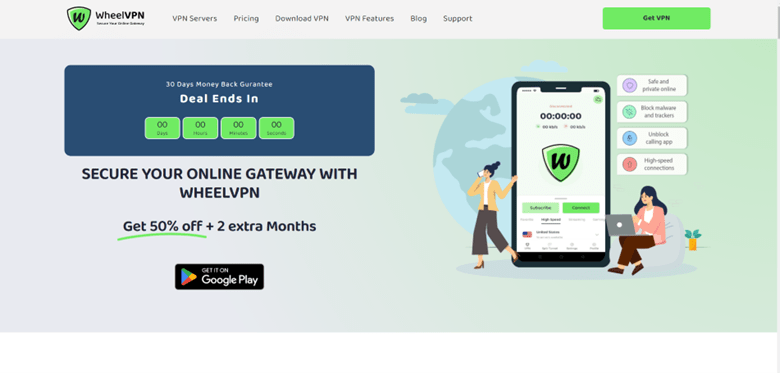
What is the first thing you should know about WheelVPN? It is one of the most impressive VPNs available today despite being underappreciated. This is a fantastic little VPN with a 7-day free trial. It does not stand out as a provider with a flashy and comprehensive security suite.
Despite not being one of the most well-known VPN services, this service competes with market leaders and frequently wins!
WheelVPN provides features that contribute to your safety and a pleasant browsing experience. It is ideal for safety and privacy because it includes secure encryption, no logs, an automatic kill switch, split tunneling, HTTP, and SOCKS5 proxy; streaming services will no longer cause stress by limiting your desired content.
The app is user-friendly, and you will be well-protected. To top it all off, your activity logs will not be collected.
Are you curious and eager to learn more? Well, you’ll find out everything in my WheelVPN review. From speed and performance to privacy and customer support, here are some things to think about before purchasing WheelVPN.
About WheelVPN
WheelVPN was founded in 2023, making it very new to the system. But what surprises me is their service efficiency. WheelVPN may be new but they are performing better than their age mates and even seniors in the game.
I bet you are already intrigued to know more about them just like I was before developing this masterpiece. It is good that you know that WheelVPN is a VPN service provided by company Wheelsec Ltd with applications for Microsoft Windows, macOS, Linux, Android, iOS, and Android TV. Its Manual setup is available for wireless routers, NAS devices, and other platforms.
We put WheelVPN’s software through our rigorous testing process for this review. A detailed summary of WheelVPN’s key specifications can be found below.
WheelVPN Pros and Cons
Pros
- Unblocks popular streaming websites. WheelVPN gained access to the majority of the world’s libraries, including Netflix, Disney+, Amazon Prime Video, and others.
- Server network that is quick. Nearby servers were lightning-fast, and even distant locations had a consistent performance.
- Functions in China. It is one of the few VPNs capable of circumventing the country’s web filters.
- A good selection of security and privacy features. WheelVPN passed my leak tests and includes some bonuses, but it lacks advanced features such as malware protection.
- Apps that are dependable and consistent. It is simple to install and use on the majority of popular devices.
- Prices are insanely low. This is one of the most affordable VPNs, but it still provides a lot of value in terms of features.
Cons
- The speeds aren’t awesome. Speeds hold up well at long distances, but even nearby servers lowered my connection rates.
- Small server network. It has a lesser number of locations than the bigger VPNs offer.
Read Also our Full reviews:
WheelVPN Core Features: How WheelVPN Benefits You?
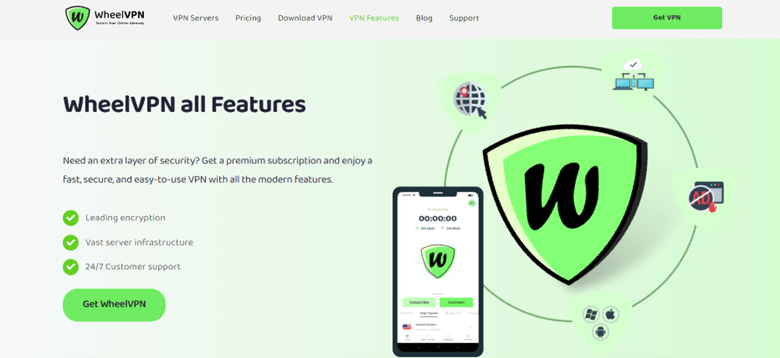
Secure Encryption
WheelVPN Protects your sensitive data from hackers with our industry-leading 256-bit AES encryption. I can confirm that this is actually true due to my personal experience with WheelVPN service.
No Logs
WheelVPN never for once logged my traffic data, internet activity, or DNS queries which proves that they keep their word on my privacy. It’s completely secure and private. They may not be the most popular VPNs, but since bigger firms steal customers’ data, this must be quite impressive for me.
Kill Switch
Their kill switch has been working as a digital guardian to ensure my privacy, but I wish it was available for apps other than Windows and Mac. I put it to the test by switching servers while a browser was open. It always blocked my connection, so I know it works. This critical feature ensures that your IP address and data are never exposed, so I wouldn’t recommend using a VPN without it. Just make sure to enable it because it is not enabled by default.
Application guard allows you to add apps to a list that are automatically disconnected when the VPN is turned off. It’s useful for things like banking apps, which you wouldn’t want to leave unprotected.
Stealth VPN is the final security feature it provides. This masks your VPN activity, allowing you to use WheelVPN on restricted networks. This is accomplished through the use of the Shadowsocks proxy. Support staff advised you to only use it if you live in a country with strict internet censorship.
Unfortunately, WheelVPN lacks some extra security features that many of its competitors have. There is no dual VPN or WiFi protection, for example.
Furthermore, there is no split tunneling, but you can use your browser to connect to WheelVPN’s SOCKS5 and HTTP proxy servers. This allows you to change locations in your browser while the rest of your apps continue to use your regular internet connection. However, it is not as convenient as split tunneling and does not provide encryption.
In general, WheelVPN is safe. It always concealed my true location and safeguarded my vital information. It could be enhanced by incorporating some of its competitors’ additional security features.
Split Tunneling
Not all VPNs have this special feature, which is also a game changer. There are some apps I feel I don’t need VPN protection on, and there are those that I feel like I need VPN safeguarding to keep me safe so far, the split tunneling feature has always helped me do this with ease.
With it, you can choose which apps you need VPN protection and the ones you don’t. You might not like it, but I do like to control certain things that go on within my devices.
Private DNS
If you are like me, you will get pretty concerned about how your private data is handled by third-party networks. With WheelVPN, I don’t worry anymore since it runs private and encrypted DNS on every server to be sure of my confidence in their service. I have read negative reports online but haven’t experienced any of such.
Server Network
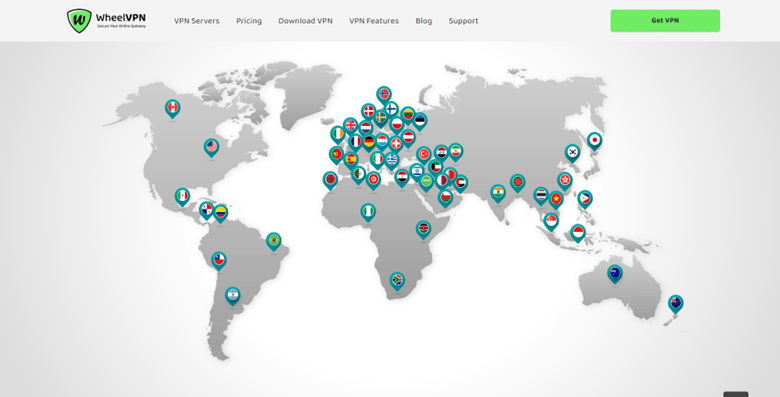
WheelVPN has a small server network comprising over 55 countries in Europe, America, Africa, and Asia, and their connections are also dependable. Despite having only 200 servers in 55+ countries, it has over 7,000 IPs in total. When one of the IPs is full, it is rotated at random. There are just seven virtual servers.
A virtual location indicates that the server is in a different location than the IP address it provides. This should not cause any security issues, but it may result in slower speeds if it is further away than expected.
The vast majority of WheelVPN’s servers are rented. The vast majority of VPNs rent servers because owning their infrastructure is prohibitively expensive. This should not cause any privacy issues as long as the VPN has a solid no-logs policy. But having a VPN cut out the middleman gives me extra peace of mind. I contacted WheelVPN via its live chat and discovered that it owns some of its servers.
I’m hoping that WheelVPN will eventually upgrade to RAM-based servers. For added privacy, these servers delete all information on them when they reboot.
However, as a smaller service, I understand that WheelVPN cannot compete with the massive networks and advanced technology of its larger competitors.
Money Back Guarantee
WheelVPN offered me a risk-free service with a money-back guarantee that lasted for 30 days. I was also given the liberty to request a full refund if I ever felt unsatisfied within these 30 days. With the assurance I got, if I felt unsatisfied, they were prepared to refund my money in full.
However, that wasn’t the case because at no point was I ever unsatisfied with their service that I should demand a refund. Don’t get me wrong, there are always glitches here and there, but just not enough to make me feel unsatisfied with their service, considering their prompt customer service system that has always attended to my challenges satisfactorily.
This VPN is also one of the best for streaming. With all of the top platforms, I could unblock a large number of libraries. There were no problems with image quality, load times, or buffering. Its dedicated IPs are on par with the streaming-optimized servers of its main competitors.
I did experience one minor issue in which I was unable to sign in to specific platforms while connected to WheelVPN. However, customer service advised me to reinstall the app. After that, everything was fine, and I had no trouble logging in to any of the streaming channels to which I had subscribed.
Unblocked: Netflix, Disney+, Hulu, HBO Max, Amazon Prime Video, BBC iPlayer, and more
WheelVPN works well with Netflix, and only a few VPNs are capable of unblocking more libraries. I began by testing all of the dedicated IP addresses that it recommends for unblocking platforms. 11 had access to entire libraries. I also tried four regular servers and was able to unblock one more entire region of content.
Some servers were unable to unblock entire libraries. Only Netflix Originals were available in some countries. This is a version of the site that only contains content owned by Netflix. This is fairly common, and I don’t consider it a major issue because Netflix has been working hard to block more VPNs.
I was able to unblock Disney+ using dedicated servers from the United States, Canada, Italy, the United Kingdom, and Australia. The most difficult part was getting into the US library. I was blocked by the New York server on Chrome and Edge. Fortunately, the Los Angeles dedicated server let me sign in without any problems.
Speed
Although WheelVPN isn’t particularly fast, I’ve tested much slower VPNs. All of my tests were carried out on a Microsoft Surface Laptop running Windows 10. WheelVPN is built on an HQN (high-quality network), so it should be faster. Unfortunately, it still slowed me down significantly, even in nearby areas.
The following tests, however, were performed with 256-bit encryption and Stealth turned off. In my tests, OpenVPN TAP was the fastest protocol, but the message “NOT RECOMMENDED” is displayed beside it in the app. As a result, I decided to stick with OpenVPN UDP for the remainder of my tests. It provided me with the second-best speeds, and it is the protocol that must be used with dedicated IPs.
I wasn’t surprised that the nearest server provided the fastest speeds. It wasn’t the best result because I’d previously tested VPNs that only reduced my speeds by 10% or less on nearby servers. However, I was relieved that the regular servers were significantly faster over long distances. I’d also like to include the Wireguard protocol to improve performance. Overall, WheelVPN’s speeds are adequate, but there is room for improvement.
Gaming
While connected to one of WheelVPN’s dedicated IPs, I was able to play online games. I used the Dallas server in my first test. It’s the closest one to me, with a ping of only 10 ms. For gaming, you want a ping rate of 50-85 ms so that your character can respond to your button presses almost instantly.
Even though the ping was low, the game was laggy when using the regular Texas server. The gun fired about half a second after I clicked my mouse. This made it impossible for me to enjoy the game, and I kept dying soon after respawning.
Dedicated IP
There was almost no lag with the dedicated IP I tested. This was despite the fact that the ping rate was four times higher (around 42 ms). I also tested a dedicated IP in the United Kingdom that is approximately 7,905 kilometers away from me. At that distance, the ping was over 100 ms, and the gameplay was glitchy. I ended up falling through the floor and having strange problems that rendered the game unplayable.
However, this is to be expected, and I was generally pleased with WheelVPN’s gaming performance. There aren’t many VPNs that allow you to play online games without lag, even when using a nearby server.
Security
Because of its military-grade encryption, WheelVPN passed all of my leak tests with flying colors. It employs 128-bit GCM encryption by default. I recommend using 256-bit GCM because it is more difficult to crack and performs faster in my tests. CBC encryption is also available, but GCM is thought to be a little more secure.
Plus, I didn’t notice any differences in speed, so I’d stick with GCM. WheelVPN also uses its own DNS servers, eliminating the need for a middleman and increasing security. During tests with servers in the United States, Australia, the United Kingdom, Sweden, and Japan, it never revealed my exact location. I did find one US server that provided me with a location other than the one listed.
It wasn’t a big deal, though, because it still unblocked the entire Netflix US library, HBO Max, and every other US platform I tested. IPv6 and DNS leak protection are enabled by default, but WebRTC leak protection is not available. As a result, you’ll need to adjust your browser’s settings. It’s inconvenient, so I’m hoping it’ll be added in the future.
Read Also our Full reviews:
WheelVPN Pricing
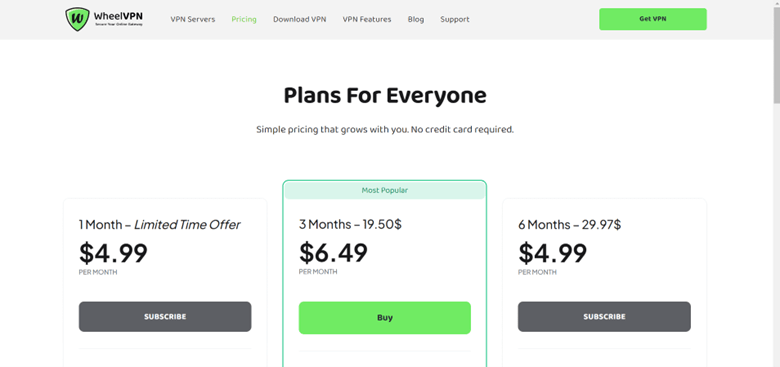
It is no news thatWheelVPN offers a 30-day money-back guarantee on all paid plans. It offers a special but limited monthly plan at the rate of $4.99, which includes 24/7 support, access to all premium servers, unlimited bandwidth, no logs policy, connection to 7 devices, and freedom to cancel anytime.
It also has a 3-month plan that goes for $19.50. However, if you purchase it at this time of the year, you will get it at $6.49 because the plan is currently on offer. I wish I hadn’t purchased mine earlier; I would have been able to save a whopping $13 on a subscription.
WheelVPN also has other plans like 6 months – $29.97 ($4. 99 on offer), 1 year – $41.95 ($3.49 on offer), 2 years – $59.94 (2.49 on offer), and 5 years – $89.91 (1.49 on offer).
On Android, you can also get a 7-day free trial that gives you the full version with no feature restrictions and doesn’t require you to enter a payment method.
Furthermore, even if you use the trial first, the refund policy remains in effect on paid plans. All three subscription options were far less expensive than what most premium VPNs charge. You can pay monthly, quarterly, or every three years, with the latter offering the most significant discount. This works out to $2.00 per month — a savings of 85%!
If you prefer a monthly VPN plan, WheelVPN’s 1-month price is only slightly less expensive than ExpressVPN or CyberGhost, but you can still use the 30-day money-back guarantee if you change your mind.
WheelVPN’s Privacy and Security
WheelVPN is bound by the excellent no-logging policy that has kept it away from leaking customers’ data. Furthermore, it is not the most privacy-friendly country (issues with its data retention laws persist).
WheelVPN only stores a small amount of information you provide them. As a result, if any government requests data from its customers, they will have nothing to share. Customers’ email addresses and passwords are the only information kept by WheelVPN. WheelVPN does not have access to financial data because payments are processed by third parties. Users who want to remain completely anonymous can create a new email address for signing up.
One issue is that the policy of WheelVPN has not been verified by an independent audit or a public court case. Other VPNs pay reputable companies to audit their policies to ensure that they are followed. Although I understand that WheelVPN is a smaller company, I hope that this is done in the future. Regardless, WheelVPN has a good reputation, and I trust them with my data.
Finally, it works with a third-party company which provides the foundation for its live chat functionality. While I don’t consider it a major privacy concern, it’s always best not to reveal any sensitive data to any company’s support staff. WheelVPN’s support team confirmed that the Intercom is not supported.
WheelVPN Performance
WheelVPN is an excellent option for torrenting. When I try to torrent, most VPNs significantly reduce my speeds. Without a VPN, I can usually reach download speeds of around 12 MB/s. I’ve tried numerous VPNs that limit my bandwidth to 1 MB/s or less. I was able to reach 4 MB/s with WheelVPN, allowing me to download a 1.6 GB file in less than 15 minutes. This was also done with a small number of seeders.
Port forwarding is enabled by default on all WheelVPN servers, resulting in faster torrenting speeds. According to a support team representative, dedicated IPs allow access to “almost all” ports, as opposed to standard servers, which only allow access to one. This could explain the significant speed difference between dedicated IPs and standard servers.
Torrenting is legal in most parts of the world, but downloading copyrighted files is prohibited. My team and I do not support any illegal activity. Before you decide to torrent, please familiarize yourself with the local laws and regulations. WheelVPN is one of the best torrenting options if you want to stay safe on P2P networks.
Despite this, the speeds of WheelVPN aren’t particularly impressive, and there are certainly faster VPNs on the market. One reason for this could be the lack of the WireGuard protocol, which provides strong security and some of the fastest speeds.
So, I measured the drop-off percentages to determine the speed of service. The lower they are, the more quickly your VPN will operate. Because WheelVPN does not support many tunneling protocols but does allow you to change the encryption, I ran multiple speed tests with different OpenVPN configurations, and they performed admirably.
But will they have an effect on your experience? Let’s find out further down.
Windows
The Windows app was simple to use for me. It sends notifications for everything that happens, so you’ll always know the status of your connection.
The main screen windows can be customized, allowing you to switch between basic and advanced views. The former only displays the status of your connection and allows you to change the country to which you are connected. Meanwhile, the advanced view allows you to customize the connection type and encryption while also accessing the app settings.
There were some strange issues. The Streaming Services tab, for example, did not display any servers. And, while I appreciated the addition of port forwarding, it assigned a different port each time you connected. That means you’d have to reconfigure your routers and other potential software each time to use a different port. Furthermore, you cannot disable it.
macOS
The macOS app is nearly identical to the Windows version, with more rounded buttons to better fit Apple’s user interface. However, there are some trade-offs, and not all of the features available in Windows are included.
You shouldn’t cry for some of them; one of the losses is PPTP. This is more of a security flaw than a flaw in the tunneling protocol. Others, on the other hand, are very useful additions, such as DNS leak protection and the ability to kill specific apps when disconnecting from a VPN server.
Linux
WheelVPN does not provide a desktop app for Linux users. As a result, they only receive instructions on how to set up OpenVPN connections using WheelVPN services.
Because there is no standalone app, you must configure everything using the OpenVPN stack and a command-line terminal. Sure, it’s not the most pleasant experience when compared to what Windows and macOS users receive. However, the program itself continues to provide you with reliable security and options.
WheelVPN Mobile Apps
The app follows the same design principles as the desktop versions. The main difference is that desktop apps appear smoother, whereas mobile apps appear choppy. This means that the user experience is different when compared to desktop devices, which should not be the case.
The app for both Android and iOS is simple and provides only the bare necessities of a mobile VPN service. I appreciate the Android app’s built-in kill switch, which solves the problem if you’re using an older device without native support. Unfortunately, the kill switch is not available on iOS.
You can switch the used port and toggle Stealth VPN. So, aside from changing tunneling protocols and encryption, there isn’t much you can change.
The app only switches between the all servers list and the dedicated IP address, allowing you to avoid the erroneous streaming services list.
Read Also our Full reviews:
Is WheelVPN Easy to Use?
The installation of WheelVPN is straightforward. To begin, download the free app. Most operating systems, including Windows VPN, Mac VPN, Android VPN, iPhone VPN, and Chrome VPN, are supported. After successfully installing WheelVPN, you will be able to connect to VPN servers.
WheelVPN Customer Support
When it came to customer service, I had a mixed bag with WheelVPN. While they do offer a 24/7 live chat, it is quite slow. I waited 10 minutes and received no response. Having said that, when I sent a WhatsApp message to their official WhatsApp number (+(372) 53633471), I received a response in about 3 minutes.
And the fact that I received an in-depth response in such a short period of time is a huge plus for me. So, while their WhatsApp support is among the fastest I’ve seen, their live chat can still be improved.
How Do I Install and Set Up WheelVPN?
Setting up WheelVPN’s full apps couldn’t be easier, but using it on non-compatible devices is more difficult. When it comes to desktop devices, you simply download the installer file and follow the on-screen instructions to get it up and running in minutes. You’ll get it from the appropriate store (Google, Apple, or Amazon) for your mobile device or Firestick. This procedure is also simple.
You’ll need to set it up on a router if you want to use it on your Xbox, Playstation, Nintendo Switch, or an unsupported smart TV. It is compatible with Asus RT, Synology, DD-WRT, Tomato, Linksys, QNAP, and pfSense routers. You should exercise caution if you attempt this because it has the potential to damage your router during this process.
Frequently Asked Questions
Is WheelVPN a Good Choice for Netflix?
Yes, WheelVPN worked flawlessly with my paid Netflix subscription. During my tests, WheelVPN was able to access Netflix libraries in every country where my team and I were testing. I was also impressed by its fast streaming speeds — connecting to a server far away resulted in only a few seconds of buffering.
Can I Get WheelVPN for free?
Yes, WheelVPN offers a completely free 7-day Android trial, so you can test its features without risk. To subscribe, all you need is a working email address, as with most of the best free VPNs — I had my free trial up and running in less than 5 minutes.
Even if you use the Android trial, all paid plans include a money-back guarantee. That means you can try WheelVPN for 7 days plus an additional 30 days, and if you’re not satisfied, you can get a full refund as I did.
Is WheelVPN Safe?
Yes, WheelVPN uses strong encryption to keep you safe and anonymous while you browse the web. It has a kill switch to protect your privacy even if your connection is lost, as well as a zero-logs policy to keep your activities private.
Conclusion
One of the most impressive VPNs available today is WheelVPN. It is one of the most privacy-conscious and secure VPN service providers you will ever find, and I’m saying it from experience. In addition, the service performed admirably in my torrenting and gaming tests. It’s also extremely privacy-friendly and secures your device with military-grade encryption.
There are a few things that could be better. It does not have the same number of servers as its larger competitors. And it’s not the fastest VPN I’ve tried, but it should be adequate for most people.
Overall, WheelVPN provides excellent value for money for the majority of users. However, if you need a simple app to keep you safe while streaming, gaming, torrenting, or browsing, you won’t find much better.


