

Keep your sensitive data safe if you use the internet for work, business, or personal purposes. It is necessary to use a VPN service for a more secure and safer online experience.
Over the years of using the internet, I have used VPN to mask my sensitive data, including payment details, location, and work emails. VPN services also helped me to access geo-restricted content by presenting my local server as if it is based at another location.
The most surprising part is that I can evade internet censorship and surveillance in a country with such restrictions. Besides, a VPN protects my online activity and identity from third parties, including the government, advertisers, and hackers.
If you want to maintain anonymity online and protect your data, use a VPN. Though many VPN products are available in the market, knowing the pros and cons of each will help you make a perfect choice.
Goose VPN is one of the most reliable and straightforward VPN products I have used. It provides greater privacy and freedom if you want to access region-bound content.
In this review, I will analyze the features, offerings, and performance of Goose VPN.
About Goose VPN
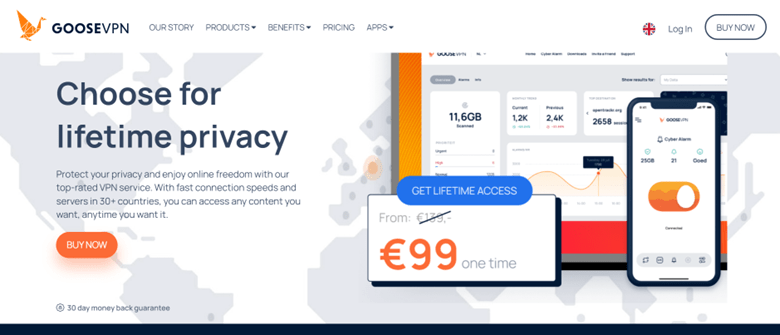
In 2016, a Netherland-based company launched Goose VPN. Compared to popular VPN services, this VPN has a relatively small network with servers in only 24 countries. However, it provides excellent VPN benefits as it prioritizes users’ privacy and security.
Though Goose VPN doesn’t have multiple servers in each country, most of its servers are P2P optimized. The provider differentiates between torrenting VPN servers and streaming servers.
If you want to use Goose VPN for torrenting, check its website to locate designated P2P servers near you. Besides, streaming servers are available in Poland, Australia, Turkey, Austria, Canada, and Bulgaria.
If you have been using VPN services, Goose VPN lacks some features you may expect, like WireGuard protocol and split tunneling. However, it offers Cyber Alarm and Autopilot, which are features that aren’t available in most VPNs.
One exciting thing about this VPN is its simplicity and user-friendliness. It has various apps for almost all devices that support VPN, including routers, Linux, iOS, Mac, and Windows.
If you are after simplicity, unlimited connections, and privacy, Goose VPN is an excellent choice. You can simultaneously connect multiple devices to the VPN.
Goose VPN Pros and Cons
When choosing any service or product, finding its benefits and downsides is the best approach. Like other VPN services, Goose VPN also has its pros and cons.
I will share the information to help you choose a suitable VPN service.
Pros
- Ease of Use: Goose VPN has a user-friendly interface and simple design with orange and white as its primary colors. Consequently, you can quickly become familiar with the apps.
- Cyber Alarm Notification: Goose VPN’s antivirus feature, Cyber Alarm, notifies you if it detects virus and malware attacks. However, it is a paid add-on tool.
- Unlimited Connections: This VPN service lets you connect any number of devices simultaneously. You don’t have to create multiple accounts to link your devices to the VPN.
- No-logs Policy: The VPN doesn’t record your online activities, including your IP address, visited websites, and session lengths. Also, it doesn’t keep track of downloaded files, keeping your user activity private.
- Affordable Long-term Plans: This VPN offers the best deals for long-term commitment. With the five-year payment plan, you will spend less money for an extended period.
- 30-day Refund Plan: With Goose VPN’s 30-day free trial, you can try the service risk-free. Besides, you will get a refund if your data usage during this period is below 100MB.
- Dedicated Servers: Goose VPN has P2P optimized servers, ensuring secure and smooth torrenting. However, you should connect to an available P2P server near you to torrent using Goose VPN.
Cons
- Small Network: Goose VPN has a limited server range compared to popular VPN services. Its servers are only in 25 countries, mainly Europe and North America. However, users can still connect to the VPN service through India, Australia, Hong Kong, Singapore, or Japan.
If the servers aren’t enough, many users will use the available few, leading to slower speeds.
- No Split Tunneling: Goose VPN doesn’t allow users to choose apps for the VPN service. The VPN only has a feature that automatically connects it when it detects suspicious networks.
- Absence of Some Basic Features: Goose VPN lacks RAM-only servers and superior security tools such as perfect forward secrecy. Additional features like ad blockers and split tunneling are also absent.
- Inability to Unlock Most Streaming Platforms: Goose VPN isn’t an all-around VPN service for streaming. Though it unblocks geo-restricted US Netflix, it fails to unlock other well-known streaming services, including BBC iPlayer and Amazon Prime Video.
Read Also our Full reviews:
Goose VPN Features

Goose VPN may not make it to the list of famous VPNs. However, it has standard security features that shield your identity and online activities.
Besides, the VPN is easy to use and doesn’t require technical knowledge to use its tools conveniently.
The following are some of the significant features of Goose VPN:
1. Autopilot
This feature automatically connects you to a VPN server once it detects an insecure network. Unlike split tunneling, which allows specific apps to run on a VPN, autopilot uses the service for all applications.
However, the feature switches on the VPN for suspicious and public networks and off if it identifies trusted ones. If you want all your traffic to run through the VPN, don’t add any network to the “trusted list.”
2. Kill Switch
If your VPN connection fails, the kill switch will disconnect your internet. The feature ensures your data remains protected when the VPN loses connection.
Goose VPN’s kill switch becomes automatically active if you enable the Autopilot feature.
3. Military-grade Encryption
The VPN service uses AES 256 bits to protect users’ data, making it unreadable to prying eyes. This advanced security feature encrypts your information before it moves to the VPN server and reaches the web.
This feature will ease your worry if you are concerned about your online privacy. It will protect your information from third parties.
4. Cyber Alarm
This feature will alert you if you try to visit a website with malware or download suspicious files. Cyber Alarm doesn’t prevent you from accessing such sites or downloading the files.
However, the real-time notification will prompt you to take action. You can avoid the suspicious sites, delete the malware-infected files, or use anti-virus software.
Though a paid add-on, Goose VPN adds a layer of security with Cyber Alarm. Enabling this feature isn’t a straightforward process.
You have to visit the VPN’s website to make the necessary adjustments. Click on “Change Subscription” and select “Edit Subscription.” Then, select “Add Addon” to include the feature in your VPN service.
5. Multiple Protocols
Goose VPN offers the following protocols:
- IKEv2 (Internet Key Exchange version 2): It is suitable for unstable connections, making it an ideal protocol for mobile devices.
- OpenVPN: It is a reliable protocol and is highly recommended.
- IPSec: It balances security and speed and is an excellent choice for gaming. Also, it is an ideal alternative to OpenVPN.
- PPTP (Point-to-Point Tunneling Protocol): It is fast but less secure than others.
On routers or Windows, you can use OpenVPN or PPTP. Apple devices support IKEv2 (default protocol on macOS) and IPSec.
6. No-logs Policy
Goose VPN claims it doesn’t collect or share users’ data with third parties. However, the company is located in Rotterdam, Netherlands, one of the Fourteen Eyes Cybersecurity Alliance countries.
Therefore, the government can access the Goose VPN service and share obtained data with other members of the 14 Eyes Alliance, including the UK and the US. Though it doesn’t store users’ information, the VPN provider admitted on its FAQ page that it will cooperate with the government when presented with a court order.
7. Available on Various Devices
Goose VPN has apps for various significant platforms, including the following:
- Linux
- iOS
- Windows
- Mac
- Routers
- Android TVs
The apps have user-friendly interfaces, enabling easy navigation of the features and connecting to the VPN server. You can seamlessly switch protocols on the desktop apps.
You can download the Goose VPN macOS app from the Apple App Store. Its availability on this platform shows that the app’s performance, reliability, and security are tested and trusted. If you enable the automatic updates, you will always have the latest version of the VPN.
Conversely, you can’t find the Goose VPN app on the Microsoft Store. Fortunately, you can download Goose VPN for Windows 7 and higher versions from the website.
The mobile apps have fewer features than the desktop apps. However, you can’t switch protocols on the Android app. Also, you will manually connect to the VPN server.
Goose VPN’s iPhone app has the same features as the macOS version. You have two protocol options and Autopilot for automatically connecting the VPN when you join insecure networks.
8. DNS Leak Protection
The feature is only available on Windows. Besides, users have to switch it on and off.
Though Goose VPN offers numerous basic features, it lacks some extra security tools you may consider VPN’s must-haves. The VPN service works efficiently with the functionalities it possesses.
However, implementing additional features like WireGuard, one of the VPN’s fastest protocols, will improve its capabilities. However, only IKEv2 is available for Android devices.
Goose VPN Pricing

This VPN service has three paid plans with different durations and prices. You can choose the one-month, yearly, or 5-year packages.
The good thing about Goose VPN is that you can get the best deal with the 5-year package. Here are the three packages:
- One-month Plan costs €9.99 per month, billed monthly. This plan is very flexible, and you can cancel it monthly.
- One-year Plan costs €4.99 monthly, billed at €59.88 annually. With this plan, you can save $60.88, and it is protected for 12 months.
- 5-year Plan: This option gives you access to Goose VPN at a reduced cost of €1.80 monthly, billed at €108 every five years. You can save $491.40 if you opt for this plan.
All the Goose VPN packages offer a 30-day money-back guarantee. That means you can use the first month to test the VPN and get a refund if you aren’t satisfied with the service.
Though the provider listed a Lifetime plan on the website requiring one-time payment, it is no longer on sale. Users who previously subscribed to the plan will still maintain it.
However, the packages now have expiry dates, which the provider stated are for administration purposes. Users should not be bothered about being denied access to the VPN when the expiry date reaches. The provider will automatically move the date forward without payment or subscription.
Goose VPN accepts only two payment options: PayPal and credit cards.
Read Also our Full reviews:
Goose VPN Privacy and Security
Goose VPN claims it has a no-logs policy, but almost all VPN services boast the same even when a provider doesn’t adhere to it. Reviewing the privacy policy and research to discover the truth is best.
Goose VPN doesn’t record your IP address, downloaded files, and visited websites. Its local servers won’t track your online activities.
The only information the VPN service logs is bandwidth usage for each account. This data alone can’t compromise your online privacy.
Besides, Goose VPN has no parent company. The provider owns and manages the VPN servers, giving the service complete control of the servers’ setup and operations. Unlike other VPNs with a larger parent company, Goose VPN won’t have to share data with the organization.
However, Goose VPN is a Netherlands-based company, and the country’s government can share information with other Nine and Fourteen Eyes Alliance countries. Consequently, government agencies can secretly monitor online users.
Goose VPN states that it has to submit to the demands of the law in cases of suspected criminal activities. Due to its location, the provider can collect and share a user’s information if ordered by the court.
Goose VPN can collect your name, credit card details, IP address, and other information during subscription purchase. The provider won’t share your browsing history since it doesn’t log your online activity.
Besides, Goose VPN hasn’t reported any server network breaches. However, independent audits conducted on this VPN service can confirm its claims of upholding the no-logs policy.
Goose VPN maintains a secure service and uses standard security features for different operating systems. It pairs each protocol with AES-256 encryption, a cipher that makes your information unreadable to prying eyes.
The provider offers OpenVPN, PPTP, L2TP/IPSec, and IKEv2 protocols. However, it lacks the WireGuard with ChaCha20 encryption.
If you prioritize security, Open VPN is an excellent option. Though its speed isn’t impressive, it can bypass restrictions.
IKEv2 is Goose VPN’s default protocol and is ideal for mobile devices. However, this protocol gets easily blocked. IKEv2 has a more incredible speed than OpenVPN.
Goose VPN can maintain online privacy if concerned about IP or DNS leaks. Leak tests conducted with OpenVPN and IKEv2 showed no leaks. Your mind will rest knowing that Goose VPN protects your identity and online activities.
The VPN service doesn’t provide IPv6 protection. It is better to turn off traffic for the feature on your device.
Goose VPN provides security and privacy for your online activities. However, it lacks superior security features in top VPNs, including RAM-only servers and forward-perfect secrecy.
Goose VPN Performance
When shopping for VPNs, performance is one of the factors you should consider. A reliable and fast VPN service is an excellent choice for online activities.
Analyzing Goose VPN’s speed, server network, and performance for various activities will help you choose a suitable VPN service.
Speed
A VPN lowers internet speed by directing online traffic through servers worldwide. Considering the latency introduced by VPNs, it is best to conduct speed tests before you make a choice.
Speed tests conducted on Goose VPN may differ depending on the location of the testers and their proximity to the servers.
If you use servers near your location, you will have lower latency and better speeds. Contrarily, those far from you will offer higher latency and lower speeds. Latency refers to the period from when a user sends a request to when the server delivers a response.
Speed tests conducted on Goose VPN show inconsistent upload and download speeds. The upload speed refers to how quickly you can send data from your device. Conversely, how fast you receive information is the download speed.
Though Goose VPN delivers decent speeds, it lags behind the fastest VPNs. These top-performing services have minimal latency, with 90% of the initial speed returned. Choosing a server near you will help reduce latency.
Unblocking Capability
Goose VPN claims it offers access to all websites despite users’ locations. However, its unblocking performance during tests was below expectation.
Though it unlocks Netflix and Max, it sometimes has slow loading times. However, a good streaming VPN bypasses geo-blocks, allowing you to access restricted content.
Unfortunately, Goose VPN can’t unblock Disney Plus, BBC iPlayer, Amazon Prime Video, and Hulu. The login page of these websites requests that you turn off VPNs and any proxies.
You can experience seamless streaming with no lags from the platforms Goose VPN unlocked. The provider can enhance the unblocking capability of the VPN service to unlock more websites.
Torrenting
Goose VPN has P2P-optimized servers in some countries. They support secure and swift torrenting.
If you want to share or download files, connect to a Goose VPN P2P server. You can check the VPN’s website for a P2P server nearby.
Besides, an exclusive list of such servers is available on Android and Windows to facilitate your selection. However, you should check the regulations of your country regarding torrenting.
Server Network
Goose VPN has over 100 servers in 24 countries, mainly in Europe. Other regions have limited or no server options. Consequently, users in such areas can’t connect to a server in their country or neighboring ones to experience fast speeds.
Due to the smaller network, the VPN service will likely provide limited country IP addresses. Besides, servers in populous locations may become crowded, slowing the VPN speeds.
The provider can add more server locations to expand Goose VPN’s network. They can use company initiatives and users’ requests to determine countries where the servers are mostly needed.
Goose VPN Customer Support
Goose VPN provides customer support through an email ticketing system and knowledgebase. You can contact the support team via the desktop and mobile apps. Besides, the agents deliver informative and fast responses to users.
You can also check the FAQ for more information about the VPN service. This section provides informative answers to service, privacy, account, and general information questions. However, the answers are concise, and you may need more details in some cases.
Live chat support with an agent isn’t available. However, if you try the option, you will get connected to a bot.
Read Also our Full reviews:
Device Connections and Compatibility
Goose VPN allows you to connect any number of devices simultaneously. You don’t have to open multiple accounts to use the VPN service on various devices.
The good news about the unlimited connection is that it doesn’t affect the performance of the VPN.
Besides, you can use Goose VPN on different devices, including desktop, mobile, and routers. The provider offers Android, Linux, iOS, macOS, and Windows apps. Goose VPN also works on Raspberry Pi, ChromeOS, and gaming consoles through routers.
However, the availability of Goose VPN features varies across the devices. Mobile apps lack a kill switch, while Windows versions have all the VPN’s security features.
Besides, Apple users can’t access OpenVPN and PPTP protocols. If you prefer mobile apps, know it doesn’t support switching protocols.
Installation of Goose VPN
You can conveniently use user-friendly VPN services, and Goose VPN isn’t lacking. Its simple interface allows easy navigation and familiarizes you with its features.
Goose VPN’s account creation is a simple process. Instead of initiating a direct payment, the provider sends an invoice to the user. This payment system may seem outdated, but it is secure.
Downloading and setting up for Android and Windows is straightforward. It will only take you a few minutes to complete the process.
Though there is a slight variation between the two interfaces, they are easy to use. Even beginners can find their way around Goose VPN.
The short descriptions of the key features available on the interface will help them familiarize themselves with the app. Besides, the little tutorial slide will guide you if it is your first time installing PC clients or mobile apps.
Goose VPN Desktop Apps
Users can control the VPN’s features more with the desktop app. Your screen will display five buttons upon login. These icons let you change the advanced setting, choose a VPN server, enable Autopilot, and take a look at the Cyber Alarm notifications.
At the top-left side of the screen is a drop-down list with several options, including
- Preferences
- FAQ/Support
- Check for Updates
- Logout
- Quit Goose VPN
The VPN doesn’t automatically select a server. You must scroll down the list to choose your preferred server and country. Icons beside each server indicate whether it is specialized for streaming or P2P-friendly.
Besides, you can switch servers with a few clicks. You only have to select a new location and server type. Then, the app will initiate a new connection and close the previous one.
You can switch the VPN protocols from the advanced options buttons. Thanks to Windows notifications, you will know when the VPN shields your online activities and when you aren’t protected.
Mobile Apps
Setting up Goose VPN on Android is an easy process. Though the app’s interface is similar to its desktop counterpart with the “Connect/Disconnect” button and location name, it has minimal options.
You can’t switch protocols on mobile apps as they have only IKEv2. Also, they lack the advanced setting options and Autopilot feature. This situation means you can’t use the kill switch on mobile apps.
You only have an option that allows you to switch servers. The app can automatically select the best server, or you can choose one from the server list.
The server switch is a simple process. Click on your preferred location, and the app automatically disconnects your current server before starting a new connection.
Goose VPN mobile apps need more options and basic security features. It would be better if the provider optimizes the VPN service for desktop and mobile devices.
Read Also our Full reviews:
Do We Recommend Goose VPN?
If you are just hiding your online activities, Goose VPN can provide basic privacy and security. The VPN is easy to use and has no limit to the number of devices you can connect.
It offers low prices on its five-year plan, allowing you to save up to $491.40. Also, it has a feature that protects you against malware.
The Cyber Alarm alerts you when you visit a suspicious website or download a malicious file. Unfortunately, it can’t prevent you from visiting such sites or help you to delete downloaded malicious files.
If you use a VPN for torrenting, Goose VPN has something good for you. The VPN service has P2P-optimized servers that support file sharing.
Goose VPN has more dedicated P2P servers than streaming servers. You can easily find one that can cater to your needs. Choosing a server closest to your location and with fewer users can help reduce latency and ensure faster speeds.
If Goose VPN can satisfy your needs for a VPN service, you should bear the following in mind:
- The VPN has its headquarters in the Netherlands, a Fourteen Eyes Security Alliance country.
- Its no-logs policy hasn’t undergone independent audits to confirm the provider’s commitment to protecting users’ privacy online.
This VPN service won’t be suitable if you mostly access geo-restricted content with the VPN. Though Goose VPN unblocks Netflix, it may not bypass the restrictions on other streaming platforms.
Also, this VPN may not work in countries that banned or strictly regulated VPNs. However, the provider claims that Goose VPN can effectively function in Iran and Tukey. It doesn’t work well if it manages to bypass China’s firewalls sometimes.
It cannot evade most geo-blocks. However, many users reported Goose VPN’s excellent performance in unblocking Netflix and streaming without buffering.
Beyond North America and Europe, Goose VPN will likely deliver slower speeds due to limited coverage and congestion of available servers in these parts of the world. Though this drawback may deter some users from using the VPN service, Goose VPN remains a valuable option in North America and Europe.
An update of Goose VPN’s features, especially on its Android apps, will help upgrade its performance and reliability. The VPN service needs more server locations, advanced security features, and more user options like switching protocols on the Android apps.
Frequently Asked Questions
Is Goose VPN secure?
The VPN service has all the basic security features for protecting online security, including 256-bit encryption and a kill switch. However, these tools aren’t available on all Goose VPN apps.
Can Goose VPN slow down my internet speed?
Yes, the use of VPN services reduces internet speed and introduces latency. However, your choice of a VPN server can help improve speed. If you opt for a nearby server, it can reduce latency and increase speeds.
Can Goose VPN unblock Netflix?
Yes, with Goose VPN, you can unlock geo-restricted content on Netflix. You can stream your favorite movies and TV shows on the platform.
Can I use Goose VPN for free?
This VPN service has no free plan. However, all Goose VPN’s subscription packages offer a 30-day money-back guarantee if you use less than 100MB in the first month. You can use the refund period to test the VPN service.
Does Goose VPN offer extensions?
Goose VPN has no browser extensions, but sometimes, this option can be more convenient than desktop apps. However, the VPN’s desktop apps can work with routers to connect some devices.
Does Goose VPN work in restrictive countries?
The VPN lacks the obfuscation tools required to evade government firewalls in internet-restricted countries. Goose VPN may not function in China even with the highly secure OpenVPN protocol.
Conclusion
Goose VPN has fast speeds, unlimited connections, and is user-friendly. However, these benefits didn’t outweigh its downsides. The VPN has a small server network and inconsistent streaming performance, lacks advanced security features, and can’t function in restrictive countries.


