

Betternet VPN offers the most comprehensive online privacy protection. Our comprehensive evaluation takes into account its capabilities, efficacy, and unshakable commitment to your security.
Betternet has grown in popularity as a VPN service for Android users. However, as more individuals use it, there are concerns that it will collect user data. In light of these concerns, I investigated Betternet’s policies to give critical information about potential risks and how they compare to the best in the industry.
Betternet retains a substantial amount of identifying user information, according to my test results, which is a big problem. This disadvantage is exacerbated by the service’s inability to circumvent restrictions on popular streaming platforms. It is worth noting, however, that Betternet does offer some positive aspects. For example, when linked to short-distance servers, it has an exceptional server spread and produces commendable download speeds.
Betternet’s 7-day free trial allows you to test out its premium features before committing. If you are dissatisfied after enrolling, their 45-day money-back guarantee protects your contentment. If Betternet does not meet your criteria, look into other top VPN companies to find the best match for your online security needs.
Continue reading to learn more about Betternet’s speeds, server network, privacy policy, and other features. Let’s get into the specifics!
About Betternet VPN
Aura, the parent company of Betternet VPN, also owns UltraVPN, Aura VPN, Hexatech, VPN360, TouchVPN, and VPN in Touch. That’s a lot of VPN service providers.
This brand has been around since 2014 and gained popularity in 2016 after an academic investigation found that it exposed customers to third-party tracking software.
So, I was intrigued to check if Betternet VPN was just a business initiative to boost the company’s worth or if it genuinely had something to offer. This Betternet review provides an answer to that question.
Betternet and several other VPNs, including OkVPN and EasyVPN, were named among the worst VPNs that jeopardize your security.
Since then, the corporation has attempted to salvage its image by improving its features and security. We decided to put it to the test and have created a comprehensive Betternet VPN review based on our results.
Finding a decent quality, trustworthy VPN provider, on the other hand, isn’t all that difficult. The truth is that you simply need to be cautious while selecting a VPN. The big-name VPNs are usually deserving of their reputation. So, can a smaller player like Betternet compete? After all, let’s see what it has to offer.
Betternet VPN Pros and Cons
Betternet VPN Core Features: How Does Betternet VPN Benefit You?
Betternet VPN includes all of the regular VPN features. However, some of the more powerful ones are only available on the premium version of the Windows program. Android, iOS, and MacOS are all relatively simple and lack the following features:
IP Leak Prevention
By masking the actual IP address, a VPN allows for anonymity and is secure online. If there is an IP leak, all the rerouting and connecting to other servers is rendered useless. IP leak prevention ensures that your actual IP address is always masked when using a VPN.
IP leak prevention is now a basic function of all VPN services, and Betternet is no exception. It also works flawlessly, which is a benefit.
Autoconnect
Autoconnect is a function that allows you to connect to a VPN automatically when you encounter dangerous or public networks. Public networks typically lack high levels of security and are readily hacked. When traveling, the auto-connect option is especially beneficial because connecting to public wifi at cafes, hotels, and airports is inescapable. If you enable the option, you won’t have to worry about security because the VPN will connect by default.
Split Tunneling
Betternet refers to this as split tunneling domain exclusion. Split tunneling is beneficial if you wish to remain anonymous online while also streaming a game or a show without interruptions. Using a VPN delays your internet connection and may cause streams to lag. Split tunneling, on the other hand, allows you to exclude specific websites from VPN traffic. Your stream will then be routed outside the VPN tunnel, allowing for normal internet speed.
Device Connections
Betternet now allows up to ten devices to connect at the same time, up from the previous limit of six. When I connected my Windows desktop, laptop, and iPhone, there were no delays while streaming or surfing. My sole criticism of the Betternet VPN iPhone app is that the free trial edition is riddled with intrusive in-app advertisements.
Device Compatibility
Betternet falls short of providing complete device coverage. It is compatible with various operating systems such as Windows, Mac OS, Apple iOS, and Android, and it includes a Chrome extension. The app is available in your device’s app store, and you can quickly get the program for other operating systems from the Betternet website.
Read Also our Full reviews:
Betternet VPN Pricing
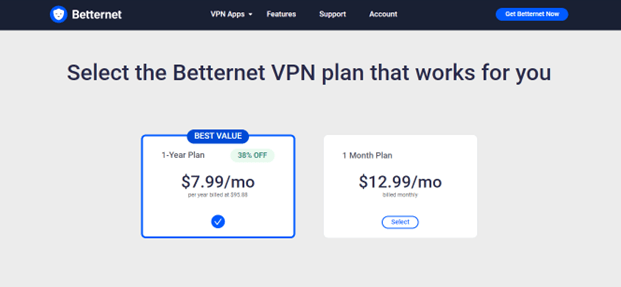
When I compared Betternet’s price to the top monthly VPNs in 2023, I discovered that it is overpriced for the value it gives. Users can choose between two major options from the provider: a one-month plan and a 12-month plan. Choosing the longer-term plan lowers the monthly cost, making it a more cost-effective alternative in the long run. Furthermore, Betternet hopes to attract potential users who are on the fence by providing a completely free plan with restricted capabilities.
Furthermore, I discovered that Betternet provides a 7-day free trial period for anyone considering purchasing a subscription service. Following that, you have the option of purchasing a one-month subscription for $12.99 or a one-year subscription for $7.99 per month with premium features.
If you are dissatisfied with the product after subscribing, you can seek a refund within the first 45 days. I believe it is an excellent policy that demonstrates the provider’s trust in its goods and gives customers peace of mind.
Betternet VPN accepts a variety of credit cards, including Visa, Mastercard, American Express, Discover, JCB, Diners Club – International, and Union Pay.
However, it’s worth noting that Betternet VPN doesn’t allow popular anonymous payment methods like PayPal or cryptocurrency. This constraint may be discouraging to users who appreciate the simplicity and security that these payment options provide.
Premium editions include extras, including a larger selection of possible places, faster bandwidth, and 5 simultaneous connection options. However, when compared to other VPNs on the market, I believe it is quite pricey. The good thing is that you can try out the premium version for free for a week, so you don’t have to commit right away.
Betternet VPN’s Privacy and Security
Privacy and Security
Every VPN service will make lofty claims about its security and privacy. However, the devil is in the details. Following a careful review of the policy, I discovered various flaws in the collection, storage, and use of personal data. Betternet guarantees that it does not track the websites that its users visit.
Nonetheless, it collects some types of data which could have serious effects.
Identity and Account Information, Billing Information, Usage Information, Device Information, Diagnostic Information, Location Data, and VPN-Specific Information are examples of this data.
I appreciate Betternet’s transparency regarding its data-gathering procedures, yet, as a user who values privacy, I am concerned about the volume of the information gathered.
This worry is compounded by the 2017 hacking event in which Betternet’s Chrome addon was infiltrated by malicious code. The fact that I haven’t seen any serious explanation for what Betternet did in response to this occurrence to strengthen its security raises even more red flags for me.
Betternet employs the proprietary Catapult Hydra protocol. Hydra is a fork of the OpenVPN protocol. It employs AES-128-bit encryption with 2048 DHE-RSA keys. However, because the protocol is proprietary, security researchers cannot peer-review it. Trusted protocols are open-source for a reason: only open-source technology can be openly audited. The use of a proprietary protocol poses a security risk in and of itself.
Moving on to IP and DNS leaks, I wasn’t shocked to find Betternet leak IPv6 addresses in my experiments. So it’s not just Betternet’s privacy policy that can jeopardize your privacy; its VPN also exposes IPv6 addresses. Not what you’d expect from a VPN. The fundamental function of a VPN is to conceal your actual IP address(es). Failure on that front isn’t ideal.
Betternet VPN’s headquarters in Canada may have repercussions for your privacy as well. Canada is a member of the 5-9-14 Eyes Alliance, a group of countries that exchange intelligence data.
This indicates that the Canadian government may gain access to Betternet VPN’s data if necessary. Data retention regulations in Canada oblige service providers to preserve user data for a set period of time so the government can order the corporation to hand up user data if necessary.
If you value your online privacy, ExpressVPN is a fantastic choice. Except for your billing information, it does not gather personally identifiable data like Betternet. It also allows you to opt-in for anonymized diagnostic data collecting, guaranteeing that your internet actions are fully confidential. Furthermore, it is less expensive than Betternet.
Read Also our Full reviews:
Betternet VPN Performance
Speed
Betternet VPN is fast, according to my testing, however, it has variable speeds across servers. Betternet manages to give remarkable results while connecting to adjacent servers despite discrepancies in performance. Surprisingly, when connected to specific Betternet servers, I saw an increase in speed – an unusual event when using other VPNs.
Speed Test Results
I ran speed tests in four separate nations to evaluate Betternet’s effectiveness, documenting my average speeds in each place. Before utilizing Betternet, I ran a speed test without the VPN service to set a baseline for comparison, recording 25.2 Mbps for downloads and 3.08 Mbps for uploads.
I was pleasantly delighted to observe a considerable increase in my speeds when I connected to a local Betternet server, which improved by roughly 50%. This outstanding performance was maintained across local servers for both the free and paid versions of the service.
However, when testing servers outside the United States, my speeds fell substantially. The download speed on the UK server was 87.8% slower at 3.03 Mbps, and the upload speed was 88.7% slower at 0.35 Mbps. When testing servers in Australia, I had the slowest speeds, with downloads taking 95.1% longer and uploads taking 78% longer.
Among the faraway servers, China’s server proved to be the fastest. Despite a 3.9% fall in download speeds, upload speeds actually climbed. Instead of the original upload speed of 3.08 Mbps, China’s servers delivered an upload speed of 9.96 Mbps, a 69.1% increase.
Network Servers
Betternet operates over 100 servers in 80 countries, including city-level servers in the United States, Australia, Canada, France, Italy, and Spain. Betternet’s free edition limits you to servers only in the United States, with server selection done automatically rather than through a list of possibilities. This means that free users are more likely to experience lag as a result of congested servers.
Betternet does not have control over its own servers because it is owned by Pango and its partners. When technical issues emerge, this can be a concern. Because of the number of parties participating behind the scenes, there are additional stages when resolving a problem, which has contributed to Betternet’s delayed progress.
Furthermore, for users who value privacy, this can be a red flag because it implies that your data may be shared with third companies. If you want a VPN with several servers in each location and no dependency on third parties, CyberGhost is a solid choice. With an outstanding list of over 9,600 servers at your disposal, you can make an informed decision while remaining confident that your information will stay exclusive to you and will not be shared with any third parties.
Torrenting
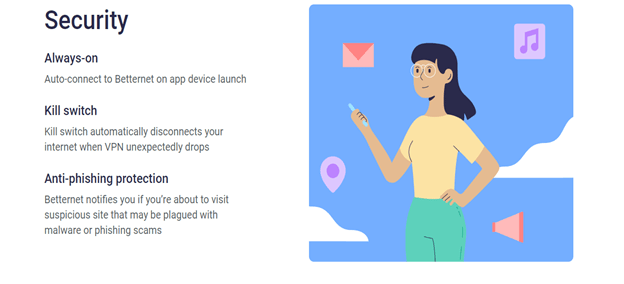
Torrenting is permitted on all Betternet servers. Furthermore, if your server goes down while torrenting, Betternet’s kill switch, which is exclusively available to paying customers, will safeguard you from threats such as hackers and malware.
Since Betternet is based in Canada, where torrenting is legal, you can do so with perfect confidence. I will stress, though, that if you do try to torrent any content, you should do your homework and make sure it is in the public domain. Before engaging in P2P file-sharing, be sure you follow your local regulations.
Betternet Unblocks Netflix and Amazon Prime Video (But Can’t Access Disney+, HBO Max, Hulu, or BBC iPlayer)
While Betternet VPN allowed me to unblock a handful of my streaming services, it fell short when I tried to access a broader selection of streaming services. I was able to utilize Netflix and Amazon Prime Video, but all other services I tried were unavailable.
Netflix and Amazon Prime Video: Unblocked
With Betternet, I was able to watch Netflix and Amazon Prime Video without interruption. When connecting to multiple servers, the VPN did not disappoint, with speeds being steady over a wide range of locations. I’m pleased to report that I, too, did not observe any buffering.
Using Betternet’s US server, I was able to access my US Netflix account. I watched a complete season of D.P. in crystal clear UHD without seeing any drops in stream quality or buffering. Amazon Prime Video also functioned flawlessly. Cinderella was watched in UHD with no buffering or interruptions.
Disney+, HBO Max, Hulu, and BBC iPlayer: Blocked
No matter how many times Betternet was tested, it did not work with Disney+, HBO Max, Hulu, or BBC iPlayer. The first two servers I tried with HBO Max wouldn’t let me log on. I had to keep switching servers until I found one that would accept my login information. When I eventually gained access to my account, I was still unable to watch my favorite shows and was given an error code.
The same thing happened when I tried different streaming services. I received an incorrect connection message from Disney+ and was unable to access Hulu since my VPN had been discovered. Similarly, BBC iPlayer failed to play any program because it detected the Betternet UK server as being located outside of the UK.
If you need a VPN for streaming, ExpressVPN can unblock all of the services you require. It provides a continuous streaming experience, allowing you to watch your favorite shows in UHD resolution on any platform without interruptions or buffering.
Desktop and Mobile Apps
What about desktop and mobile apps, though? Furthermore, Betternet VPN shines in this area, as evidenced by its downloads on Google Play and Apple Store. Its applications look fine and are quite straightforward to use. Betternet is available for Windows, iOS, macOS, and Android.
As you can see, the Linux VPN program isn’t on the list, so if you’re looking for a provider for Ubuntu, Fedora, or another operating system, you may try ExpressVPN instead. In our Betternet VPN review, I primarily utilized the service on Windows, and the app looks like this:
I mean, it has a really straightforward appearance, with a connection button on the home screen and the server list directly beneath it. The server list is well-organized, with server locations listed from A to Z and the option to select custom locations in certain countries.
However, when you click on the server list, you’ll notice the “Virtual locations” heading above, which makes me doubt if Betternet VPN even has physical servers. To access the Settings menu, pick Settings from the three horizontal lines in the top-left corner.
The Settings menu is quite straightforward because it offers a few functions, which I’ll discuss later in our Betternet VPN review. Nonetheless, I have no concerns about how simple it is to use Betternet VPN. Is it, however, always flawless?
To be honest, I don’t think so. I frequently encountered its failure to connect to the server, regardless of what I attempted. And, based on what I see online, I’m not the only one. The smartphone app, on the other hand, is a bit better, with over 50 million downloads, which is amazing.
As one would expect from a free service, the app is filled with advertising, which frequently makes it unpleasant to use, and the app becomes an inconvenience rather than a utility.
Gaming Apps
It is impossible to play games with Betternet VPN. You can use it for gaming on your iOS/Android phone or Windows computer, but it will be impossible. Betternet VPN offers 500 MB of data per month as a free VPN, which is insufficient for most purposes.
Furthermore, it lacks gaming VPN apps, which means it will not work on gaming consoles such as the PS5, Xbox Series X, and Nintendo Switch. It lacks the Smart DNS feature included in ExpressVPN, NordVPN, and CyberGhost, making it impossible to connect to your game console.
Router Support
Finally, Betternet VPN will not function with any router. It has no router support and is limited to a few apps for four operating systems: iOS, Windows, macOS, and Android.
As a result, anyone in need of a VPN for routers should look into the other premium choices I’ve already mentioned. Betternet VPN simply isn’t up to par, even when compared to free competitors like ProtonVPN and Hide.meVPN, which work with a variety of routers.
AES-256 Encryption
Betternet claims to use 256-bit encryption, which is a wonderful thing if genuine. You probably already know that almost every VPN employs 256-bit encryption to secure your connection, which is the greatest degree of encryption available.
When you connect to a VPN, this form of encryption makes your traffic untraceable by your ISP, allowing you to be anonymous online. Even a good hacker will be unable to break it because it requires millions of attempts, which will take hundreds of years and may still fail. So, in the end, I found one good in this Betternet VPN review.
Automatic Kill Switch
Another advantageous feature of Betternet is the inclusion of a kill switch. I know it wasn’t available a few years ago, and that was my biggest complaint about this service provider. However, it appears that Pango, the company behind this supplier, has finally found its footing.
They now have an automatic kill switch that works well, as well as a function called “Prevent IP leak” that protects against IP leaks. To be honest, I’m not sure if DNS leak prevention is included since I believe Betternet VPN only provides IPv4 leak protection. Nonetheless, it is what you can expect from a free VPN for iPad, Windows, or any other operating system or platform.
Split Tunneling
Split tunneling is a feature that allows you to prevent specific domains and programs from using a VPN tunnel. Simply put, you can disable the VPN when accessing certain websites or using certain apps, which is essential for online banking and shopping at local online retailers.
Betternet VPN lets you exclude only domains, not programs, which isn’t too awful. After all, the “Exclude domains” function is simple to use, and I have no issues. After you enable it by clicking the button, you must click “+ add domain” and enter the domain name.
You can include as many domains as you want even in the free version, which I found rather useful for adding my bank’s website and other similar domains.
Hydra VPN Protocol
Finally, in this Betternet VPN review, let’s discuss protocol selection. Betternet, like Hotspot Shield (which is also owned by Pango), does not support OpenVPN. Instead, you’ll get IKEv2/IPsec and a program called Hydra.
Every Pango service, including Ultra VPN and VPN 360, employs the Hydra protocol. Why? Well, the business says that Hydra is significantly faster and more secure than OpenVPN, even going so far as to call it the “fastest in the industry.”
I’m unsure if this is the case, especially as protocols like ExpressVPN’s Lightway and NordVPN’s NordLynx have seen substantial performance improvements in recent years. Hydra lacks an external audit, making it a “self-proclaimed” best protocol.
And, while I’m sure a lot of work went into developing this protocol, saying it’s the best would be a lie – sorry, Pango. Is Betternet VPN missing OpenVPN or WireGuard support? I certainly do!
No IP/DNS Leaks Found
I decided to conduct some practical testing to ensure that the aforementioned features in this Betternet review have an influence on your privacy. This test involves connecting to a Betternet VPN server and checking for IP and DNS leaks using two websites. I first connected to a server in the United States and utilized the website ipleak.net to examine the results. As you can see, I discovered no IP or DNS leaks.
Is Betternet VPN Easy to Use?
To be true, there are far superior alternatives to Betternet VPN. The beautiful user interface does not compensate for the service’s shortcomings.
Betternet VPN plainly under-delivers despite making promises of fast speeds and unblocking streaming content. The speeds are slow and erratic, and it only unblocks some of the Netflix library, not the other streaming sites.
When it comes to extra features like split tunneling and kill switch, only the Windows version offers them, so if you’re using another operating system, you’re out of luck.
In short, Betternet VPN has nothing that the other VPN providers don’t already possess, with both the free and the premium versions taken into account. It is acceptable for encrypting your data when you’re just casually browsing, but not for much more than that.
Betternet VPN Customer Support
24/7 customer support, whether by live chat or phone calls, is often seen as a crucial element of any VPN provider wishing to compete in the market.
Betternet VPN, in fact, does not provide 24/7 customer service, live chat, or the ability to contact customer care professionals via phone. Instead, it appears that free users are restricted to Betternet VPN’s official website’s FAQ section.
Paid subscribers can contact support through email. On mobile apps, however, this choice is badly constructed.
Read Also our Full reviews:
How Do I Install and Set Up Betternet VPN?
Here are the procedures for installing Betternet VPN:
- Download the Betternet VPN installer. Tap open a web browser on your Windows computer and proceed to the Betternet VPN website.
- Click to load the Betternet VPN installer. Once the download is done, navigate to the location where the installer was saved (usually the Downloads folder) and double-click on the Betternet VPN installer file.
- Install Betternet VPN App. The Betternet VPN installer wizard will now load. Click “Install” to proceed with the installation.
- Launch Betternet VPN App. Once the installation is accomplished, you can launch Betternet VPN by double-clicking on the desktop shortcut or by searching for “Betternet VPN” in the Start menu. When the app launches successfully, you’ll be asked to sign in or create an account if you don’t already have one.
- Connect to any VPN server. Once you’re signed in, you can link to a VPN server by clicking the “Connect” button in the Betternet VPN app. You can select from different server locations by clicking the “Location” drop-down menu.
- Completed successfully. Commence usage of the VPN to secure your internet connection and protect your privacy.
Frequently Asked Questions
Is Betternet Good?
I don’t think Betternet is a good VPN. Although it is easy to install and use and has straightforward options when selecting servers, there are better, more affordable VPNs out there that reliably unblock websites, have bigger server networks, and have airtight no-logs policies.
Can I Use Betternet for Free?
Yes, Betternet supplies a completely free version for users to enjoy. However, if you’re interested in an enhanced experience, premium plans are also available.
Is Betternet Really Safe?
No, there are too many providers associated with Betternet who have access to your information and data. And, given the fact that it logs your information, I don’t recommend Betternet VPN as the best choice for privacy.
Conclusion
Overall, Betternet isn’t a VPN I’d recommend for you. Despite the software being easy to set up, having reliable support service, and supporting torrenting, this product has more serious disadvantages than advantages. Some of my best streaming services are blocked, and the service is slow in some locations.
The biggest drawback of Betternet is its privacy, which is one of the biggest reasons consumers seek out VPNs in the first instance. Betternet’s incidents with hacking and proven data collection imply that you’re likely to incur a lot more risk when using the internet.
If you desire a non-compromise VPN that offers fast speeds, stellar security, and an air-tight no-logs policy, then I recommend CyberGhost. You can test CyberGhost out completely risk-free as it’s backed by a 45-day money-back guarantee — if you don’t like it, you can simply get a full refund.


