

Are you about to start your online journey but don’t know where to start? Interestingly, you’re not the only one on this train, as many with amazing ideas don’t know how to get their website online.
For many, hosting a website sounds like a daunting task. They see it as a task reserved for tech-savvy individuals.
However, that is not true. Hosting a website is actually simpler than you might think.
Whether you’re a blogger, entrepreneur, or just someone who wants to establish an online presence, I will walk you through five easy steps to host your very own website.
From purchasing a domain name to getting your site live, I’ll break down each step to make the process smooth and stress-free. This will enable you to channel more time and energy into creating content for your website rather than worrying about what goes on behind the scene.
I will also recommend some of the best web hosting companies you can use to host your site.
Without further ado, let’s get down to business.
How Do I Host My Website?
The Five Simple Steps to Hosting Any Website
Here are the various steps for hosting a website:
Step 1: Decide Your Website Type and Choose a Hosting Type
Before you build a website, you must contemplate and decide on the type of website you want to build. We have two major types of websites – static and dynamic.
What Is a Static Website
Static websites are websites that consist of unchanging, fixed web pages – as the name implies. These types of websites display the same content to every visitor and do not change unless a developer or content creator updates them manually.
Common use cases for static websites are landing pages, brochure websites, personal blogs, event websites, documentation sites, etc.
Some of the key characteristics of a static website include:
- The content is static and remains unchanged for all users.
- Static websites are mainly built with HTML for structuring content and CSS for styling. Each web page is a separate HTML file.
- A static website loads quickly since it does not involve server-side processing.
- It is relatively easier to host static websites because they consist of static files that you can serve directly to web servers.
- Interactivity on static websites is minimal. While you can include links, images, and basic navigation, complex functionalities like user logins, commenting systems, and dynamic data fetching are challenging to implement.
- Static websites are well-suited for small to medium-sized projects with limited content updates. They may become challenging to maintain as the site grows, requiring manual updates for each page.
What Is a Dynamic Website
A dynamic website is a website that produces content in response to a user’s interactions, behavior, location, and other factors.
Unlike static websites, which display fixed content coded directly into HTML files, dynamic websites use server-side scripting languages, databases, and other technologies to deliver personalized and interactive content to users.
Common use cases for dynamic websites include membership websites, eCommerce stores, web apps, streaming services, social media websites, and more.
Some of the key characteristics of a dynamic website include:
- Dynamic websites can tailor content based on user preferences, interactions, and data
- Dynamic websites can incorporate a wide range of interactive features, such as user accounts, comments, forms, search functionality, and more.
- Content on dynamic websites can change in real-time. This is particularly useful for news websites, social media platforms, e-commerce sites with changing inventory, and any site that requires frequently updated information.
- Server-side scripting languages like PHP, Python, Ruby, and ASP.NET are used to process user requests, interact with databases, and generate dynamic content.
- Dynamic websites can handle complex functionalities and are suitable for projects with evolving content and high levels of interactivity.
Once you know the type of website you want to build, it is easier to determine the resources it needs to function optimally. This will enable you to narrow down the web hosting services that meet your unique needs.
Most web hosting providers offer different hosting services for static and dynamic websites. These services include shared hosting, WordPress hosting, dedicated hosting, VPS hosting, and more.
Web Hosting Types
I will quickly walk you through the basics of the different hosting types to enable you to choose one that best meets your needs:
1. Shared Hosting
So, when you’re starting a website, shared hosting is like the beginner’s choice. It’s budget-friendly and super for brand-new websites.
The cool part is that you will share a server with other websites. Imagine it’s like splitting a pizza with friends – we all chip in to save money! This will help you save a lot of money, which you can channel into other parts of your business.
But here’s the scoop: if one of those websites suddenly gets crazy busy, it might make your own site load a bit slower.
2. WordPress Hosting
You know, when it comes to WordPress websites, there’s something called WordPress hosting made just for them.
It’s like a tailor-made suit – perfect fit!
These special hosting plans already have WordPress set up for you, plus they throw in cool stuff like automatic backups and updates for WordPress. If your site runs on WordPress, going for this type of hosting is a smart move.
Not only does it work super smoothly with the most famous website system, but you also get top-notch help from hosting pros who really know their way around WordPress.
3. VPS Hosting
Time for a little upgrade talk!
So, there’s this thing called VPS, which stands for a virtual private server. It’s like moving up a level from sharing a pizza to having your own slice – you’re still on the same table, but your piece is all yours!
With VPS hosting, your site gets its own special resources on the server, even though there are other sites around. It’s a tad pricier but totally worth it if your website is getting more popular.
VPS ensures your site stays speedy and awesome, no matter what the others are up to on that same server.
4. Dedicated Hosting
Alright, let’s dive into the VIP of web hosting – dedicated servers!
They’re like the luxury option but come with a higher price tag. Think of it like having a whole pizza to yourself – it’s fancy and filling!
But hold on, if you’re just starting out and found your way here, chances are dedicated hosting isn’t your thing right now. You can safely skip those fancy packages.
This type of hosting is like a sports car for websites with loads of visitors and tech-savvy folks who want to tweak things at a deep level.
5. Cloud Hosting
Time to talk about the cool kid on the block – cloud hosting!
It’s the newer kind of hosting, like the latest smartphone model. Imagine it as a mix of VPS hosting without a hefty price tag. So, with cloud hosting, your website gets a spot on multiple cloud servers.
Picture it like having many backup buddies – if one server has a hiccup, the others step in to keep things running smoothly.
Cloud hosting is like a superhero for websites that get different amounts of visitors.
And the best part?
You can easily get more or less power for your site whenever you want, depending on how many people drop by. It’s like having a magical dial for your website’s performance!
Most new website owners usually choose shared or WordPress hosting because of their affordability and ease of use. You can choose either of these hosting types if you want to host a simple website that does not require heavy resources.
Step 2: Choose a Hosting Provider
In this exciting journey of learning how to host a website, we have reached a pivotal step – selecting a web hosting provider.
Think of this provider as your website’s landlord – they offer you space on the internet to store your site’s files and make it accessible to visitors around the world.
The hosting provider you choose can either make or break your website. We have hundreds of different hosting providers out there, and choosing the right one for your website should be one of your topmost priorities.
I’ll share with you some helpful tips for choosing a hosting provider.
When picking a hosting provider, reliability is key. You want a provider that ensures your website is up and running most of the time. Look for providers with good uptime guarantees – ideally, 99.9% or higher. This ensures that your website is accessible to visitors whenever they want to check it out.
Think about your website’s requirements. Do you expect heavy traffic?
Will you run resource-intensive applications?
If you’re just starting, shared hosting is often the best choice because it’s affordable and suitable for most small to medium-sized websites. You can check out our list of the best shared hosting providers here.
However, if you anticipate rapid growth or need more control, dedicated hosting might be worth considering.
Another important thing to consider is user-friendliness. The cPanel control panel is currently the most user-friendly control panel. It can make your life a lot easier. With this interface, you can manage your website, email accounts, domains, and more, all without needing to be a tech guru.
Other important things to consider when choosing a hosting provider are tech support, scalability, and security.
You want to ensure they will always be there for you when you have questions or need technical support. You should also choose a provider that will allow you to easily scale up your resources as the needs for your website increase.
Lastly, ensure the provider has stringent security measures to keep your website and data safe and secure. Some safety features to look out for include SSL certificates, DDoS protection, regular backups, and more.
Recommended Web Hosting Companies
- Hostingger – One of the best and most affordable hosting providers
- InMotion Hosting – A high-performance hosting provider suitable for various projects
- DreamHost – A global hosting provider best for simple hosting needs
- A2 Hosting – Best for super-fast web hosting experience
- Bluehost – Best provider for WordPress hosting
- HostGator – Best hosting provider for scaling your online business
- NameCheap – Best hosting provider for startups and beginners
- IONOS – Best for businesses with a global presence
- Cloudways – Best for cloud hosting services
- SiteGround – Best for reliability and uptime
Step 3: Select a Hosting Plan
Choosing a hosting plan is one of the most important steps in hosting your website.
Every hosting provider has different hosting plans, allowing you to choose a plan that best meets your needs and budget.
Each plan offers different resources suitable for hosting various types of websites and online projects. CPUs, memory, storage space, and RAM are a few things you should consider when choosing a hosting plan.
I will use Hostinger as an example.
Hostinger is undoubtedly one of the best and most affordable hosting providers on the market today.
This company offers various hosting services at very affordable rates.
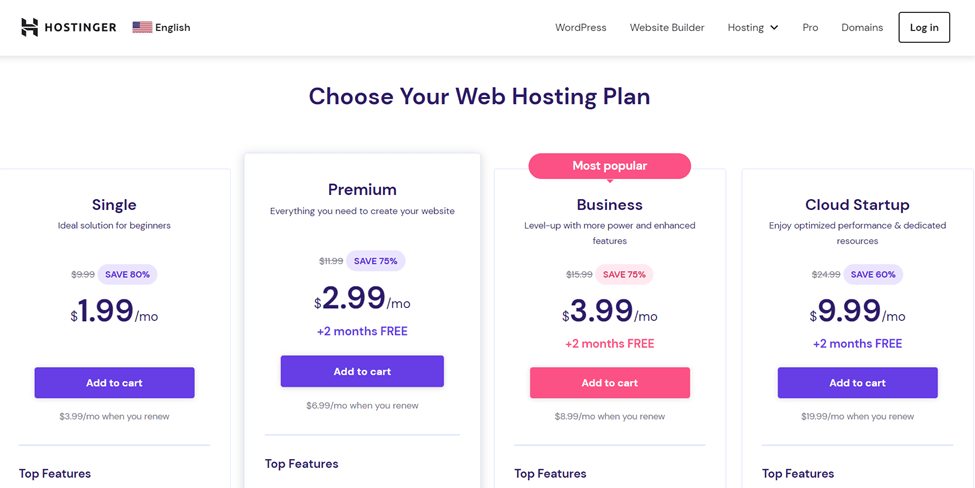
Those are Hostinger’s shared hosting plans.
The Single costs only $1.99/mo. This plan allows you to host only one website. However, it comes with many benefits, such as 50 GB of SSD storage, unlimited bandwidth, unlimited free SSL, weekly backups, and more.
It is important to consider the offerings of each plan before making your final verdict.
If the resources or offerings of a particular plan are not enough, you can opt for a higher plan with more resources and offerings.
The same thing applies to other hosting services, including dedicated hosting, VPS, cloud hosting, and more.
If you don’t want to share a physical server with other users, which can affect your website’s performance, I recommend you opt for a Virtual Private Server (VPS) or dedicated server.
If you’re all set to host a new personal website or a little blog, don’t stress too much about this. Just kick off with a simple shared plan and take it step by step.
You can totally level up your plan down the road if you need to. And here’s the cool part – if you find yourself needing to upgrade, it’s actually a great situation. It means your site is getting lots of visitors, which is fantastic!
Step 4: Register Your Unique Domain Name
A domain name is the address visitors type into their browsers to access a site.
It typically comprises a second-level domain (SLD) and a top-level domain (TLD). In WordPress.org, for example, WordPress is the second-level domain or the website’s name. In contrast, .org is the top-level domain or the domain extension.
Website owners cannot change their domain names after registration. Therefore, it’s important to decide carefully. Here are some tips for choosing the right domain name:
- Know Your Stuff: Think about what your website is all about. Try using important words related to your topic in your domain name. Tools online can help you come up with ideas.
- Go for .com: If you can, go for a “.com” ending. It’s popular and trusted, so people usually remember it.
- No Tricks: Avoid using numbers, hyphens, or repeating letters. These can confuse people or lead to mistakes.
- Easy Peasy: Make your domain name short and catchy. Simple names are easier for visitors to remember and type in.
- Be Unique: Get a name that another company isn’t already using. It’s good to check if anyone owns the name you want to avoid problems later.
- Check First: Before you decide, check if your chosen name is free using an online search tool or the hosting provider’s domain name search. If it’s taken, don’t worry – these tools often suggest alternatives or different endings.
Remember, your domain name is like your website’s ID card. Make it special and easy to remember!
It is often best to keep web hosting and domain name registration separate. However, if you use a reputable hosting provider like Hostinger, HostGator, or Bluehost, you can register your domain name with the company to get everything you need in one account.
Some hosting providers also offer free domain name registration with their hosting plans, which can help you save a lot of money.
Do not forget to check if a free domain registration is included in the hosting plan you want to choose before making the purchase; otherwise, you will have to pay for it separately.
Step 5: Design or Upload Your Website
Now that you have chosen a hosting provider, selected a hosting plan, and registered your domain name, the final step is to design or upload your website.
Congratulations! It is time to go live.
If you’re not familiar with web design, don’t worry! Content management systems like WordPress, Joomla, and Drupal offer a range of customizable templates and themes that you can use as a foundation for your site.
These platforms also provide user-friendly interfaces for adding content, images, and other elements without any coding knowledge.
Interestingly, the best web hosting providers offer a one-click installer for these popular content management systems. With this feature, you can install WordPress and set up your website with just a few clicks.
Some hosting providers also have a website builder, making it more convenient and easy to build your website.
Once you’ve set up the platform you like, it’s time to start building your website. This involves a few steps, like picking a design theme, adding useful plugins, and creating your website’s content.
Create pages like Home, About, Services, and Contact to provide visitors with essential information. Add high-quality images, engaging written content, and any other multimedia elements you want to showcase.
Double-check your website’s responsiveness to ensure it looks and functions well on desktop and mobile devices.
If you already have a website, you can put it on the web server. There are helpful tools like FTP clients, automatic website importers, migration plugins, and the file manager in the hosting control panel that can make this easier.
Once you’ve uploaded everything, check your domain name to make sure it takes you to your new website.
Before making your website live, take the time to review and test everything thoroughly. Ensure all links are working, images are properly displayed, and forms are functional. Once you’re confident in your website’s appearance and functionality, you can publish it for the world to see.
The Benefits of Choosing a Good Web Host
Web hosting is the backbone of every successful website you see today. It plays a crucial role in shaping your site’s performance, accessibility, security, and more.
Here are some of the core benefits of choosing a good web host for your website.
1. Reliability and Uptime
Choosing a reputable web host ensures that your website remains accessible to visitors at all times.
With dependable servers and a well-maintained infrastructure, downtime is minimized, which is crucial for retaining user trust and maintaining favorable search engine rankings.
Visitors can access your site whenever they want, leading to a consistent online presence that aligns with your business goals.
A reliable web host’s commitment to uptime reflects their dedication to providing a seamless experience for you and your audience.
2. Blazing Speeds
Opting for a quality web host guarantees that your website loads quickly and efficiently. These hosts employ high-performance servers, optimized software, and content delivery networks (CDNs) to minimize loading times.
Rapid page loading not only enhances user satisfaction but also contributes to better search engine rankings, as search engines favor websites that offer excellent user experiences.
A good web host’s emphasis on speed ensures that your content is delivered swiftly to users, reducing bounce rates and boosting engagement.
3. Excellent Customer Support
The support offered by a reliable web host is a lifeline when technical issues arise.
A good web host provides responsive customer support, assisting you in resolving any website-related problems promptly.
This availability of support ensures that your website remains operational without prolonged downtime, preventing potential disruptions to your business.
Knowing that expert assistance is just a message or call away can provide peace of mind, allowing you to focus on your core activities while relying on their expertise.
4. Enhanced Security
Top-notch web hosts prioritize security measures to safeguard your website and data. They implement robust security protocols, firewalls, and regular malware scans to protect against cyber threats and hacking attempts.
This focus on security not only shields your business and user data from potential breaches but also preserves your online reputation.
By partnering with a secure web host, you demonstrate your commitment to maintaining a safe browsing experience for your visitors, fostering trust and credibility.
5. Scalability and Growth
A quality web host offers hosting plans that allow you to scale your resources as your website grows easily.
Whether your traffic increases or your content becomes more complex, a scalable host enables smooth transitions without disrupting your online presence.
With options to upgrade resources like bandwidth and storage, you can accommodate higher demand and introduce new features seamlessly.
This scalability eliminates the need for frequent migrations and supports your website’s sustained growth over time.
6. Backup and Recovery
Regular data backups and reliable recovery mechanisms are fundamental features of a reputable web host. In the event of data loss, accidental deletions, or website issues, having recent backups readily available can be a lifesaver.
A reliable host ensures that you can restore your website to its previous state quickly, minimizing potential downtime and preventing significant loss of information.
Safeguarding your data contributes to a more secure and confident website management experience.
7. Advanced Features and Tools
Quality web hosts often provide a suite of tools and features that simplify website management and development. They may offer user-friendly content management systems (CMS), one-click installations for popular software, and developer-friendly functionalities.
These tools streamline tasks such as content creation, design updates, and software integration, saving you time and effort.
By leveraging these advanced features, you can enhance your website’s functionality and aesthetics without the need for extensive technical expertise.
8. Search Engine Optimization (SEO) Benefits
Partnering with a reputable web host can indirectly boost your website’s search engine optimization (SEO) efforts.
Search engines like Google consider factors like page loading speed and uptime when ranking websites. A reliable web host contributes to faster loading times and minimal downtime, which aligns with SEO best practices and can positively influence your site’s ranking.
By prioritizing a good hosting provider, you contribute to your website’s overall visibility and accessibility in search engine results.
9. Domain and Email Services
Many quality web hosts offer additional services such as domain registration and personalized email accounts associated with your domain name.
This provides a cohesive branding experience for your business, enhancing your professional image.
Custom email addresses that match your domain (e.g., yourname@yourdomain.com) establish credibility and help reinforce your brand identity.
Consolidating these services with your web host simplifies management and allows you to maintain a unified online presence.
10. Resource Allocation and Performance Optimization:
A reliable web host efficiently allocates resources to ensure consistent performance, even during traffic spikes.
Their optimized server configurations and load-balancing techniques prevent slowdowns and crashes when your website experiences higher-than-usual visitor traffic.
By maintaining steady performance, a good web host enhances user experiences and encourages visitors to engage with your content. This reliability helps you deliver a seamless online experience, fostering positive interactions and potential conversions.
11. Reduced Technical Hassles
By choosing a reputable web host, you delegate the technical aspects of server maintenance, updates, and security to experts.
This frees you from the burden of handling complex technical tasks and allows you to focus on creating content and managing your website’s growth.
With reliable technical support at your disposal, you can navigate any challenges without the need for in-depth technical knowledge.
This streamlining of technical responsibilities contributes to a smoother website management experience overall.
Wrapping Up
Hosting your own website might have seemed like a complex task, but by following these five easy steps, you’ll have your website up and running in no time. Remember that practice makes perfect, so don’t be afraid to explore your hosting account’s features and experiment with different design elements. With a bit of effort and dedication, you can create a professional and attractive website that effectively communicates your message to your target audience. So go ahead, take that leap, and get your website live on the web today!


