

Due mainly to the rising use of the internet and ever-improving technology, our world has become a global village. Since most of our everyday activities are now done online, securing privacy is crucial.
Nowadays, users of the internet have a strong desire to keep their online identities and activities safe from snooping or prying eyes. This informs of the increasing demand for services that protect users’ online privacy.
A VPN (Virtual Private Network) secures and protects your privacy by encrypting your internet connection. Monitoring or intercepting your online activities and behaviors when you use a VPN service becomes difficult, as it protects you from all types of prying eyes.
I have discovered and used some VPN services during years of internet browsing. VyprVPN is one of the most secure VPN services in those instances.
Is the high price truly justified, though?
It is vital to be aware of what a company offers and what makes it unique before opting for a VPN service.
To assist you in determining whether this VPN provider is the best option for your needs, I’ll go through its special features, services, and offerings. So that you are aware of VyprVPN’s strengths and shortcomings, I will also discuss its pros and cons.
Here is all the information necessary for you to know about this VPN provider:
About VyprVPN
VyprVPN started around the year 2010 and was until recently, run by a company called Golden Frog, which was incorporated in Switzerland to take advantage of the favorable privacy laws.
Golden Frog founders (Ron and Carolyn Yokubaitis) were behind some other big internet names, including Usenet provider Giganews, Data Foundry, and Texas.net
VyprVPN’s ownership has been transferred. The US-based Certida LLC now owns VyprVPN. In April 2023, Texas-based Certida bought VyprVPN, resulting in a legal jurisdiction change.
Not much information is available on the new owner, Certida, a Texas-based US company. VyprVPN did not notify its subscribers about the ownership change, raising trust issues within its subscribers’ populace.
Certida’s web page also contains a few lines of information about its services like Giganews Supernews (their Usenet resources), and VyprVPN.
Despite this unsettling shift of jurisdiction, privacy is nevertheless protected by self-hosted servers, audits of logging policies, and other programs. However, only time will tell if VyprVPN maintains its no-logs promise.
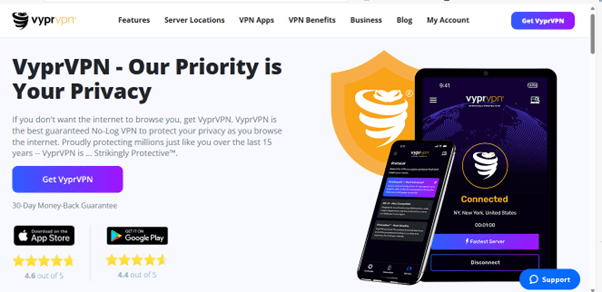
VyprVPN secures your information and IP address against hackers, identity thieves, and malware due to its cutting-edge, powerful encryption and guaranteed no-log policy.
As well as preventing advertisers from gathering and selling your sensitive data, it also prevents your ISP, government agencies, and other third parties from watching your every step online.
VyprVPN allows you to “browse the internet without the internet browsing you” by strikingly protecting your online privacy.
With VyprVPN, you can get rid of restrictive censorship, access geo-restricted content, and enjoy a better internet experience.
VyprVPN offers over 700 servers in about 70 countries. These are proprietary physical servers that they maintain. While this server count is on the lower side of the normal, they offer over 300,000 different IP addresses. There’s plenty of ability to cycle through IP addresses, even with fewer server locations.
The fact that it owns and operates its servers is worth noting. Physical servers in physical locations are better for VPNs because they allow you to browse with more speed. A virtual server is still good for VPN usage but may cause a slower connection.
VyprVPN Device Compatibility
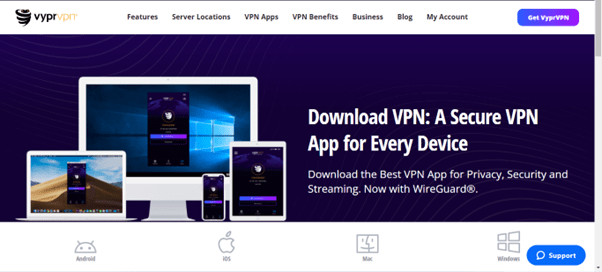
VyprVPN has compatibility with the following operating systems:
- MacOS
- iOS
- Android
- Windows
- Smart TVs
- Routers
- QNAP
- Synology NAS
- OpenELEC/Kodi on OpenELEC
- Anonabox
VyprVPN has Apps for Mac, iOS, PC, Android, and router support. VyprVPN is one of the few VPN providers that offer a router app, but it only supports Tomato routers. It does not offer a proxy browser extension for Firefox or Opera, except on Chrome.
Though it lacks Smart DNS functionality, I enjoy its feature-rich Fire TV and Android TV app. VyprVPN apps on Windows, macOS, iOS, and Android are compatible with WireGuard.
VyprVPN does not have a native app for Linux operating systems, though it offers tutorial videos on configuring it to work manually on Linux systems.
VyprVPN Pros and Cons
Every company has its strong points and weaknesses. Knowing these two sides to the coin of engaging the service of a VPN firm is paramount in deciding whether to go for the service or not.
The pros and cons of VyprVPN are looked into here to help you make an informed decision about its usage.
Pros
- Strong encryption for online privacy and security: VyprVPN has been found to greatly secure your online privacy through its deployment of modern and strong encryption with its proprietary Chameleon protocol.
- Fully independent server network: VyprVPN owns over 700 servers in about 70 countries, minimizing the risk of data leaks via third-party servers
- User-friendly: VyprVPN offers super easy-to-use and install on Windows, MacOS, iOS, and Android.
- Strict and transparent no-logging policy: VyprVPN’s policy of not tracking or retaining user records and details was audited by an independent security compliance firm, Leviathan, giving credibility to this strength
- Good at unblocking services and sites: VyprVPN has a wide range of abilities to unblock restricted services and sites, as it works to unblock BBC iPlayer and Amazon Prime Video.
- Committed Customer Support: The importance of good customer support cannot be over-emphasized as this adds credibility to service. VyprVPN offers 24/7 customer support via live chat, email, and knowledge base.
- Money-back Guarantee: A money-back guarantee offers reassurance and faith to customers to take a chance in getting the service on offer. VyprVPN offers a 30-day money-back guarantee, thus allowing you to try their services for free and get a full refund if dissatisfied.
Cons
- Limited Support for Linux: VyprVPN does not automatically work on Linux systems and has a lot of issues even with the tutorials on how to manually set it up on Linux systems, which, at best, is still limited.
- Low-speed connecting to far-away servers: If any of the VyprVPN servers are not near you, then you should expect a slow speed when using their service, which is a major drawback, considering they only have over 700 servers in a few over 70 countries.
- Relatively expensive: VyprVPN is relatively on the high side when compared to VPN services with better speed and overall performance. The monthly plan is even more expensive than usual.
- No anonymous registration: Registering with VyprVPN does not allow you to do so without a name. VyprVPN requires you to supply personal details such as email, name, and address during registration.
- Limited servers: VyprVPN has a limited number of servers at around 700 servers when compared with other top VPN companies, thus raising doubts about their quality of services when handling heavy loads.
- No iOS kill switch: The kill switch feature of VyprVPN is not available on iOS devices, thus making it likely to have your IP and information momentarily exposed after disconnection on iOS devices.
- No cryptocurrency payment option: VyprVPN does not offer you the option to pay for your subscription to their services through cryptocurrency like Bitcoin. In the current world of blockchain technology, this is a drawback for VyprVPN usage.
VyprVPN Core Features: What to expect from VyprVPN?
VyprVPN is built around a vital principle of the necessity for a free, open, and secure internet, thereby thwarting hackers, escape restrictions, and censorships through its features.
It is noteworthy that VyprVPN’s actual strength lies in its exceptional security due to features like Chameleon protocol, NAT firewall, VyprDNS, and other special features.
VyprVPN’s features are as underlined here:
1. Split Tunneling
Split tunneling is a unique feature that allows you to control your internet traffic over an encrypted tunnel while continuing your normal internet access in an unencrypted, open web.
VyprVPN supports split tunneling, allowing you to designate certain apps to use the VPN service while allowing others to have direct access to the internet. However, this feature is only available on Mac and Android apps.
2. DNS Leak Protection
DNS leaks happen when third-party servers other than your selected VPN service have access to your DNS queries’ record.
VyprVPN has its servers and protects you securely against data leaks as it does not use any third-party server at all. Thus, none of your activities on the internet via VyprVPN can be traced back to you.
3. No-Log Policy
A strictly no-log policy of VyprVPN is also one of its strong gains in comparison to other VPN companies. This means that VyprVPN does not store any of your traffic logs.
This feature ensures that your privacy is not only protected from attackers but also from VyprVPN themselves as well. It will interest you to know that an independent security compliance firm, Leviathan Security Group, has audited this claim.
4. Proprietary Chameleon Protocol
VyprVPN uses a proprietary Chameleon protocol, which has been acknowledged to be a veritable way of bypassing VPN blocking, geo-restrictions, and censorship.
To avoid being detected by deep packet inspection (DPI), VPN blocking, and throttling, the Chameleon technology uses an unmodified OpenVPN 256-bit protocol and interferes with metadata packets.
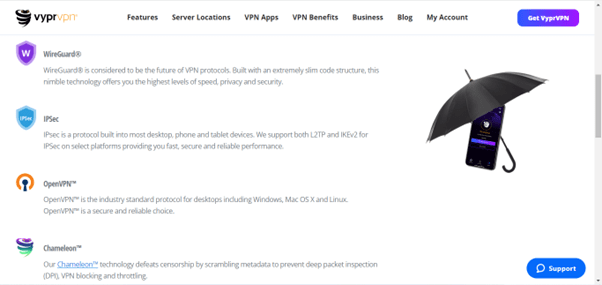
5. Multiple VPN Protocols
VyprVPN supports various VPN protocols to safeguard compatibility across an extensive range of devices and operating systems.
This feature allows you to choose your preferred level of encryption, speed, and protection. The protocols are:
- Wire Guard
- OpenVPN
- Chameleon protocol
- IKEv2
- L2TP/IPsec
6. Privacy with Proprietary VyprDNS
VyprDNS is the proprietary and exclusive DNS server for VyprVPN. VyprVPN owns and maintains it, thus preventing third-party access to your DNS queries.
The feature not only improves discreetness but circumvents censorship like proxy servers, which is embedded into the software.
VyprDNS is zero-knowledge and log-less, so you need not worry about your internet traffic being recorded by VyprVPN.
7. NAT Firewall
A NAT firewall operates on a router to protect private networks by hiding the identity of a network and not revealing the internal IP address to the internet.
NAT firewall is an additional security layer for your VyprVPN connections equipped to block unrequested inbound traffic when connected to VyprVPN.
8. Personalized Kill Switch
A VPN kill switch feature enhances the automatic disconnection of your devices from the internet once your VPN connection drops out.
VyprVPN offers a strong and reliable kill switch feature to protect your real IP addresses when your VPN connection is interrupted or disabled. This ensures that your information and peer-to-peer (P2P) traffic are kept private.
9. Public Wifi-Protection
Connecting to public Wi-Fi comes with many risks and vulnerabilities to attacks and snoops from whoever is in charge of the Wi-Fi and other third parties. VyprVPN ensures your connection to the public Wi-Fi is secure.
This feature allows you to automatically connect to VyprVPN when on an untrusted public Wi-Fi network. To do this, just enable their Public Wi-Fi protection feature on the app.
10. Secure Encryption
VyprVPN is well known for providing an assured level of security and privacy due to its usage of secure encryption.
VyprVPN uses AES-256-CBC encryption, which is one of the most secure ciphers. It takes plain text data and fully encrypts it with this 256-bit advanced encryption service (AES) by scrabbling it into hashed text to effectively hide your online identity.
VyprVPN Pricing
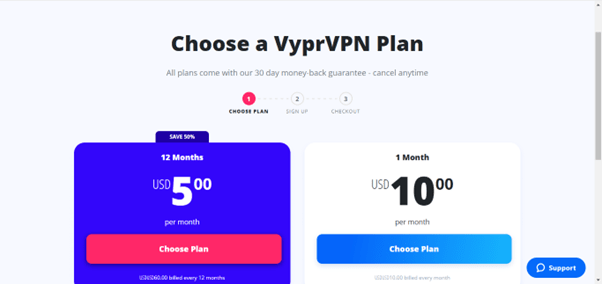
VyprVPN offers two subscription plans for an individual to choose from – either you go for a more expensive monthly plan or save some money through its annual plan. Here are their pricing options:
- 1-month plan – This is the more expensive of the two options at $10.00 per month, but you also get a 30-day money-back guarantee on it. You can cancel your subscription and be fully refunded if you are dissatisfied with the service.
- 12-month plan – This is the less expensive option, which costs $60.00 annually at $5.00 per month. The 30-day money-back guarantee also comes with it, allowing you to cancel and be refunded within the first month of subscription.
The 12-month plan option is highly recommended for its low price, but that means you will have to spend up to a year using their service.
Both plans include all of its features, and you can make up to 10 simultaneous connections on an individual account on both plans. The pricing makes it averagely cheap but still relatively expensive in comparison with other cheap VPN options.
VyVPN also has two extra subscription plans for business ventures, which are:
VyprVPN for Business Cloud – This plan is at the cost of $349 per year and gives you features such as 3 users, multiple user management, and a dedicated server with fast and easy deployment.
VyprVPN for Business – The plan costs $299 per year and has dedicated services of 3 users, multiple user management, global business servers, and a dedicated account manager.
The two business plans further have an additional user option at $ 99 per year for each additional user. The business plans also come with a 30-day money-back guarantee, as with the individual plans.
VyprVPN offers multiple payment options such as PayPal, credit card, and more but does not include the option of payment via cryptocurrencies like Bitcoin.
VyprVPN’s Privacy and Security
VyprVPN is a great choice when it comes to your privacy and security. It uses special features and better encryption to mask your online identity, thus protecting your online privacy.
VyprVPN, however, does require your name and email for registration, as it does not allow anonymous registration. But overall, your details are not available to any third party and implement a strict no-logging policy to protect your online privacy.
VyprVPN prides itself as one of the most secure VPN services, so it comes as no surprise that VyprVPN employs the AES 256-bit Wireguard protocol by default. Using brute force to break the AES 256-bit encryption is almost impossible, indicating that your data is secure.
VyprVPN is also one of the few VPNs to have allowed an independent audit by Leviathan, a security compliance firm, to check their no-logging policy, giving credence to the policy.
Furthermore, the prying eyes of third parties are avoided when using VyprVPN as they own and control every one of their over 700 servers in over 70 countries and pieces of hardware to make sure no one outside of VyprVPN can ever have access to the identity of their customers.
VyprVPN provides an encrypted, zero-knowledge DNS service, DNS filtering, and other snooping strategies. This ensures that your DNS requests are handled securely, adding an extra layer of security.
VyprVPN Performance
When choosing a VPN service, one of the most essential factors to take into serious consideration by customers is the VPN performance. Using a VPN generally reduces your web-browsing performance mainly because your internet connection takes a more indirect path.
I ran VyprVPN through a series of tests to check its performance capabilities. The result showed a decent speed but had some issues when being used for streaming.
Here is a detailed review of its speed and reliability performance:
Speed
VyprVPN tested on a 500 Mbps connection in the US, testing servers in the US, Canada, and Europe using the WireGuard protocol gives the following results:
- Seattle server: 301 Mbps – good performance due to low latency.
- Los Angeles server: 235 Mbps – great speed also, but slightly slower than Seattle.
- New York server: 210 Mbps – slower with increased latency, but still good.
- Toronto Server (Canada): 246 Mbps – Offers faster speeds for Canadian users.
- UK Server: 223 Mbps – Though it has a high latency observation, VyprVPN gives solid speeds for a UK server.
The speeds were noticeably slower when utilizing the OpenVPN protocol in comparison:
- 47 Mbps for Seattle
- 53 Mbps for Los Angeles
- 24 Mbps for New York
The download speeds are, at best, a little above average in the closer proximities, but connecting to a further server will make you experience some lags and buffering while browsing. Thus making it have poor speed in places like Africa with fewer servers.
The use of proprietary protocol also proved to reduce the speed of connections on VyprVPN. Overall, VyprVPN works well with WireGuard on many systems and provides comparable speeds to most other VPNs, while it might not be the absolute fastest option available.
Reliability
For the sake of preserving privacy, security, and easy access to online resources, VPN reliability is crucial. In a world that is becoming more and more digital, VPN reliability guarantees that users can browse, work, and communicate without disruptions or vulnerabilities.
VyprVPN is one of the prime examples in terms of the reliability of VPN services. Users always experience steady connectivity thanks to its over 700 servers network that spans over 70 sites worldwide.
The proprietary Chameleon protocol enhances its dependability, easily gets over censorship, and guarantees a flawless service.
Furthermore, the stringent no-logs policy upheld by VyprVPN fosters confidence and guarantees users’ privacy. With this consistent assurance, VyprVPN is positioned as one of the best solutions to secure online activity, break censorship, and access geo-restricted content.
VyprVPN’s Ease of Use
VyprVPN excels in offering an easy-to-use experience on most of its systems. Its user interface maintains a balance between functionality and simplicity, making it usable by people of various technical backgrounds.
VyprVPN usage on Windows is so simple to use that even VPN newbies may use it without feeling intimidated. It is easy to log in to the server and make your selections.
VyprVPN’s ease of use for various operating systems is below:
- Windows: Good performance, but lacks some features such as split tunneling
- macOS: Excellent app performance, with lots of features
- Linux: VyprVPN performs poorly on Linux systems as it lacks WireGuard on the OS.
- Android: Great mobile experience
- iOS: Some limitations on the app. Kill switch issues are one of its limitations on iOS
Read Also our Full reviews:
VyprVPN Installation
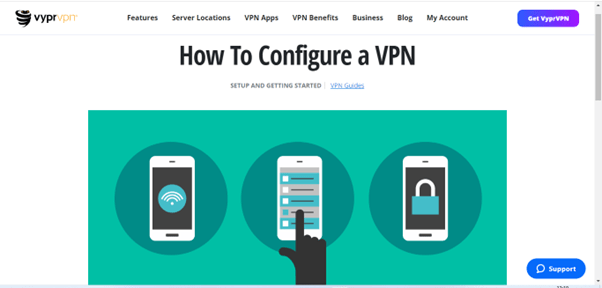
Installing VyprVPN is also easy and seamless, as the installation is in simple 3 steps:
- Sign up for VyprVPN: Make your choice between the available two options of either a 1-month or 12-month plan and create an account.
- Download and install its app following the wizard’s instructions
- Open the VPN app on your device with VyprVPN installed, select your preferred server, and enjoy its features.
Additionally, you are not restricted to apps. The instructions on the VyprVPN website cover manual service setup for routers running platforms such as Chromebook, Synology NAS, OpenELEC, Android TV, Apple TV, and Blackphone
The majority of these setup procedures are easy to make. Only “Android apps are required,” according to Android TV instructions. They frequently contain little text or screenshots and state, “Get them here or here.” However, it looks to provide the barest minimum of functionality, so interacting with it shouldn’t be too tough.
VyprVPN Customer Support
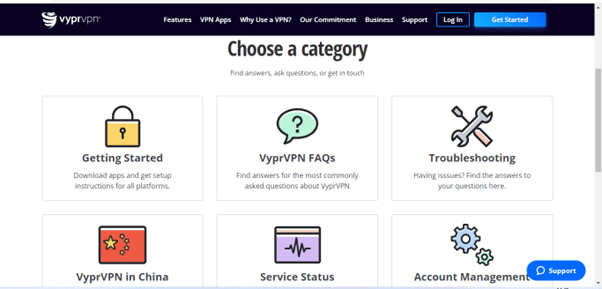
The offer of a great customer support service by a VPN adds credibility to its services. VyprVPN has 24/7 customer support via live chat, email, and knowledge-based.
For customer assistance, VyprVPN provides a variety of solutions. There is a live chat option available 24 hours a day, email support for serious situations, and a wealth of information to help you find the solutions on your own.
VyprVPN only offers web-based customer care; it does not provide phone support. The Support button, which is located in the bottom-right corner of the majority of its website pages, must be tapped or clicked to access live chat.
I have used their live chat feature, and it’s fantastic. After waiting for a minute, I was able to speak with a customer support agent, indicating their quick response.
The identical popup is also opened when you click the “Need Assistance” button on the support page. VyprVPN’s support has some shortcomings and isn’t as thorough as top competitors like ExpressVPN.
VyprVPN’s Netflix and Streaming Quality
Netflix has been particularly aggressive in preventing users of VPNs and proxy servers from using their services. While connecting to a US-based VyprVPN server, I had no issues streaming Netflix video.
The most dependable VPN choice for accessing multiple Netflix content libraries is not VyprVPN, as it fails to unblock Netflix streaming in a few regions.
Additionally, connecting via the WireGuard protocol is your best hope for streaming. You’ll get the finest video quality this way and won’t have gratifying lags or buffering.
VyprVPN also acknowledges the issues with Netflix streaming, writing on their website that: “VyprVPN customers are also increasingly reporting that they are seeing the Netflix “streaming error” message when using VyprVPN, but access issues have been inconsistent.”
VyprVPN works for unblocking and streaming Netflix to a certain degree of acceptability, but it is not the best.
VyprVPN Servers and Locations
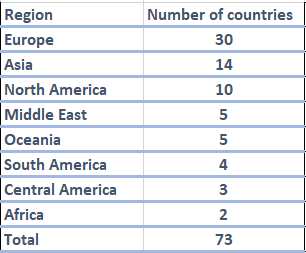
VyprVPN does not appear impressive due to the number of their servers, just over 700 servers. However, geographical coverage over a wide range of countries is good, with the servers in 73 countries.
The implementation is vital, even though a bigger server array allows for lower loads on individual servers because the user base is more evenly distributed among them.
The VyprVPN configuration comprises its DNS, and all of its VPN servers are its own. This implies that they can maintain their infrastructure considerably more effectively.
With VyprVPN, choosing a server is simple; you can even sort the servers by speed, location, and nation.
Read Also our Full reviews:
Frequently Asked Questions (FAQs)
Is VyprVPN Free?
No, VyprVPN does not have a free VPN service but offers a 30-day money-back guarantee on all its plans, giving you a risk-free way to test the service for a month.
Does VyprVPN allow torrenting?
Using the BitTorrent network to download and upload files is torrenting. Torrenting includes downloading files from other users’ computers on the network rather than from a main server. On the other hand, users share files from their own devices for download by other users.
VyprVPN allows torrenting on their servers. Users can safely anonymize their connections with it so that no torrent traffic is forwarded to them.
It is clearly stated on VyprVPN’s website that P2P torrenting is permitted on its network. Additionally, VPNs feature dedicated servers that allow for safe downloads.
Is VyprVPN good for gaming?
Yes, VyprVPN is one of the best gaming VPNs available. I had no lag or ping issues playing multiplayer games when connected to VyprVPN servers that are in closer proximity.
I played Call of Duty online using UK servers and was pleased with how nicely my game went. The game never froze, I didn’t have to wait for it to buffer, and the graphic quality was excellent.
VyprVPN hides your DNS requests, so your ISP won’t be able to throttle your internet connection because your gaming activities are concealed from them.
However, connecting to servers in far-away locations reduces its speed for gaming purposes. The slower speed is due to the high latency experienced when connecting to far-away servers.
Does VyprVPN have Obfuscation?
Obfuscation in VPN servers hides the truth of your usage of a VPN to reroute your traffic. VPN does this by changing your data packets to imitate standard HTTPS traffic, thus allowing you to break censorship and escape tools that are used in blocking VPN traffic.
VyprVPN has a great obfuscation feature to defeat VPN blocking and censorship through the use of its proprietary Chameleon protocol.
Does VyprVPN work in China?
VyprVPN is among the few VPNs that can break the Great Firewall of China. VyprVPN can circumvent deep packet inspection (DPI) of Great Firewall through its proprietary Chameleon protocol.
VyprVPN’s chameleon technology conveniently escapes both VPN blocking and deep packet inspection (DPI), thus overcoming speed issues caused by internet throttling from ISPs
VyprVPN’s Chameleon uses the unchanged OpenVPN 256-bit protocol for its encryption, which masks its traffic so China’s Great Firewall can’t block it.
Is VyprVPN safe and secure?
Yes, users’ security and safety are safeguarded by VyprVPN. It ensures security by using AES-256 encryption, the reliable WireGuard protocol, and a powerful kill switch (though the kill switch feature is not available on iOS).
Additionally, it strictly enforces the no-logs policy, preventing any possible leaks. Overall, VyprVPN is a dependable option for your online security.
Conclusion
VyprVPN is a reliable, fast, and user-friendly VPN for online browsing and streaming purposes. It uses the WireGuard protocol for average-speed results and features split tunneling and a malware blocker.
VyprVPN supports torrenting, although its speeds may not be fast. It is relatively fast, inexpensive, and user-friendly, though it prioritizes security and safety over speed.
VyprVPN has no free version, but its pricing is among the average ones. It uses its proprietary Chameleon protocol to bypass deep packet inspection and also has a proprietary DNS (VyprDNS) to hide users’ DNS requests, further protecting your online privacy.


