

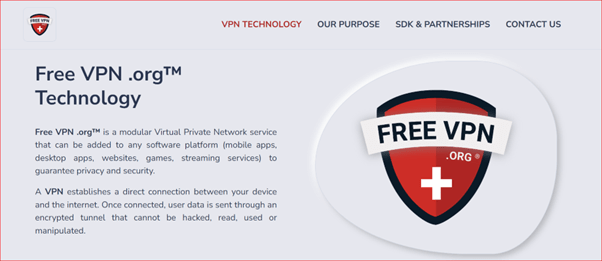
Free VPN is a VPN service owned by FreeVPN.org. By using this app, a direct connection is created between the internet and your device. Once you are connected, your data is sent through an encrypted tunnel that is impenetrable and cannot be read, used, or tampered with.
According to FreeVPN.org, they aim to create a safer, borderless, and unrestricted internet experience for all users. If this is true of the app, you have secure and open access to the online world.
Furthermore, FreeVPN.org has an ever-expanding user base. I believe that many of its users are satisfied with the services it offers, being that it now caters to over 80 million users across the globe.
What are the services offered by FreeVPN.org?
The VPN services offered by FreeVPN.org can be implemented across your browser, app, or business. This is further bolstered by their team’s readiness to assist you in integrating the services.
The services are also compatible with popular platforms such as Linux, Android, Windows, Mac, and iOS. Alongside this is the Private Proxy mode for applications like web browsers.
There is also a provision made for startups. They help businesses to determine a suitable pricing plan for their operation. In addition to this, FreeVPN.org offers 24/7 technical support to meet the expectations of their clients.
About Free VPN
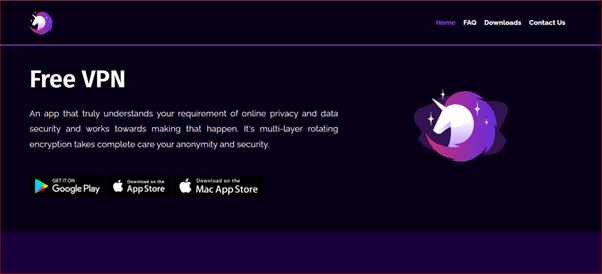
Free VPN by FreeVPN.org is one of the most popular free VPNs currently available. It dominates the app store on both iOS and Android, amassing millions of downloads.
Free VPN gives you 100% unrestricted, registration-free online access. With the app, you can enjoy complete anonymity because when the app is active, all of your internet traffic is encrypted.
Additionally, Free VPN protects your IP address by using data encryption and using secure servers to route traffic. You can enjoy unlimited free VPN access with advertisements with the basic mode or select Premium Mode for an ad-free experience and complete access to network, security, and privacy features.
However, Free VPN provides no information on its security or encryption methods, even though you can still be safe from prying eyes and tracking devices. This is while browsing the web without worry.
Despite offering unlimited data, millions of daily active users, more than 75,000,000 downloads, and 1000-plus IP locations, there may be other safer VPN options in the VPN market. In other words, there are better options to take into account for protecting your online activities.
Pros and Cons of Free VPN
There are both good sides and bad sides to Free VPN, just like everything else. Knowing the strengths and the weaknesses of this VPN service by FreeVPN.org will ensure that you make the right decision to either use or avoid it.
Pros
- Free version: Available for download on Google Play, App Store, and Mac App Store, Free VPN comes with a Basic mode. Using all available features on it is free, but it comes with in-app ads.
- Unlimited bandwidth: Free VPN offers no hard data cap or speed throttling. This means that they do not impose strict limitations on the amount of data you can transfer or the internet speed you can access while using their VPN service. In other words, they do not place specific restrictions on your bandwidth or data usage.
- One-tap VPN connection: A one-tap VPN connection simplifies the process of connecting to Free VPN. This is further bolstered by its user-friendly mobile application, where you can connect to the VPN with a single click without the need for complex configurations. This streamlined approach enhances user convenience and privacy.
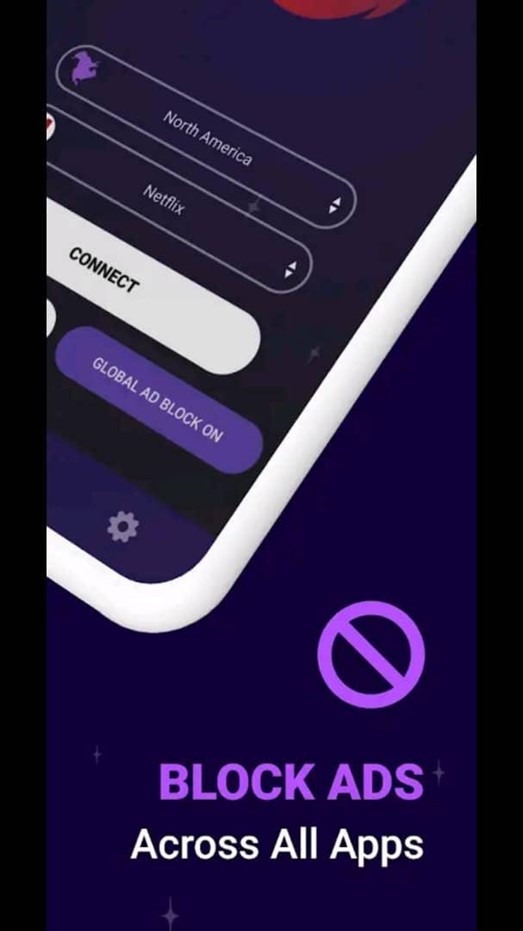
- Block Ads across all apps: Free VPN allows you to block ads across all apps by rerouting your internet traffic through its servers. During this process, it filters out ads and trackers. This helps improve user privacy, reduce data usage, and create an ad-free browsing experience that extends to all applications you use.
- Multiple servers: Free VPN offers thousands of global virtual locations to its users. These locations represent servers strategically placed worldwide, enabling users to connect to the internet through different geographic points. Users are given flexibility and anonymity while browsing the web due to the variety of virtual locations.
- No user data logs: Free VPN does not record or store any information related to their users’ online activities. Since no user-specific information can be accessed by or shared with outside parties, this increases user privacy and security.
- No registration needed: You can make use of Free VPN without the need to create an account or provide personal information. It offers anonymity and privacy as you can access the VPN service without the need to disclose your identity or undergo a registration process.
Cons
- Third-party adverts:You will be shown third-party ads when you use Free VPN. These advertisements are not directly managed by Free VPN and are typically produced by outside sources and could appear inside the VPN app you use. These ads may occasionally track user behavior or contain malicious content. Therefore, you should be cautious regarding potential privacy and security implications.
- iOS, Android, and Mac apps only: Free VPN primarily caters to mobile users, providing dedicated apps for both Apple and Google operating systems. In addition, it offers an app accessible through the macOS App Store. However, its usage is somewhat constrained due to this platform-specific focus.
- The app may fail on some occasions: When using Free VPN, there may be instances where the app does not work as expected or encounters issues. These issues could result in a temporary loss of the VPN’s functionality or connection problems.
Read Also our Full reviews:
Main Features of Free VPN
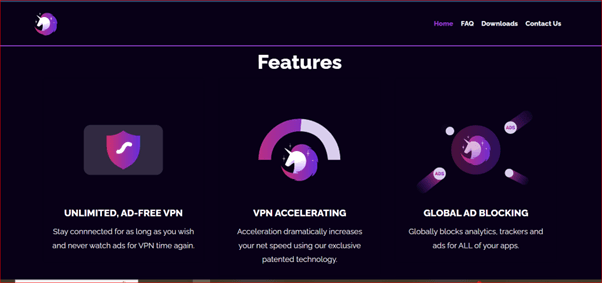
Various features built into Free VPN improve its overall functionality. These components help to create a more robust and useful service. They all work to make a useful tool for anonymous and secure internet browsing and provide users with improved privacy, accessibility, and security.
Triple Encryption
Free VPN makes use of a strong triple encryption protocol. This security and privacy feature is compatible with iPhone, iPad, Mac, and Android devices to ensure that your internet data is protected and that any website or mobile app you access is securely connected.
Your data traffic is redirected through their servers when using Free VPN. This way, you stay private and remain anonymous when browsing. Also, your IP address is effectively hidden during this process as well.
By making use of this feature, Free VPN strengthens your online privacy and security. This is in addition to protecting your private data from prying eyes and enabling you to use mobile apps with the assurance that your data is safe and your identity is hidden.
Accelerate
The feature Accelerate is a Free VPN’s exclusive patented technology. Using it dramatically increases your net speed when you experience a slow network.
The idea behind Accelerate is to streamline data transfer while reducing the lag and delays frequently connected with the VPN. This technology prioritizes data packet efficiency, which may result in a faster and smoother online experience.
Regardless of your location or the state of the network, you can benefit from a more seamless and responsive internet connection. Anyone looking for a better online experience will find this technology to be a priceless resource because it can reduce the performance impact of VPNs.
Bypass VPN Filter
The Bypass VPN Filter is another feature I find interesting about Free VPN. This feature lets some applications connect to the internet directly, cutting out the VPN while still keeping the rest of your device protected.
This feature is especially helpful in instances where you might want to give some apps unrestricted, unfiltered access to the internet. At the same time, your online activities are kept safe and private by the VPN.
You can carefully customize your online experience by using this feature to tell particular apps to work outside the VPN’s tunnel. However, this may give them unprotected internet access.
Nevertheless, Free VPN keeps protecting the data and privacy on your device for the time being, ensuring a personalized online experience. This adaptability will let you make conscious decisions about your internet security and access while taking advantage of VPN security.
Quick Toggle VPN
With the Quick Toggle VPN feature, you have the utmost convenience because you can quickly turn your VPN on or off from the notification panel. You can even do this without having to open the application.
The user experience is improved, and it is more accessible because of this simplified functionality that guarantees you have immediate control over the status of your VPN.
In other words, the addition of this feature means that managing your VPN connection no longer requires navigating the app’s menus or settings. It streamlines the procedure and provides a quick and practical way to protect your online privacy or get instant access to geo-restricted content.
The Quick Toggle VPN feature makes managing your VPN a simple and painless process, putting the power of accessibility and privacy at your fingertips with just a tap.
One-tap Button
Free VPN provides a one-click button that makes setting up and disabling your VPN easier. Protecting your personal information and hiding your online activities are simple tasks made possible by this simple feature.
Also, with this feature, you can quickly establish a secure VPN connection by pressing the button. This simple, one-tap VPN toggle gives you the ability to take charge of your online security in a world where digital privacy is very important.
Many people do not realize it, but I tell you that this VPN button is your entry point to a safer, more private online experience. It covers multiple activities, whether you are browsing the web, watching a streaming video, or engaging in any other internet-related activities.
Auto-connect
With the auto-connect feature of Free VPN, you can benefit from increased security and continuous protection. Every time you use Free VPN, you are continuously protected due to this feature.
If you want to protect your online identity, access public Wi-Fi, or simply browse the web, this feature provides an effective defense. I can tell you that your online activities remain shielded from prying eyes without the need for manual intervention.
Free VPN auto-connect feature also gives you the freedom to browse the internet with confidence in a setting where privacy and security are top priorities. Your online experiences will be secure and worry-free because of this continuous protection.
Boost Streaming
With a multitude of servers spanning across diverse regions, Free VPN offers you the opportunity to connect to dedicated servers. You are given access to content from your favorite services with the help of this service. This feature essentially improves your streaming experience greatly.
Furthermore, you can access dedicated servers and access your preferred content from any platform, regardless of location, by connecting to them. This increases your streaming options while also ensuring a smoother, quicker experience.
With such a strong server infrastructure, Free VPN gives you the ability to access a world of content. This VPN solution broadens your options while ensuring a secure and effective connection, regardless of whether you enjoy streaming movies, TV shows, or playing online games.
Multiple Servers
With thousands of virtual network locations around the world, Free VPN offers you a wide range of servers. With the availability of its servers across various regions, you are given unlimited and flexible VPN access.
Additionally, you can customize your virtual network experience to meet your unique needs with this wide range of server options. You can get around geo-restrictions and access content from all over the world securely and anonymously due to the coverage’s wide geographic range.
The vast server network of Free VPN can meet your needs whether you require a virtual presence in a distant country or seek enhanced online privacy.
This wide range provides the flexibility and assurance you need for your online activities, in addition to ensuring unrestricted access and dependable, high-performance connections. Your online experience is truly borderless when using Free VPN.
Global Ad Blocking
Global Ad Blocking, a feature on Free VPN apps, gives you complete protection against intrusive analytics, trackers, and annoying advertisements across all their applications. Your online experience will be seamless if it eliminates the need for specific app configurations.
I should also mention that Global Ad Blocking makes your online experience simpler. It will also save you time and money that would otherwise be used to deal with ads and tracking components in different applications.
This integrated solution creates a united online environment, optimizing your privacy and improving your overall user experience. You enjoy this capability whether you are browsing the web, using social media, or accessing your favorite apps.
Basic Mode and Premium Mode
Free VPN offers you the opportunity to select different packages. By opting for the Basic Mode, you can obtain an unrestricted and secure VPN service at no cost simply by watching in-app advertisements.
However, you should consider upgrading to Premium Mode if you wish to experience additional capabilities. This premium upgrade eliminates the in-app advertisements, ensuring uninterrupted browsing, and offers additional privacy, security, and network features.
Also, with Premium Mode, you gain enhanced protection for your online activities, safeguarding your sensitive information from potential threats. Moreover, you will enjoy access to geographically restricted content and a host of advanced features that bolster your internet experience.
The choice between Basic and Premium Modes caters to both the cost-conscious user and those seeking comprehensive privacy and security solutions. Both packages ensure that your VPN experience meets your specific needs and preferences.
Device Compatibility
Free VPN is exclusively for mobile platforms, such as iOS and Android. Although it is also available for download on the macOS App Store, Android is where it is most widely used.
Like many other free VPNs, you will be required to watch ads to accumulate VPN usage minutes. This means that you can only use the VPN on your mobile device for a certain amount of time each day unless you want to watch more ads.
Despite its drawbacks, it remains a popular option for users looking for a free and user-friendly VPN. This is in addition to its benefits of protecting users’ online privacy and security.
Pricing of Free VPN
To use Free VPN, you only need to download the app and create an account. Once you have created an account, you will be given a certain amount of free VPN time each day. You can earn more free VPN time by watching ads.
Free VPN also offers a premium subscription plan, which gives users unlimited VPN time and access to additional features, such as ad-free browsing and faster speeds. However, the premium subscription plan is very expensive, at $9.49 per week or $59.99 per year.
Here is a comparison of the free and premium plans for Free VPN according to users’ feedback:
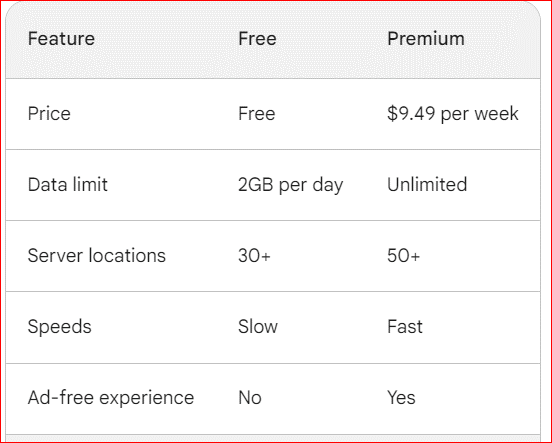
The data limit shared is 2GB per day when using Free VPN for free is according to reviews of users. Generally, Free VPN is a free VPN service that offers a good value for money. However, you must be aware that the free plan has some limitations, such as a data limit and slow speeds. If you need more data or faster speeds, you may want to consider upgrading to the premium subscription.
As part of this review, I must let you know that Free VPN has been criticized for its pricing practices. Some users have reported that Free VPN is difficult to cancel and that the company has charged them even after they have canceled their subscription.
I will recommend that you read the terms of service carefully before using Free VPN. Also, you should ensure to keep a record of your subscription. This can come in handy when you need to contact their customer support.
Read Also our Full reviews:
Performance Analysis of Free VPN
Knowing how well or badly a VPN service performs is a big deal to most people who are used to using VPNs. The performance results often will let you know if you are making the right decision in installing and using a specific type of VPN.
In the case of Free VPN, here is an analysis of its speed and reliability. Kindly note that the results presented here are mostly based on user’s reviews and feedback.
Speed
According to user reviews from all compatible platforms, the speed of Free VPN is generally slower than a paid VPN. I can attribute this to the fewer servers and lesser bandwidth that are typical of free VPNs as compared to paid ones. Additionally, free VPNs often need to compress data to save bandwidth, which can also slow down speeds.
According to a recent test by Top10VPN, Free VPN’s download speed dropped by more than 50% when connected to a nearby server and much more when connected to a distant server. This is significantly slower than most paid VPNs, which typically offer a slight decrease in speed.
Even though users’ claims back this up, I strongly do not agree with most other results from Top 10 VPNs, as they contradict what users experienced.
However, it is important to note that speed test results can vary depending on several factors, including the time of day, the server location, and the user’s internet connection speed. Additionally, The Free VPN app has a “VPN Acceleration” feature that is designed to improve speeds.
Also, Free VPN uses a proprietary VPN protocol that is not as efficient as more popular protocols like OpenVPN and IKEv2. Additionally, its servers are not as well-distributed as those of paid VPNs, which can also lead to slower speeds.
To help you improve your speed when using the Free VPN app, here are some tips I would recommend:
- Connect to a server that is close to your physical location.
- Disconnect from other devices that are using the same internet connection.
- Disable any unnecessary apps and programs.
- Try using the “VPN Acceleration” feature.
Reliability
User reviews of Free VPN by FreeVPN.org are mixed, with some users reporting positive experiences and others reporting negative experiences.
On the Google Play Store, Free VPN has a rating of 4.0 stars out of 5, based on over 1 million reviews. However, many of the positive reviews are short and generic, while the negative reviews are more detailed and specific.
Here are some positive user reviews of Free VPN:
- “I have been using Free VPN for a few months now, and I have had no problems. It is fast and reliable, and it is great for unblocking websites and streaming video.”
- “I am on a tight budget, and Free VPN is the perfect solution for me. It is not perfect, but it is reliable enough for my needs.”
- “Free VPN is a great way to get started with VPNs. It is easy to use and offers good value for money.”
Here are some negative user reviews of Free VPN:
- “Free VPN is so slow and unreliable. It is constantly disconnecting and is not good for streaming video.”
- “I am concerned about Free VPN’s privacy practices. The privacy policy is vague, and it is not clear how the company collects and uses user data.”
- “I would not recommend Free VPN to anyone serious about their privacy and security.”
Overall, FreeVPN.org user reviews of Free VPN are mixed. Some users report that the VPN is reliable and works well, while others report that it is slow, inconsistent, and prone to outages.
If you are looking for a reliable VPN for everyday use, I would recommend that you invest in a paid VPN service. Paid VPNs offer a wider range of features, better security, and more reliable connections. However, if you are on a tight budget and only need a VPN for occasional use, Free VPN may be a good enough choice.
Is Free VPN Safe?
Free VPN is not the safest VPN option. It has been known to have server outages, and its speeds can be slow and inconsistent. Additionally, there have been some concerns about its security and privacy practices.
In 2021, a data breach exposed the personal information of over 1 million Free VPN users. While Free VPN claims that the breach was quickly patched, it raises concerns about the company’s security practices.
Additionally, Free VPN’s privacy policy is not very clear about how the company collects and uses user data. Free VPN claims it does not keep any logs of user activity, but it is unclear how the company enforces this policy.
Customer Support of Free VPN
My conclusion about the customer support for Free VPN is that it is not the best you can get. The company only offers support through email, and users have reported that it can take days or weeks to get a response.
Additionally, some users have complained that the customer support team is not very helpful and that they do not seem to have much knowledge about the VPN product.
Here are some customer reviews of Free VPN’s customer support:
- “I have tried to contact Free VPN customer support twice, but I have not heard back yet. It has been over a week.”
- “The Free VPN customer support team is not very helpful. They do not seem to know much about the product and did not solve my problem.”
- “I had to wait over two weeks for a response from Free VPN customer support. When I finally did get a response, it was not very helpful.”
If you are looking for a VPN with better customer support, I would also recommend that you invest in a paid VPN service. Paid VPNs typically offer 24/7 customer support through live chat, email, and phone.
Here are some tips for getting good customer support from a VPN provider:
- Choose a VPN provider that offers 24/7 customer support through multiple channels, such as live chat, email, and phone.
- Read reviews of different VPN providers before making a decision. Pay attention to what other users say about the customer support experience.
- Be clear and concise when you contact customer support. Explain your problem in detail and provide as much information as possible.
- Be patient and respectful to the customer support team. Remember that they are there to help you.
Read Also our Full reviews:
Frequently Asked Questions
Does Free VPN collect user data?
What are the different subscription options available?
Can I use the same subscription benefit across multiple devices?
How can I get Free VPN time?
Conclusion
Overall, Free VPN by FreeVPN.org is a good option for users who are looking for a basic VPN solution and do not mind watching ads. Its use of a strong triple encryption protocol shows that it has good security and privacy features, but its speed and reliability are not the best you will find.
However, if you are looking for a more secure or reliable VPN solution, it is worth considering investing in a paid service. When choosing a VPN, it is important to consider your individual needs. If you are looking for a VPN to protect your privacy and security online, then you will want to choose a VPN that offers strong encryption and a large server network.
Choose a VPN that has servers in the nations you want to access if you are looking for a way to get around geo-restrictions. It is also important to read the reviews of different VPNs before you choose one. This will help you to get an idea of the pros and cons of each VPN and to choose the one that is right for you.


