

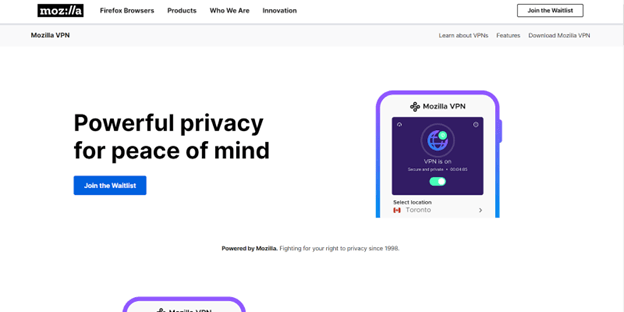
Gone are the days when VPNs are used by only the super-techy people. In an increasingly digitized world, where most of ur daily activities revolve around the internet, it is important that you take intentional steps to ensure maximum security and privacy.
Spending a lot of time on the internet means your private information is vulnerable to whoever needs it, be it hackers, advertisers, or private organizations.
As much as VPNs are the saving grace, you need to choose a reliable and trusted VPN service amongst the abundance of VPNs available.
Mozilla VPN has built its reputation as one of the world’s most-used VPN providers, which can be because of its affiliation with Firefox, one of the most popular browsers known. Mozilla VPN is also renowned for its unwavering commitment to security, blazing-fast connection speeds, and other beneficial features you didn’t know you needed.
Before deciding to choose a VPN service, you should know what Mozilla VPN offers and what sets it apart. In this article, I will look intricately at its performance, unique features, unique selling points, and other features that will aid your decision-making process.
Let’s get right into all you need to know about Mozilla VPN
About Mozilla VPN
You might know Mozilla as the company behind the popular Firefox browser and other privacy-focused tools. Well, they’ve teamed up with Mullvad VPN to bring you Mozilla VPN.
This VPN was created to ensure privacy in all your internet endeavors, but some changes were made to the Mullvad VPN (its parent VPN), mainly when it comes to how much it costs and how many servers it has.
Now, Mozilla VPN is built on the same strong foundation of privacy and security as Mullvad, making it a great choice if you really care about keeping your online adventures super safe.
But here’s the catch: if you’re a remote worker or run a small business, you might run into a few hiccups because it doesn’t let you connect many devices at once, and it’s missing some features like having your own special IP address.
Before Mozilla VPN came along, not many web browsers had their own VPNs, except for Opera.
But when this VPN became available for download in July 2020, I couldn’t resist trying it out. I put it through its paces, checking how fast it is, how well it keeps your info secure, and whether you can trust it when it comes to online browsing.
Mozilla VPN Pros and Cons
Mozilla VPN has its pros and cons. It is best to know the pros and cons before making a decision on if it is the best fit for you. Here are some pros and cons you will find helpful.
Pros
- Unblocked ITV, Channel 4, 9Now: Mozilla VPN can unblock content from various streaming services, including ITV, Channel 4, and 9Now. This means you can access and enjoy shows, movies, and other content from these platforms even if you’re in a region where they are typically restricted. Many VPN users value this capability as it allows them to bypass geo-restrictions and enjoy a more extensive range of entertainment.
- App Security Audit: One of the strengths of Mozilla VPN is its commitment to security. The service conducts app security audits to identify and rectify potential vulnerabilities and ensure that users’ data and privacy are protected. Regular security audits help to keep the VPN app updated and resilient against emerging threats, making it a reliable choice for safeguarding your online activities.
- Trusted Mozilla Name: Mozilla, the organization behind Mozilla VPN, is a well-respected and trusted name in the tech industry. Known for its dedication to open-source technology, privacy advocacy, and web standards, Mozilla has earned a strong reputation for promoting internet privacy and user rights. When you use Mozilla VPN, you benefit from the trust associated with the Mozilla name.
- Split Tunneling and Flexible Multi-Hop Connections: Mozilla VPN offers advanced features like split tunneling and flexible multi-hop connections. Split tunneling allows you to choose specific apps to route through the VPN while allowing others to use your regular internet connection. This flexibility is handy, especially if you have bandwidth limitations or only want to secure specific activities.
- Effective Blocking of Ads and Malicious Domains: For users who despise intrusive ads and want protection against malicious domains, Mozilla VPN is an excellent choice. The service includes effective ad blocking and protection against dangerous websites. This means that while using Mozilla VPN, you’re less likely to encounter annoying ads during your internet browsing, and your device is shielded from potentially harmful websites.
- Uses the Excellent Mullvad Network Underneath: Mozilla VPN relies on the infrastructure and network of Mullvad VPN, a provider known for its strong focus on privacy and security. Leveraging the Mullvad network means that Mozilla VPN inherits the reliability, performance, and privacy features associated with Mullvad. This partnership ensures that Mozilla VPN operates on a robust and trusted network, further enhancing its appeal to users seeking top-tier VPN services.
- No Bandwidth Restrictions or Throttling: This means that Mozilla VPN does not impose any limitations on the amount of data you can transfer or the speed at which you can browse, stream, or download content. This is a highly desirable feature for users who engage in data-intensive activities, such as streaming high-definition videos, online gaming, or transferring large files. With no bandwidth restrictions, you can enjoy a seamless and uninterrupted online experience without worrying about data caps or speed limitations.
- Fast Network Speeds with WireGuard: WireGuard is widely recognized as one of the most efficient and high-performance VPN protocols available. It is designed to minimize latency and maximize network speeds while maintaining strong security. For gamers, in particular, fast network speeds are essential to ensure a smooth and lag-free gaming experience. The use of WireGuard helps Mozilla VPN deliver the speed and low latency required for online gaming, enhancing the overall gaming performance.
Cons
- WireGuard Only: WireGuard is a specific type of technology used by VPNs to secure your internet connection. While it’s known for being fast and reliable, Mozilla VPN exclusively relies on WireGuard, meaning it doesn’t offer you a choice of using different technologies or protocols to connect to the internet securely.
- Doesn’t Unblock Major Streaming Services: Many people use VPNs to access content from streaming services like Netflix, Amazon Prime Video, Disney Plus, and BBC iPlayer that might not be available in their region. Unfortunately, Mozilla VPN may not be the best choice if you’re looking for a VPN to unblock these streaming platforms.
- Below-Average Speeds (360Mbps): Internet speed is crucial, especially for tasks like streaming, online gaming, and fast downloads. Mozilla VPN’s performance in terms of speed might not be as impressive as some other VPNs. The average internet speed of Mozilla VPN, as tested, is around 360 Mbps.
- Only Five Simultaneous Connections: Mozilla VPN imposes a limitation on the number of devices you can use with a single subscription – just five specific devices. This means you’ll have to be selective about which devices you protect with the VPN. If you have multiple devices like smartphones, tablets, laptops, and more, you might find it challenging to secure all of them under one subscription.
- No Live Chat Support: One notable drawback of Mozilla VPN is the absence of live chat support. Live chat is a valuable feature offered by many VPN providers that allows users to get immediate assistance when they encounter issues or have questions. With live chat, you can connect with a customer support agent in real time, and they can provide solutions or guidance promptly.
- Cheaper to Buy Directly from Mullvad: Interestingly, Mozilla VPN is essentially powered by Mullvad VPN, which means they share many features and use Mullvad’s infrastructure. However, one significant downside is that purchasing a Mozilla VPN subscription can be more expensive than buying directly from Mullvad.
Read Also our Full reviews:
Mozilla VPN Core Features
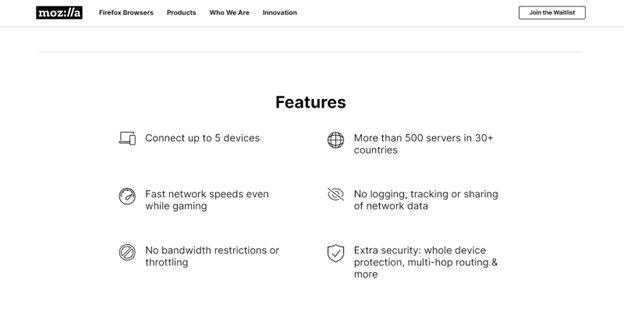
Mozilla VPN has some handy features that can make your online life easier and more secure. Some of these features are hardly available in many VPNs. Here are some of the most notable features
1. Ad Blocking
Are you tired of those pesky ads that pop up everywhere every two minutes while you are browsing?
Well, Mozilla VPN comes to the rescue with ad blocking. It’s like having an ad bouncer at the door; you don’t have to worry about any ad sneaking in whenever you are working.
It works excellently on Firefox, but I had some hiccups trying to get it to work perfectly on Chrome, and it’s a no-go on Microsoft Edge.
2. Split Tunneling
Ever wanted to decide which apps should use your VPN and which can go about their business as usual? Mozilla VPN has your back. It’s called split tunneling, and it’s like having a traffic cop for your internet.
You can tell the VPN to only cover certain apps, like your work-related ones, while the rest use your regular internet connection.
This way, if your VPN has speed limits, you can make sure your important stuff gets the VIP treatment. Mozilla VPN’s split tunneling feature does the job as expected; no complicated jargon, just solid performance.
3. Multihop
Multihop is a bit like taking the best pathways on the internet. When you use most VPNs, your data goes in and out through the same door, which can be a security risk. But with multihop, you bounce your data through different doors.
Imagine starting your online journey in Japan but ending up in South Africa. It’s like a detour for your data, making it harder for anyone to figure out what you’re up to.
Keep in mind, though, this can slow down your internet a bit, but it’s worth it for extra security. Mozilla VPN’s multihop feature does the job, but I did notice a little slowdown during the tests.
Servers: When you’re using Mozilla VPN, you’re tapping into the power of Mullvad’s impressive server network. They’ve got over 500 servers scattered across more than 30+ countries. So, wherever you’re roaming in the digital world, there’s a good chance Mozilla VPN has a server nearby to help you out.
4. Kill Switch
Imagine your VPN suddenly goes off in the middle of a search, leaving you exposed online.
Scary, right?
Well, Mozilla VPN has a plan for that.
They’ve got a kill switch, which is like a security net. If your VPN connection decides to play hide and seek, Mozilla VPN will close down all your web browsers. It’s like an emergency exit for your online privacy.
This feature comes turned on by default for iOS and Windows, but you’ll need to set it up manually on Android. Kill switches are super important for VPNs and are one of the best features Mozilla VPN could incorporate.
5. Dynamic IP Addresses
Think of your IP address as a way to disguise in the online world. The more you wear the same disguise, the easier it is for someone to spot you. That’s where dynamic IP addresses come in handy.
With Mozilla VPN, every time you connect to their server, you get a brand-new disguise (IP address).
This adds an extra layer of privacy, and it’s way better than those static IP addresses that never change. So, rest assured, Mozilla VPN keeps you incognito every time you log in.
6. 30-Day Money-Back Guarantee:
Mozilla VPN offers users the peace of mind that comes with a 30-day money-back guarantee. This means that when you subscribe to their service, you have a full month to test it out and assess whether it meets your needs and expectations.
If you find that Mozilla VPN doesn’t align with your requirements or preferences within this period, you can request a refund, no questions asked. This guarantee allows you to explore the service risk-free, ensuring you are satisfied with your investment.
7. No Logging, Tracking, or Sharing of Network Data
Mozilla VPN prioritizes user privacy and data protection. They unequivocally state that they do not log, track, or share your network data. This commitment means that your online activities, including browsing habits and personal information, remain private and secure.
By not collecting personal browsing information, Mozilla VPN ensures that your data is kept confidential, and you have peace of mind knowing that your online activities are not subject to surveillance or tracking.
8. Built Transparently in Open Source
Mozilla VPN’s commitment to transparency is shown by its use of open-source code. Open-source code means that the software’s underlying programming is publicly accessible and viewable by anyone.
Mozilla VPN takes this approach, allowing users to review the code on their GitHub repository. This transparency fosters trust and confidence among users, as it ensures that the service operates with a high degree of accountability and scrutiny.
9. Reviewed by 3rd-Party Security Experts
To ensure the highest standards of security and privacy, Mozilla VPN has undergone rigorous scrutiny by independent, third-party security experts. Notably, the service has been audited by Cure53, a prominent and highly respected cybersecurity auditing firm.
Mozilla VPN Pricing
If you opt for a monthly subscription, it’ll cost you $9.99 per month. Now, that’s not too bad. It’s just a bit above the average monthly price with other VPNs, which usually hovers around $9.84. So, it is still within reasonable range
Now, if you’re the kind of person who likes to commit long-term, you can go for the one-year subscription at $59.88. But here’s a twist – getting a Mozilla VPN subscription isn’t like other VPN subscriptions.
You’ll need to have a Firefox account, even if you’re not planning to use the browser. It’s all part of the package deal.
Mozilla VPN’s Privacy and Security
Speed is important, but not at the cost of your digital security. DNS and WebRTC leak tests on Mozilla VPN reveal that the IP address was well protected from prying eyes, specifically the Internet Service Provider (ISP). Mozilla passed both tests with flying colors. While Mozilla VPN does keep your IP address, it remains hidden from your ISP, which is a comforting level of privacy.
When it comes to security and privacy, the Mozilla Foundation has a stellar track record. Their Firefox browser is renowned for its top-notch security features, and they’ve developed other cybersecurity products, like Firefox Monitor, which alerts you if your email is found in a data breach. Mozilla VPN continues this legacy, having been developed in partnership with the privacy-focused Mullvad VPN.
Multifactor Authentication (MFA) Unlike Mullvad, Mozilla VPN operates with a traditional account system, and this brings a crucial security feature – Multifactor Authentication (MFA).
Your Mozilla VPN subscription is tied to your Firefox account, so you’ll need to create one, even if you have no plans to use the Firefox browser.
Mozilla VPN collects certain data when you sign up and use their service. This includes your IP address, technical information about your setup (such as app version, operating system, and hardware configuration), and interaction data.
Interaction data covers details like when you log in and when the app requests server information. Mozilla notes that they only hold your IP address temporarily, although they don’t specify the exact duration of “temporary.”
If you’re uncomfortable with this data collection, Mozilla VPN allows you to disable some of it. During the Windows app installation, I was asked whether I wanted to send usage data to Mozilla, with clear explanations of what this entailed, and I had the option to decline.
Even if you miss this during installation, you can adjust these settings later.
Firefox accounts come with two-step authentication, which I tested and found to work exactly as intended, enhancing the overall security of your VPN usage. Your privacy and safety are in good hands with Mozilla VPN.
Read Also our Full reviews:
Mozilla VPN Performance
Mozilla VPN exclusively uses the open-source WireGuard protocol, which, despite its lack of customization, is highly regarded as one of the best VPN protocols available. When I put Mozilla VPN to the test, it didn’t disappoint.
Speed tests were conducted using the same conditions and standards as all of the other VPN assessments. Mozilla VPN exhibited an average download speed of 60.3 Mbps with a latency/ping of 28 ms.
It also delivered an average upload speed of 30 Mbps with latency/ping of 136.2 ms. These results are quite impressive and place Mozilla VPN among the fastest VPNs in my rankings.
It’s worth noting that Mozilla VPN had a more noticeable impact on the speed of Android devices compared to iPhone.
In terms of speed reduction, Mozilla VPN decreased download speeds by 16.1%, which is a very good score.
Additionally, Mozilla VPN reduced upload speeds by a commendable 6%, further solidifying its performance. The increase in latency caused by Mozilla VPN was minimal, at just 5.3%.
Mozilla VPN delivers a strong performance, making it a reliable choice for maintaining good speeds and low latency during your online activities.
Mozilla VPN Customer Support
Now, let’s talk about getting some help when you need it with Mozilla VPN. I was hoping for a variety of ways to contact their support team, given Mozilla’s size, but alas, it’s not quite as extensive as expected.
Unlike some VPN providers, there’s no live chat or hotline to dial up an actual human. Instead, you’ll find yourself relying on Mozilla’s online help center or community forum or reaching out to them via their Facebook and Twitter accounts. That’s pretty much the extent of your support options.
However, here’s the silver lining – setting up and using Mozilla VPN is pretty straightforward. It’s user-friendly, so you might not find yourself needing a lot of hand-holding from their support.
So, while their support options may be limited, it might not be a deal-breaker if you’re comfortable with a more DIY approach. Just something to keep in mind.
How Do I Install and Set Up Mozilla VPN?
Setting up Mozilla VPN is a straightforward process; this guide will walk you through the steps to get started. Here’s how to install and set up Mozilla VPN:
- Before you can use Mozilla VPN, you need to have a Firefox account. If you already have one, you can skip this step. If not, you can create a Firefox account on the Mozilla website.
- Mozilla VPN offers both monthly and annual subscription plans. Select the plan that suits your needs and budget. Keep in mind that a Firefox account is needed to subscribe to Mozilla VPN, even if you don’t plan to use the Firefox browser
- Download the Mozilla VPN App: Mozilla VPN is available for various platforms, including Windows, macOS, Android, and iOS. Visit the official Mozilla VPN website or your device’s app store to download the app.
- Follow the on-screen instructions to install the Mozilla VPN app on your device. The installation process is just like any other software installation on your platform.
- Open the Mozilla VPN app and log in using your Firefox account credentials. This step is important as your subscription and VPN access are already connected to your Firefox account.
- Once you’re logged in, you can select a server location to connect to. Mozilla VPN takes advantage of Mullvad’s server network, providing you with various server options across more than 30 countries.
- Mozilla VPN offers settings that you can customize to your preferences. You can enable or disable features like split tunneling and multi-hop connections.
- With your settings configured, you can now connect to the VPN. Click the connect button in the app, and Mozilla VPN will establish a secure connection to the server you selected.
- Once you’re connected, your online activities are protected by Mozilla VPN. You can access region-restricted content, maintain your privacy, and stay secure while browsing the internet.
If you encounter any issues or need assistance, Mozilla VPN relies on online resources and community forums for support. Visit the Mozilla VPN website and community forums, or contact their support via social media channels for help.
Read Also our Full reviews:
Frequently Asked Questions
Is Mozilla VPN free?
No, Mozilla VPN is not free. It’s a paid subscription service, and you can choose between a monthly subscription at $9.99 per month or an annual subscription at $59.88 per year.
Is Mozilla VPN good for torrenting?
Not really. Mozilla VPN lacks support for port forwarding, which can be important for torrenting. If you’re looking for a VPN specifically for torrenting, you might want to consider other options like Mullvad or NordVPN.
Does Mozilla VPN keep logs?
Mozilla VPN does not keep logs of user activity, as stated by Mozilla itself. However, it does collect some data for the purpose of improving its VPN product. The good news is that users have the option to opt out of this data collection.
While third-party verification of Mozilla VPN’s no-logs policy is limited, the strong privacy reputation of the Mozilla Foundation and the proven no-logs policy of its sibling VPN, Mullvad, provide confidence in the claim.
Conclusion
Mozilla VPN offers a solid VPN service, but it has its limitations. While it excels in privacy features, it falls short in some areas, such as the absence of a dedicated IP for small businesses, a low number of simultaneous connections, and struggles with streaming services, including Netflix.
It’s important to note that Mozilla VPN is built on the foundations of Mullvad VPN, a strong privacy-oriented VPN. However, the differences between the two often tilt in favor of Mullvad. Mullvad is more affordable on a month-to-month basis, boasts a more private account system, and has a greater number of servers and server locations while retaining the key features we appreciate in Mozilla VPN.
The fact that Mozilla VPN is powered by Mullvad is a testament to both companies, highlighting their commitment to privacy. Mozilla VPN offers a simpler, traditional account system but gathers slightly more user information compared to Mullvad. While Mozilla VPN has an advantage in ease of use and design, it’s hard to justify the price difference.


