

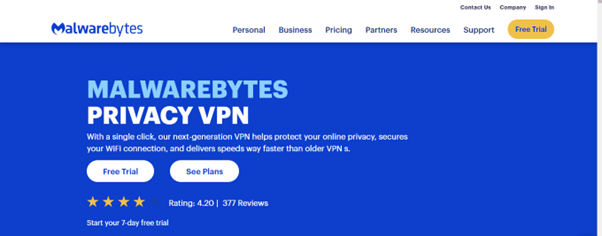
A virtual private network (VPN) is a secure internet connection that connects people and devices. A VPN makes internet browsing safer and more private by not revealing who you are, where you are, or what you’re looking at.
Malware Privacy VPN was developed and is owned by Malwarebytes. Malwarebytes Inc. is a top cybersecurity firm known for its advanced technology in detecting and preventing advanced cyber threats, including malware and ransomware.
Malwarebytes, established in 2008, has built a strong reputation in the industry for its reliable and proactive methods of identifying and eliminating harmful software. This makes it a crucial asset in combating online threats.
Malwarebytes, with its devoted team of specialists focused on constant advancements, stands at the vanguard of cybersecurity, safeguarding millions of global users.
The corporation maintains various branches in Santa Clara, California; Clearwater, Florida; Tallinn, Estonia; Bastia Umbra, Italy; and Cork, Ireland.
Is this VPN service good enough?
Malwarebytes is well-known for providing trustworthy and efficient security solutions. Its Malwarebytes antivirus program is regarded as one of the top five antivirus software alternatives available on the market.
Nonetheless, I became interested in the performance of their VPN service and decided to conduct a complete evaluation of Malwarebytes Privacy VPN. The goal was to see whether their VPN service was good enough to be considered an option.
Here, I present a detailed discussion of the features, reliability, speed, efficiency, and other essential details that you should consider when making your decision.
About Malwarebytes Privacy VPN
MalwareBytes gained recognition mostly for its anti-virus software that safeguards computers and devices against harmful software. However, in April 2020, the company introduced its own Virtual Private Network (VPN) service, permitting users to establish a secure and private internet connection.
Through the provision of a VPN, Malwarebytes strives to furnish users with extra protection and confidentiality while browsing the internet.
Malwarebytes, an American Internet security company, was founded by Marcin Kleczynski and Bruce Harrison in 2008. Malwarebytes combined their expertise in cybersecurity with a VPN service to offer you a comprehensive solution for protecting your online privacy and security.
Malwarebytes Privacy VPN was specifically designed for Windows operating systems at its launch in 2020. However, other device compatibility has now been developed within its three years of VPN service.
Malwarebytes Privacy VPN provides a robust VPN with privacy features, allowing users to access Wi-Fi securely, with a user-friendly interface, and supports over 500 servers in over 40 countries.
Device Compatibility
If you have experienced the functionality of Malwarebytes and its protection against malware, you will comprehend the effectiveness of its applications.
These applications are meticulously designed and customized for compatible platforms, guaranteeing a user-friendly and seamless interface for effortless usage and interaction.
Malwarebytes Privacy VPN was launched with only Windows device compatibility, it has now improved to a few other operating systems compatibility. The current device compatibilities are:
- Windows
- MacOS
- iOS
- Android
Windows devices require the following operating systems: Windows 11, 10, 8.1, 8, and 7 SP1. If you are using a Windows 7 device, you will need first to install the Microsoft 2019-09 Security Update.
To use Malwarebytes Privacy VPN on macOS devices, your device must be running on any of the following: macOS® 10.15.4 Catalina, macOS® 11 Big Sur, macOS® 12 Monterey, macOS® 13 Ventura, macOS® 14 Sonoma.
Malwarebytes Privacy VPN works well on Android 9, 10, 11, 12, or 13 for Android devices. It also works well on iOS 14 (or higher) if you are an iOS device user.
Malwarebytes Privacy Pros and Cons
VPNs are crucial for securing digital privacy, offering enhanced security, unrestricted internet access, and anonymity. However, understanding their pros and cons is crucial for making informed decisions about your choice of VPN service.
The pros and cons of using Malwarebytes Privacy VPN are discussed below:
Pros
- Enhanced online privacy: Malwarebytes Privacy VPN keeps your internet connection safe and private from others who might try to see what you are doing online.
- Protection against cyber threats: Malware Privacy VPN service keeps your data and devices safe from malware, hackers, and other cyber threats. Malwarebytes incorporates its advanced antivirus, anti-malware, and anti-spyware into the VPN service.
- Support multiple connections: Malwarebytes Privacy VPN service can be used on multiple devices connected to a single license. It supports a range of devices, including computers, smartphones, and tablets.
- Unblocks Netflix: The Malwarebytes Privacy VPN lets you access and watch shows on Netflix, even if they are restricted or blocked in your area. Not all servers of Malwarebytes Privacy VPN can fully work with Netflix. However, a few of them work well enough to let you watch Netflix.
- Has an automatic kill switch for Windows: With an automatic kill switch, your online activities are protected even if there are problems with the VPN connection. This adds more security to your digital privacy. This is only available for Windows devices.
- AES-256 encryption: Malwarebytes Privacy VPN employs AES-256 encryption to provide a secure and dependable shield for your online activity. As a result, your data will stay private and secure in the face of several cyber-attacks.
- No logging: By having an effective no-logging policy, Malwarebytes Privacy VPN offers you greater peace of mind, knowing that your online activities are not being monitored, recorded, or tracked. This is particularly useful for you if you are concerned about your privacy and security.
- Good speed: Malwarebytes Privacy VPN demonstrates satisfactory speed, meeting the desired criteria for a quality VPN. The percentage reduction in your internet speed while using the VPN service is less than 30%, which is a decent performance for a VPN service.
- Allows torrenting: Malwarebytes Privacy VPN lets you safely torrent using their service. Malwarebytes Privacy VPN grants you the ability to download and share files through a peer-to-peer file-sharing network if you use their VPN service.
- Uses modern WireGuard protocol: Malwarebytes Privacy VPN uses a modern, advanced technology called the WireGuard protocol to make sure your connections over networks are secure.
- User-friendly interface: Malwarebytes Privacy VPN has an easy-to-use interface that helps you take full advantage of its VPN service without any unnecessary difficulties or frustrations.
- Free trial and a 60-day money-back guarantee: Malwarebytes Privacy VPN offers you a week (7 days) free trial on all their pricing options for risk-free usage. A 60-day money-back guarantee is also available for you in case you are not satisfied with their service.
- Easy to install: Malwarebytes Privacy VPN is an easy-to-use VPN that is quick to install and doesn’t require much expertise, making it a simple and effective solution.
Cons
- Limited server network: When you compare Malwarebytes Privacy VPN to other VPN providers, you will notice that it has fewer servers. It has just around 500 servers in about 40 different countries. This could cause your internet to be slower and have fewer ways to connect to different places.
- No dedicated streaming servers: Malwarebytes Privacy VPN can help you access content that is restricted based on location. However, it does not have special servers specifically designed for streaming, which could make your streaming experience less smooth.
- No free version: Malwarebytes Privacy VPN is a service that you have to pay for. It doesn’t have a free version. This is a drawback for you if you want to find a free VPN without cost.
- No anonymous payment options: The Malwarebytes Privacy VPN service does not currently allow you to pay with anonymous methods like cryptocurrencies. If you want to pay for a VPN without revealing your identity, this is something you should be worried about.
- Limited customer support: Many consumers have expressed dissatisfaction with Malwarеbytеs Privacy VPN’s limited customer care options, such as delayed response times and a lack of live chat help. I also confirmed this to be true. As a result, getting an urgent and immediate response from their customer service is challenging.
- US jurisdiction: Malwarebytes Privacy VPN is based in the US and is a founding member of the Five Eyes alliance and other intelligence-sharing agreements. Though Malwarebytes Privacy VPN has an effective no-logging policy, its US jurisdiction is still a source of concern.
- A limited number of simultaneous device connections: Malwarebytes Privacy VPN supports a maximum of only five simultaneous connections per license. If you want a VPN service that offers more than five simultaneous connections at a time, explore other alternatives.
- Annual billing only: Malwarebytes Privacy VPN provides a year-long subscription or payment plan, requiring you to commit to using their service for a minimum of one year. However, the monthly cost for each of their plans is shown before the billing.
Read Also our Full reviews:
Core Features: What are the Capabilities of Malwarebytes Privacy VPN?
Next-generation VPN technology
The latest updates to VPN technology include better ways to protect your data through improved encryption, faster internet connections, stronger security measures, and using resources more efficiently.
Next-generation VPN technology offers a secure, efficient, and seamless online experience, catering to the evolving demands of a digital world, prioritizing privacy and security.
Malwarebytes Privacy VPN employs next-gen VPN technology to secure your online information and to help you remain anonymous while surfing the internet through their service.
This technology protects your Wi-Fi connections at faster speeds than a traditional VPN so that the usage of Malwarebytes Privacy VPN does not impact your internet speed.
256-bit encryption
256-bit encryption is widely recognized as a highly secure kind of data security that is at the cutting edge of technology. It is widely used in a wide range of applications that necessitate additional security measures, including secure communication channels, digital certificates, and the protection of sensitive data.
Malwarebytes Privacy VPN claims to offer robust online security with 256-bit encryption and an advanced algorithm that surpasses AES benchmarks, ensuring users’ online presence remains protected from potential cyber threats and secured browsing.
Malwarebytes Privacy VPN uses 256-bit encryption to provide you with better online privacy and security. So, Malware Privacy VPN is a secure service.
Kill switch
The VPN kill switch is a helpful feature that keeps you safe online. If your VPN connection is lost, it stops any data from being sent over the network, which helps to protect your private information. It also provides extra security in case there are any unexpected network problems.
Malwarebytes Privacy provides a VPN service with a strict no-log policy, ensuring network data anonymity and secure internet browsing without tracking, storage, or sharing.
The VPN kill switch feature in Malwarebytes Privacy VPN operates smoothly and effortlessly. When enabled, it also activates two additional functionalities: Auto Launch and Auto Connect.
This means that upon starting your computer, the VPN will automatically start and provide immediate protection. Additionally, it will intelligently connect you to the fastest available server, enhancing your browsing experience in terms of efficiency and speed.
This combination of features not only enhances your online security but also simplifies your VPN experience, showcasing the user-friendly and efficient design of Malwarebytes Privacy VPN.
VPN split tunneling
Split tunneling allows you to selectively exclude certain applications from the VPN tunnel, extending beyond just apps. By enabling split tunneling, you can determine which applications will utilize the benefits of the VPN, while others can bypass it and opt out of its usage.
Using VPN split tunneling requires careful consideration, as it may pose a risk to your privacy if applied to certain apps. Selecting the right apps, domains, and devices to use VPN split tunneling is crucial for enhancing online security.
Malwarebytes Privacy VPN offers an impressive split tunneling feature; this feature sets them apart from other VPNs. This feature is referred to as “Connection rules” by Malwarebytes.
Once you select this feature, you will see two options – Require VPN and Bypass VPN. Next, press the “Add Item” button to include an application, IP address, and, specifically, the port. Essentially, you can evade the VPN tunnel for specific applications, IP addresses, and ports, which I found impressive.
While other VPNs may have either app-split tunneling or website-split tunneling, Malwarebytes Privacy VPN offers you both to enable you to exclude some apps and websites from using the service.
MultiHop
A multi-hop VPN enhances your online security by encrypting your connection through multiple servers before connecting to the internet. By routing your traffic through different servers located in different places, this feature adds an extra layer of encryption and anonymity to your online activities.
Malwarebytes Privacy VPN stands out due to its remarkable MultiHop feature. This feature allows you to enhance your online security by diverting your internet traffic through two servers located in separate countries, resulting in double encryption and ensuring that your online activities cannot be tracked.
Malwarebytes Privacy VPN offers a Manual MultiHop feature, allowing you to customize the first and second server locations. Thus enhancing your security but potentially causing speed losses due to the two encryption layers.
WireGuard protocol
WireGuard is an open-source protocol that helps create safe private networks (VPNs). It uses special codes to keep data protected when it travels through a protected tunnel.
Its utilization of sophisticated encryption allows for superior performance when compared to established protocols such as IPsec and OpenVPN, granting secure, speedy, and user-friendly options.
WireGuard, a secure tunneling protocol, operates with UDP, eliminating handshake protocols and verification processes. It employs modern encryption methods, making it a reliable VPN protocol.
The strong security measures in place guarantee that external attackers are unable to access significant details about your internet browsing activities.
Malwarebytes Privacy VPN exclusively employs the WireGuard protocol, showcasing its commitment to delivering an advanced and exceptionally secure VPN service.
Wi-Fi security
There is a necessity for Wi-Fi security that stems from the inherent vulnerabilities in wireless networks, especially in public spaces. Wi-Fi security is crucial for protecting sensitive information and preventing cyber threats or attacks through robust measures like encryption protocols and secure authentication.
Malwarebytes Privacy VPN includes a Wi-Fi security feature that provides an extra layer of protection when using public Wi-Fi networks.
Proprietary DNS server
A proprietary DNS server offers control and customization but requires expertise in DNS management and compliance with legal and regulatory requirements, especially in the area of data protection and privacy.
Malwarebytes Privacy VPN uses its own unique DNS servers. This implies that Malwarebytes controls and runs its own DNS system rather than depending on public DNS services given by third-party entities such as ISPs or major technology corporations.
Malwarebytes Privacy VPN’s proprietary DNS server protects you from DNS-related attacks like DNS hijacking and DNS cache poisoning, preventing you from being routed to malicious websites.
Malwarebytes enhanced its DNS infrastructure with customized security measures, including additional filtering, blocking known malicious domains, and other security enhancements.
Furthermore, Malwarebytes Privacy VPN also offers an option called Alternate DNS. This allows you to opt for a third-party DNS solution if you prefer not to have Malwarebytes handle your DNS requests.
Malwarebytes Privacy VPN’s Pricing
The pricing of Malwarebytes Privacy VPN is easy to understand and clear. They don’t use fancy promotions or complicated deals, which makes it a good option for users.
Malwarebytes Privacy VPN offers two bundle plans at varying pricing options depending on the number of device connections. The bundles are:
- Malwarebytes Privacy VPN: The bundle allows you to choose from three pricing options depending on the number of device connections you wish to make on the service. The pricing options on this bundle are:
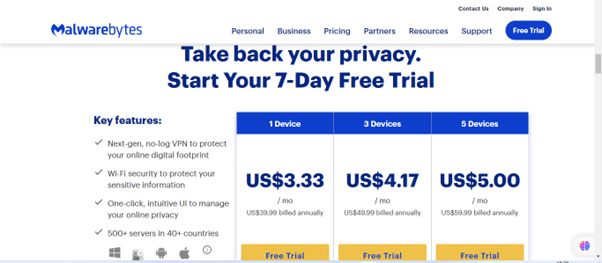
- One device connection costs $ 3.33 per month billed annually at $ 39.99.
- Three device connections cost $ 4.17 per month, billed annually at $ 49.99.
- Five device connections cost $ 5.00 at an annual billing of $ 59.99.
The three options on the Malwarebytes Privacy VPN bundle come with a 7-day free trial on each of them.
b . Malwarebytes Premium + Privacy VPN: This bundle plan also has three pricing options based on the number of device connections.
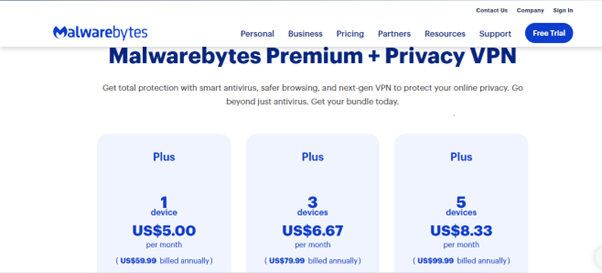
- A one-device connection costs $ 5.00 a month, billed at $ 59.99 annually.
- A three-device connection costs $ 6.67 per month at an annual billing of $ 79.99.
- A five-device connection is at the cost of $ 8.33, billed annually at $ 99.99.
The three pricing options for Malwarebytes Premium + Privacy VPN have a 60-day money-back guarantee.
Privacy and Security
According to Malwarebytes Privacy VPN claims, they guarantee a service that does not retain any logs of user activity. However, their privacy policy contradicts this claim as it explicitly outlines the types of data the company collects and their intended purposes for using it.
The policy specified that Malwarebytes Privacy VPN gathers both your personal and non-personal information. The personal information collected includes email, phone number, user name, address, and other contact details.
It also collects non-personal data such as IP address, ISP, browser type, and operating system to provide a more comprehensive understanding of the individual.
Malwarebytes creates a unique identifier specific to each device to verify the license, collects data about the Malwarebytes Privacy VPN version, and incorporates GeoIP information during the process of installation and activation.
Malwarebytes Privacy VPN offers a license key for device login but requires an email address and password for online sign-up.
Malwarebytes Privacy VPN US jurisdiction means it may face local privacy laws due to invasive surveillance programs, potentially forcing it to disclose user data upon request. So, I recommend using other alternative VPNs without the US jurisdiction.
Malwarebytes Privacy, despite its limited features, fulfills minimum VPN requirements by obscuring your online identity and preventing others from revealing your real IP address or other sensitive information. It is, therefore, a secure VPN.
Read Also our Full reviews:
Malwarebytes Privacy VPN Performance
A VPN’s performance is crucial for a good internet experience, focusing on its speed, response time, stability, and ability to bypass website restrictions, all of which are essential for a secure online experience.
Malwarebytes Privacy VPN proved to be a well-performing VPN service. I will be assessing its speed and reliability here;
Speed
I conducted a speed test on my internet connection using servers near my location, and the results were good. Nonetheless, when I tested the connection on far-distance servers, the speed diminished considerably, experiencing a decrease of over 60%.
The download speed test I got showed a reduction in the normal speed by less than 26 %, which indicates that Malwarebytes Privacy VPN has a good speed. I even got less than a 20 % reduction in speed while connecting to the UK servers.
The speed at which files were uploaded stayed the same and met the expected standards. It performed well on all the servers that I tested. This ensured that data was always sent smoothly and efficiently during usage.
Based on the successful outcomes I experienced while testing various servers, I can say that Malwarebytes Privacy VPN has better speed on local servers. Connecting to a server that is too far from you leads to reduced speed.
Reliability
Malwarebytes is renowned for its robust cybersecurity solutions, particularly its anti-malware software, which effectively protects against various forms of malware, including viruses, spyware, and ransomware.
Malwarebytes Privacy VPN lives up to this reputation as well. It is a really good VPN that works fast and has reliable connections in most of its available locations.
Malwarebytes Privacy VPN is widely acknowledged for its reliable performance. You can expect a stable and consistent VPN service designed to ensure the security of your online activities. This reputation underscores its effectiveness in safeguarding your privacy and data security.
Here is a user’s comment on their website:
“Seamless service while offering superior privacy. I highly recommend it.”
Servers and Locations
A common characteristic of antiviral VPNs is that they typically have smaller server networks that soon get overwhelmed with users. Malwarebytes Privacy VPN is comparable in this sense since it offers only 500 servers in over 40 countries.
Malwarebytes Privacy VPN has multiple server locations in certain countries. The United States has the highest number of servers, a total of 15, which is impressive.
Ease of Use
Malwarebytes Privacy VPN has a user-friendly interface, which makes it suitable for those with various technical backgrounds. Its features and settings are simple to use, allowing you to quickly establish secure connections.
The application’s simple design offers a smooth experience from installation to day-to-day use, making it a good choice for both newbie and expert VPN users.
Using the Malwarebytes Privacy VPN application is easy, even if you’re new to it, as it provides you with a secure and efficient way to access your desired features and options.
Installation
Malwarebytes Privacy VPN app is a straightforward VPN that is easy to install and use, but its simplicity may be a drawback if you are one of those who enjoy tinkering with settings.
The settings menu offers user-friendly options for auto-launch, auto-connect, dark mode, and language preferences, allowing VPN launch immediately after computer booting.
To install the app on a Windows device, you have just a few steps to follow:
- Download the application from the Malwarebytes Privacy VPN website
- Install the app on your device: Open the set-up file (MBPrivacySetup.exe) downloaded and follow the instructions.
- Log in with your information on the app by supplying your given license key obtained after the purchase.
- Establish a connection
Installation steps for other device compatibilities (macOS, iOS, and Android) are also similar.
Payment Options
Malwarebytes Privacy VPN provides various payment options, including major credit cards and PayPal, to ensure user security and accessibility while also offering a globally recognized online payment platform.
While Malwarebytes Privacy VPN accepts a range of payment methods, it does not presently support cryptocurrencies such as Bitcoin or Ethereum. While cryptocurrencies have benefits in terms of privacy and decentralization, Malwarebytes has chosen more traditional payment options for its service.
Customer Support
Malwarebytes Privacy VPN offers limited customer service with phone, email, or chatbot options. While bots can assist you with basic questions, they may not be able to troubleshoot major issues.
Malwarebytes Privacy’s extensive knowledge base, including FAQs, tips, forums, and blogs is impressive. However, it falls short in its customer service quality.
The support team for Malwarebytes Privacy VPN is not available, unlike typical VPN support teams that assist customers with technical issues. The chatbot offers limited help for my queries.
If the problem cannot be resolved, the chatbot will direct you to a ticket creation screen, where you will have to submit a ticket and wait for the team to respond. I sent a few inquiries regarding Malwarebytes’ VPN service, but unfortunately, there was no response.
Read Also our Full reviews:
Gaming and Streaming Quality
Malwarebytes Privacy VPN offers good speed, but you might experience a high latency due to its use of WireGuard. Thus preventing you from having uninterrupted gaming sessions.
Malwarebytes Privacy VPN offers you the ability to stream content from television channels that are based in countries in the United States, Canada, the United Kingdom, and Europe. However, it does not unblock all foreign TV channels.
Malwarebytes Privacy VPN is not suitable for streaming services due to its lack of servers specifically designed for streaming. Thus, if you want better gaming and streaming quality and a VPN that can unblock several streaming sites, you should consider other alternatives.
Frequently Asked Questions (FAQs)
Is Malwarebytes Privacy VPN free?
No, Malwarebytes Privacy VPN does not have a free version available. Malwarebytes Privacy VPN offers a 60-day money-back guarantee for annual plans, allowing you to request a refund if you are not satisfied within the first 60 days.
Does Malwarebytes Privacy VPN allow torrenting?
Yes, Malwarebytes Privacy VPN allows legitimate peer-to-peer file-sharing connections but strictly prohibits copyright infringement.
My tests revealed that Malwarebytes Privacy VPN’s download and upload speeds are adequate for torrenting. However, you should avoid using it for torrenting due to its US jurisdiction.
Is Malwarebytes Privacy VPN good for gaming?
Due to potential latency concerns and logging restrictions, Malwarebytes Privacy VPN is suited for basic surfing and streaming but not for gamers or those with strong security and privacy needs.
Does Malwarebytes Privacy VPN have obfuscation?
No, Malwarebytes Privacy VPN does not have an obfuscation technology to disguise its VPN traffic. So, it may not work well in areas with restrictions on VPN usage.
Does Malwarebytes Privacy VPN work in China?
Malwarebytes Privacy VPN does not have obfuscation technology, it also does not have any server in China. So, Malwarebytes Privacy may not work in China
Is Malwarebytes Privacy VPN safe and secure?
Malwarebytes Privacy VPN offers advanced security features like 256-bit AES encryption, leak protection, and Wireguard protocol for online privacy. Its kill switch prevents data leaks, but its US jurisdiction and logging of identifiable data may concern users.
Read Also our Full reviews:
Conclusion
Malwarebytes Privacy VPN, despite its speed and user-friendly features, has several weaknesses, including a lack of flexibility and customer support, unsuitability for streaming videos, and potential privacy concerns due to its US jurisdiction.
You can be satisfied with the effectiveness of Malwarebytes Privacy VPN in getting rid of malware and keeping your devices free from ransomware or viruses. However, the VPN is limited when it comes to features. If you want minimal security and streaming features, Malwarebytes Privacy VPN is a good option. The Malwarebytes Premium + Privacy VPN comes with smart antivirus software to provide you with multi-layer device security


